

AI can help you in a system design interview, but not the way it helps in a coding round. There is no answer to paste. The interviewer is watching you scope a vague prompt, draw an architecture, and defend it under pressure. So the job of an AI assistant here is narrow and specific: keep your reasoning moving when you stall, and remind you of the step you are about to skip.
Used that way it is a safety net. Used as a crutch that draws the diagram for you, it fails, because you still have to say every design choice out loud.
This playbook maps the five stages of a system design round and shows exactly where an assistant like InterviewMan fits at each one. Pair it with the full system design interview guide for the fundamentals.
Last updated: October 14, 2026.
Key takeaways:
- Use AI to prompt the step you skip under pressure, not to produce the architecture. The reasoning has to come from you out loud.
- Set up two inputs before the call: let the app hear the interviewer, and make sure it can screenshot your whiteboard cleanly.
- The highest-value moments for a nudge are scoping (first 5 minutes) and the trade-off sentence, because those are what interviewers actually grade.
- Rehearse with it on three mock rounds first. The prompts only help if turning them into speech already feels natural.
Before the call: set up both inputs
A system design assistant works from two things, so set up both.
Run your first AI-assisted system design mock
Set up InterviewMan, pick a classic prompt, and run a timed mock. By the third round the trade-off sentences come from you.
Download InterviewMan1. Let it hear the interviewer. The app reads the prompt from the interviewer's voice. The reliable setup is two devices: take the call on your main device, run the app on a second one placed near the speaker, call on speaker, no headphones. The hear-the-interviewer guide has the full setup and the two mistakes to avoid.
2. Make the whiteboard readable. System design happens on a shared diagram (Excalidraw, a doc, CoderPad). The app screenshots your primary screen, so keep the whiteboard on that screen, and zoom so the whole diagram and the prompt text fit. If a capture is cut off, the app tells you instead of guessing; the screenshot help page explains how to capture the whole thing.
3. Set the answer length. The default is a middle ground. If you want the full breakdown on every design question, add this to the extra instructions field in the app settings: "For system design questions, give a detailed answer: the clarifying questions to ask first, requirements, the high-level architecture, the data model, trade-offs, bottlenecks, and a full Mermaid diagram." If you want something you can scan in two seconds, ask for 3 to 5 bullet points instead.
The same field takes prepared notes, for example your preferred stack or your prepared behavioral stories, so answers draw on your real experience. See the custom settings guide.
Then rehearse. Open a practice prompt and run a full mock so the setup is muscle memory before interview day.
Stage 1: Scope before you draw (first 5 minutes)
This is the stage that decides the round, and the one candidates rush. Do not draw a single box yet. Ask:
- How many users, and how many requests per second at peak?
- Read-heavy or write-heavy?
- What latency is acceptable?
- Do we need strong consistency, or is eventual consistency (data that becomes correct after a short delay) fine?
- What is in scope, and what is explicitly out?
Where AI fits: this is the best place for a nudge. Under pressure people jump straight to architecture; a prompt that reminds you to ask the read/write ratio and the latency target keeps you from skipping the step interviewers weight most. You still ask in your own words.
Stage 2: High-level design
Now draw the backbone: clients, an API layer, the main data store, and the one or two components the prompt turns on (a queue for notifications, a blob store for a photo app, a fan-out service for a feed). Keep it minimal. Resist dumping every component you know onto the board.
Where AI fits: if you blank on the core shape for an unfamiliar prompt, InterviewMan draws a real architecture diagram for that specific system, a Mermaid diagram with the right components and data flow, not a generic "add a load balancer, add a cache" list that fits any question. You reproduce it on the whiteboard in your own words and explain each choice. A diagram built for your prompt is something you can defend; a generic step list is not.
Stage 3: The deep dive
The interviewer picks one piece and drills. Data model, caching, the queue, the sharding strategy. Spend most of your time here. For every choice, say the trade-off:
"I'd use NoSQL here because the access pattern is key-based and we need horizontal scale; the cost is weaker multi-row transactions, which this workload doesn't need."
Where AI fits: when the interviewer asks about a piece you are shaky on, a prompt surfaces the relevant trade-off for this workload so you have something to reason from. The assistant reads your diagram, so the suggestion fits the design you actually drew, not a generic one.
Stage 4: Bottlenecks and failure
Expect "what breaks first?" Name the weak points before you are asked: a hot shard, a cache stampede when a hot key expires, a single point of failure in a service with no replica, a health check that routes traffic to a dead server. This is what separates senior answers from junior ones.
Where AI fits: a nudge listing the likely bottlenecks for your specific design is a strong backup if you freeze. Say them in your own words and explain the fix.
Stage 5: Trade-offs and wrap-up
Summarize the design in a few sentences and name what you would change with more time. One clean trade-off sentence lands better than a long recap.
Where AI fits: help phrasing the final trade-off tightly, the eight-second version an interviewer is listening for.
Staying undetectable, and staying honest
In a system design round you almost always share your screen. InterviewMan's overlay stays out of the shared window, and for a full desktop share two-device Stealth Mode keeps the interface on your phone while the desktop app runs hidden on the laptop. It reads your screen without appearing in the capture.
Run your first AI-assisted system design mock
Set up InterviewMan, pick a classic prompt, and run a timed mock. By the third round the trade-off sentences come from you.
Download InterviewManThe part people worry about is the keypress itself. In Stealth Mode you never press an InterviewMan hotkey on the laptop keyboard: you tap Screenshot and Assist on your phone, and the hidden desktop app does the capture. So a browser page on the laptop that listens for keystrokes has no InterviewMan keypress to record. Open a free keyboard event viewer in a laptop browser tab, tap Assist on your phone, and the tab stays empty.
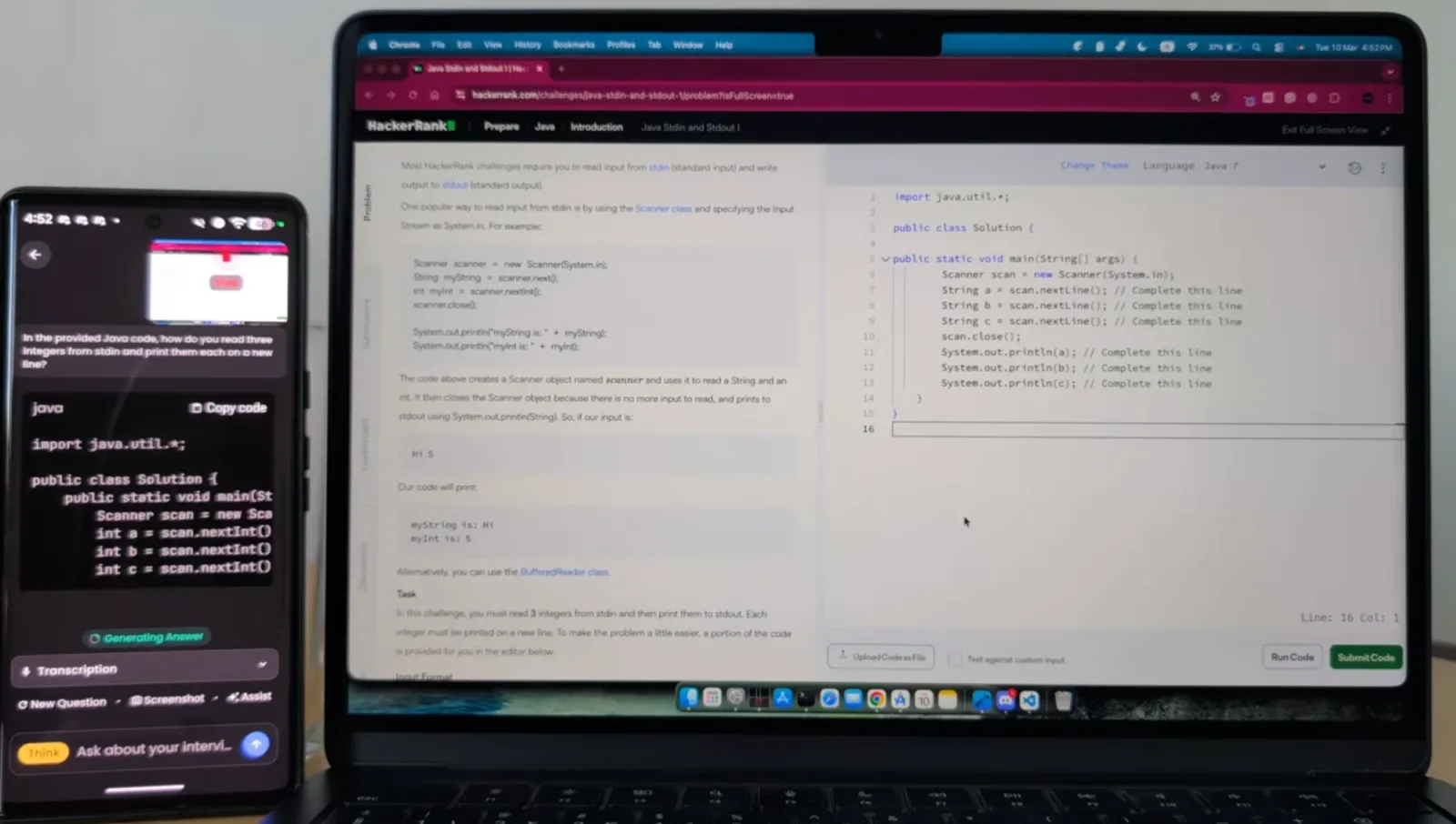
The same setup carries over to a system design round: the whiteboard lives on the laptop, and every tap happens on the phone.
Be clear-eyed about the rules, though. Many employers forbid live assistance, and using it can count against you. Read should you use AI in a job interview and decide for your situation. The safest, highest-return use is practice: run full mock rounds with the assistant until the scoping questions and trade-off sentences come from you without thinking.
One habit will serve you better than any review or ranking: test the assistant yourself before you pay. Run it on a practice system design round and watch what it actually does with a real prompt. Does it scope the problem first, surface the read/write ratio and latency target to ask, then draw a diagram for that exact system? Or does it hand back the same generic steps any question would get?
You learn more in ten minutes of hands-on use than from any list. And weigh reviews carefully. Praise and criticism are both easy to stage, so a strong opinion from a stranger tells you less than a few minutes with the tool itself.
The practice loop that actually works
- Pick three classic prompts: URL shortener, chat app, news feed.
- Set up the app exactly as on interview day (two devices, whiteboard on the primary screen).
- Run each as a timed 40-minute mock, out loud.
- After each, note where you stalled. Those are the stages to drill.
By the third run the assistant is backup, not a script. That is the point.
Keep going
- Watch the two-minute demo: a URL shortener, then a news feed, each with its own Mermaid diagram drawn live.
- See how an AI system design assistant works under the hood.
- Compare tools in best AI interview assistant for system design.
- Set it up with the system design help page.
Download InterviewMan and run your first practice round tonight.
Run your first AI-assisted system design mock
Set up InterviewMan, pick a classic prompt, and run a timed mock. By the third round the trade-off sentences come from you.
