

An AI interview assistant is software that listens to a live job interview, works out what you were just asked, and puts a suggested answer on your screen while the interviewer is still talking. Some tools do this in real time during the actual call. Others only run before the interview, as practice partners or answer writers. The category has grown fast enough that "AI interview assistant" now covers four genuinely different products, and buying the wrong one is the most common mistake we see.
Last tested: October 11, 2026. Prices checked on each vendor's pricing page on that date.
Key takeaways:
- There are four types of AI interview assistant: live copilots, mock interview trainers, resume and answer prep tools, and coding-specific assistants. They solve different problems and are priced very differently.
- A live assistant runs a five-stage pipeline: audio capture, streaming transcription, question detection, answer generation, streaming display. Delay in any stage becomes visible silence on camera.
- "Invisible" is an operating system feature, not magic. On Windows it is
, and Microsoft's own documentation says it carries no guarantee of protection.WDA_EXCLUDEFROMCAPTURE- Prices in 2026 run from free to $299 per month. Cluely charges $149.99/month for its undetectability tier, or $44.99 per month on annual billing; Interview Coder charges $299/month; InterviewMan is $30 monthly or $12/month billed annually, and $129.60 a year for students.
- Policies differ by company and by round. Anthropic, for example, allows Claude on application drafts but states that in live interviews "no AI assistance is allowed" unless told otherwise.
- Detection is mostly behavioral, not technical. Assessment platforms log tab switches and monitor counts; interviewers notice pauses and answers that do not match your resume.
One thing to know about the source of this guide: we make InterviewMan, which is the first tool reviewed below. The way to keep us honest is the links. Every price, refund clause and session cap here points at the vendor page it came from, ours included.
What an AI interview assistant actually is
Strip away the marketing and an AI interview assistant is a transcription engine bolted to a large language model, with a user interface designed so you can read it without looking away from the camera.
The transcription engine turns the interviewer's speech into text. The language model turns that text, plus whatever it knows about you and the job, into a suggested answer. The interface decides where that answer appears: an overlay on your own screen, a panel in a browser tab, or a second device sitting beside your keyboard.
Ready to ace your next interview?
InterviewMan gives you real-time AI answers during live interviews — undetectable on Zoom, Meet, and Teams.
Try InterviewMan FreeEverything vendors argue about sits in three places. How fast the pipeline runs. How well it hides. How much of the interview loop it covers. Our AI interview assistant page explains how we approach all three, and the interview AI page covers the underlying transcription and question-detection layer in more detail.
What these tools are not: they are not autopilot. Ours does not type or submit answers, does not compile or execute code, and does not hide network traffic. Any vendor claiming otherwise is describing a product that does not exist yet.
The four types of AI interview assistant
People search for "AI interview assistant" and land on four product categories that share almost nothing except the phrase. Knowing which one you need saves both money and a bad interview.
1. Live interview copilots
These run during the real interview. They listen, detect questions, and stream answers while you are on the call. This is the highest-stakes category and the most expensive one. It is also where stealth, latency, and platform support matter, because a copilot that appears in a screen share or lags four seconds behind the question is worse than nothing.
InterviewMan, Final Round AI, LockedIn AI, Cluely, Sensei AI, Verve AI, and LinkJob AI all sell live copilots. Our interview copilot guide breaks down the category on its own, and live AI interview help covers the real-time mechanics in depth.
2. Mock interview and practice tools
These run before the interview. You answer questions out loud, the tool scores your delivery, or a human peer gives feedback. Nothing runs during the real call, so nothing needs to hide and nothing can get you flagged.
Exponent Practice (formerly Pramp) is the best-known free option in this group. Google Interview Warmup and most bootcamp platforms sit here too. Our AI mock interview product covers this, and the practical side is in mock interview practice with AI.
3. Resume and answer preparation tools
These generate content: tailored resumes, cover letters, STAR-formatted stories, company research briefs. They are the least controversial category because most employers now explicitly allow them. Final Round AI has invested heavily here, and its free tier is built around resume and job-description parsing.
If this is what you need, our interview prep page and the 5-story method guide cover the process without any tool at all.
4. Coding-specific assistants
These target technical assessments: LeetCode-style problems, take-homes, and pair programming rounds on HackerRank, CodeSignal, Codility, and CoderPad. They usually read the problem from a screenshot rather than from audio, because coding problems arrive as text on screen, not as spoken questions.
Interview Coder, StealthCoder, ShadeCoder, UltraCode AI, and GhostCoder all sit here. Our coding interview AI tools guide compares them.
The practical point: if your loop is three behavioral rounds and one system design round, a coding-only tool is useless to you no matter how well it hides. Most candidates over-index on coding help and under-index on the rounds that actually decide the offer.
How a live AI interview assistant works, step by step
Here is the pipeline in our own product. Every live tool runs something close to this, and understanding it tells you where each vendor's product is likely to break.
Stage 1: audio capture. The microphone picks up the interview conversation. Browser-based tools capture through the tab or a virtual audio device. Native desktop apps capture at the system level, which is why they work on phone screens and platforms that browsers cannot reach.
Stage 2: real-time transcription. Speech-to-text runs continuously as the interviewer talks, not after they finish. This part is where most of the delay lives. Streaming transcription engines only finalize a chunk of text once they hear silence: Deepgram's documentation states that endpointing is enabled by default and set to 10 milliseconds, using a voice activity detector to spot pauses long enough to count as the end of a phrase. Vendors tune that threshold upward to avoid cutting sentences in half, and every millisecond they add is a millisecond you wait.
Ready to ace your next interview?
InterviewMan gives you real-time AI answers during live interviews — undetectable on Zoom, Meet, and Teams.
Try InterviewMan FreeStage 3: question detection. The system decides which parts of the transcript are questions worth answering. Get this too eager and the screen fills with noise every time the interviewer says "so." Get it too conservative and it misses indirect prompts like "walk me through that." We expose three sensitivity levels for exactly this reason, because a rapid-fire technical screen and a slow conversational culture interview need different settings.
Stage 4: answer generation. The model writes an answer from your profile, the job context, and your answer settings. This is where structure choices matter. We support STAR, CAR, SOAR, PAR, and SOARA, three length settings (roughly 30 to 50 words, 75 to 125 words, or 150+ words), and three styles: bullets, conversational, or example-driven. Short and bulleted beats long and polished, because you are speaking, not reading aloud.
Stage 5: streaming display. Text appears incrementally as it is generated, not in one block after the model finishes. This single design decision is worth more than any model upgrade. If the first useful words hit your screen while you are saying "that's a good question," you never stall. If they arrive after the model finishes a full paragraph, you sit in silence.
Live audio is not the only input. Questions can also arrive by manual screenshot capture, which a vision model reads for code or diagrams, or by typing them in directly. That matters for coding rounds and system design whiteboards, where the question is on screen rather than spoken.
What "invisible" really means, and where it stops
Every vendor in this category uses the word "invisible," "undetectable," or "stealth," and almost none of them explain the mechanism. Here it is.
On Windows, the relevant function is
SetWindowDisplayAffinityWDA_EXCLUDEFROMCAPTURERead the rest of Microsoft's page, though, and two limits appear that no vendor advertises. First: "unlike a security feature or an implementation of Digital Rights Management (DRM), there is no guarantee that using SetWindowDisplayAffinity ... will strictly protect windowed content, for example where someone takes a photograph of the screen." Second:
WDA_EXCLUDEFROMCAPTUREWDA_MONITORmacOS has equivalent window-sharing controls and a capture framework that lets an app exclude specific windows from a stream. The principle is identical, and so are the limits.
So what does screen-capture exclusion actually protect you from?
- It hides the overlay from software screen sharing on Zoom, Google Meet, Microsoft Teams, Webex, Chime, and Lark.
- It hides the overlay from local screen recordings made by those same APIs.
- It can keep the app out of the dock, the taskbar, and the app switcher.
What it does not protect you from:
- A phone camera pointed at your monitor, exactly as Microsoft's own documentation says.
- Network monitoring on a managed device. API calls are visible traffic, and we say so plainly.
- Proctoring software running with device-management privileges that inventories running processes.
- Your own eyes moving off-camera, or a four-second pause before every answer.
That last one is the one that actually gets people caught, and no software feature fixes it. We advertise "20+" counter-measures on macOS. Our undetectability help page describes four groups of them and is clear about what we do not claim, but the full itemized list of twenty is not published, so treat the number as marketing and the four groups as the part you can actually check.
We report zero confirmed detections across a company-reported 570,000+ users, and we describe that as a track record rather than a guarantee, because it is one.
For candidates on managed or heavily proctored machines, the more robust answer is a two-device setup: the desktop app runs hidden on the interview machine while answers appear on a phone or a second browser, so there is no overlay on the interview screen at all. We cover the trade-offs in stealth interview AI and the best invisible AI for interviews.
Is using an AI interview assistant allowed?
There is no single answer, and anyone giving you one is selling something.
Policies vary by company, by round, and by the wording of the assessment you clicked through. Anthropic is a useful example because it published its reasoning. After reversing an earlier blanket ban, it now asks candidates to write their own first drafts and then use Claude to "polish how you communicate about your work," says take-home assessments should be done without AI "unless told otherwise," and states that in live interviews "no AI assistance is allowed in this part of the process unless told otherwise." Three different rules for three stages of the same process.
That pattern is common. Preparation help is broadly accepted in 2026. Live assistance during a proctored technical assessment is broadly not. The middle ground, live help in an unproctored behavioral round, is where most of the argument sits.
Two rules we would give anyone:
- Read the assessment terms before you accept them. If the page says no outside assistance, that is a written agreement, and violating it is a defensible reason to withdraw an offer later.
- Never let a tool put words in your mouth that your resume cannot support. The fastest way to fail is a beautifully structured answer about a system you have never touched, followed by a follow-up question you cannot answer.
We wrote two longer pieces on this: which companies allow or ban AI in interviews in 2026 maps the published policies, and should you use AI in a job interview in 2026 works through the ethics without pretending the answer is obvious.
How companies try to detect AI interview software
Detection splits into two categories, and candidates consistently worry about the wrong one.
Platform-level detection is what assessment tools do. It is real, documented, and mostly about behavior inside the browser. HackerRank's Secure Mode, for example, "prevents candidates from minimizing or resizing the test window," "warns candidates when they attempt to navigate away from the test," "blocks external copy and paste actions during the test," and "detects the use of multiple monitors and allows candidates to continue only if a single monitor is in use." Every violation goes into the candidate report, which is then scored.
Notice what is on that list and what is not. Tab switches, copy-paste, window focus, monitor count: all logged. A hidden native application that never touches the browser: not on the list. That is why the two-device approach and screen-capture exclusion work against this class of monitoring, and why an extra monitor is a bigger risk than the assistant itself.
We have per-platform breakdowns for the major assessment vendors: HackerRank, CodeSignal, Codility, CoderPad, Karat, HackerEarth, TestGorilla, Adaface, Mercer Mettl, Vervoe, Talview, DevSkiller, Coderbyte, CodeInterview, Byteboard, Woven, iMocha, Kira Talent, Glider AI, and CodeJudge. Video-interview platforms are covered in our HireVue guide.
Human detection is what actually ends interviews. Interviewers notice a consistent two-to-five-second pause before every answer. They notice eyes tracking left to right. They notice answers that are structurally perfect and emotionally flat. They notice a candidate who cannot go one level deeper on their own story.
None of that is software. All of it is fixable with preparation and with a tool fast enough that you never visibly wait. How companies detect AI cheating in interviews goes through the full list of behavioral signals recruiters are trained on.
The 8 best AI interview assistants in 2026
We picked these eight to cover all four product types rather than to rank eight versions of the same thing. Prices were read off each vendor's own pricing page on September 17, 2026.
The table below sorts them the way this guide is organized: by which of the four product types each one really is, and who that type suits. Prices, refunds and caps sit in each tool's own section underneath.
| Tool | Which product type | Best for |
|---|---|---|
| InterviewMan | Live copilot, interview-only, with a two-device mode | A full loop of behavioral, coding and design rounds, including machines where an overlay is a bad idea |
| Final Round AI | Live copilot wrapped in a career suite: resume, applications, prep | Someone who wants applying and interviewing on one bill and will actually use both halves |
| LockedIn AI | Live copilot specialized for technical rounds, sold as separate coding and assessment surfaces | Loops that are mostly algorithms and online assessments |
| Cluely | General live-meeting overlay. Interviews are one use case among many | Sales calls, lectures and meetings, with interviews as a side benefit |
| Sensei AI | Browser-based live copilot plus a prep toolkit | A cheap annual copilot when a browser tab open during the call is acceptable |
| Verve AI | Live copilot with the most legible free tier and published per-session limits | Finding out whether the whole category works for you before paying |
| LinkJob AI | Live desktop copilot sold on model transparency | Buyers who want to know which model writes their answer |
| Exponent Practice (Pramp) | Mock interview practice with a human peer. Nothing runs in the real call | Rehearsal, with no policy question to answer at all |
InterviewMan
We built it, so treat this section as disclosure rather than a review.
Which type it is: a live copilot, and only that. There is no resume builder, no job board, and no auto-apply, which is the trade the whole product is built around. It listens to live interview audio, detects questions, and streams answers to your screen, across coding, behavioral, system design, and non-technical rounds, in 40+ languages with separate interview and answer language settings.
Who it suits: someone whose loop mixes round types and who does not want to buy a second tool for the coding screen. It suits people interviewing on machines where an overlay is risky, because Stealth Mode moves the answer surface off the interview machine entirely: the desktop app runs hidden and the answers appear on a phone or second browser. It does not suit someone who wants their applications and resume handled by the same subscription. That is Final Round AI's job, not ours.
Pros
- One purchase covers every round type in a normal loop, and stealth is not an add-on tier the way it is at Cluely and LockedIn AI.
- No cap on session length or on the number of interviews on paid plans, which matters most on system design rounds.
- Five platforms: macOS, Windows, iOS, Android, and a web client.
- The stealth behavior is explained on our undetectability page as four groups of counter-measures rather than one marketing word.
- $12 per month on annual billing is the lowest per-month price among the full-coverage live copilots here, and $129.60 a year with the student discount.
Cons
- Which models sit behind each tier is not published. LinkJob AI does publish that, tier by tier, and if the model matters to you, buy theirs.
- The narrow product type is a real cost for some buyers. A candidate who needs resume rewriting and application tracking is buying two subscriptions with us and one with Final Round AI.
- A desktop machine has to be in the setup. Phones and the web client are display clients in Stealth Mode, never the host, so a tablet-only configuration does not exist.
- The honest limits are the same as everyone else's in this category: no hidden network traffic, no typing or submitting on your behalf, no code execution, no proctoring integration. Device-management software on a corporate laptop sees what it sees.
- The free trial is minute-limited, so it measures whether the product fits, not how it behaves over a long search.
Price
$30 per month, or $12 per month billed annually at $144 per year. There is a free trial with limited minutes and no credit card required. Students get 10 percent off the yearly plan, which comes to $129.60 per year, through the student discount page. Current numbers are on the pricing page. Reader feedback is collected in our review roundup and is InterviewMan legit.
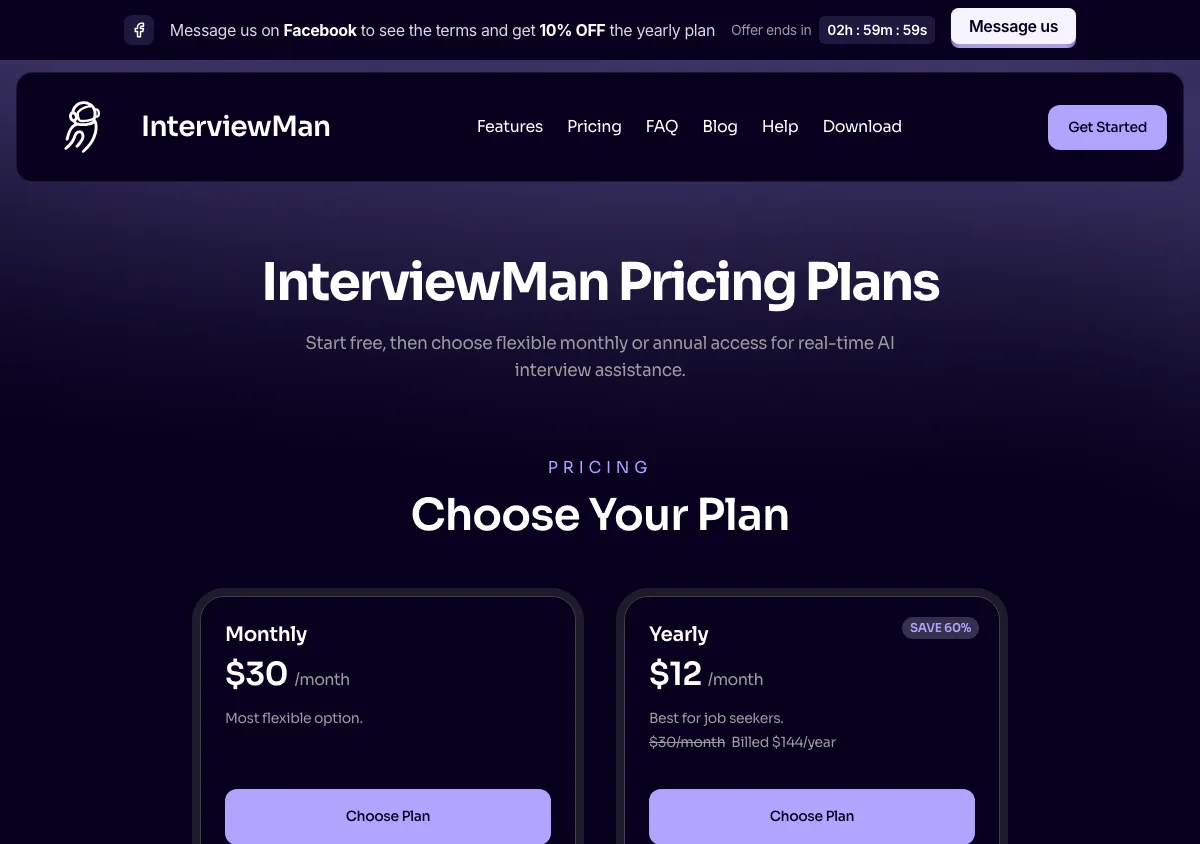
InterviewMan pricing page, captured September 17, 2026. Plans and prices can change; check the vendor's page before buying.
Final Round AI
Which type it is: three of our four types in one subscription. Resume and answer preparation, mock practice, and a live copilot, on a macOS and Windows desktop app plus a web version, with no phone apps. The coding-specific type is the one it does least.
Who it suits: someone at the start of a search who has not written their resume yet. If you already have your materials and only need help in the call, you are paying for a suite to get one feature.
Pros
- The free tier is genuinely useful on its own: unlimited goals with resume and materials, job-description parsing with a prep checklist, and the desktop app.
- Stealth Mode is included with Pro rather than sold as a separate tier, which is a meaningful advantage over Cluely's structure.
- Automatic AI debriefs after sessions are a good feedback loop that most live copilots do not offer.
- If you want one subscription that covers applying and interviewing, it is the most complete option here.
Cons
- The pricing page states plainly: "There is no free trial - live sessions need an active Pro subscription." You cannot test the copilot without paying.
- The advertised "$25+/month" is the annual rate. The month-to-month rate is $150.00, published on a different page, finalroundai.com/subscription-simple. The $25 rate means paying $300 for the year upfront.
- Their own pricing explainer post still says $90 per month. It is stale, and it is the figure most third-party roundups have copied.
- The refund is a 72-hour money-back guarantee on first-time yearly purchases only, and the terms add a usage condition: fewer than 2 interview sessions each strictly over 30 minutes. The FAQ and the terms disagree with each other about renewals.
- Breadth costs focus. If you only want live interview help, you are paying for resume tooling you will not use.
Price
Free plan at $0, for setup only. Month to month is $150.00, and yearly is $25.00 per month ($300 per year), per finalroundai.com/subscription-simple on October 11, 2026. See our InterviewMan vs Final Round AI comparison for a side-by-side.
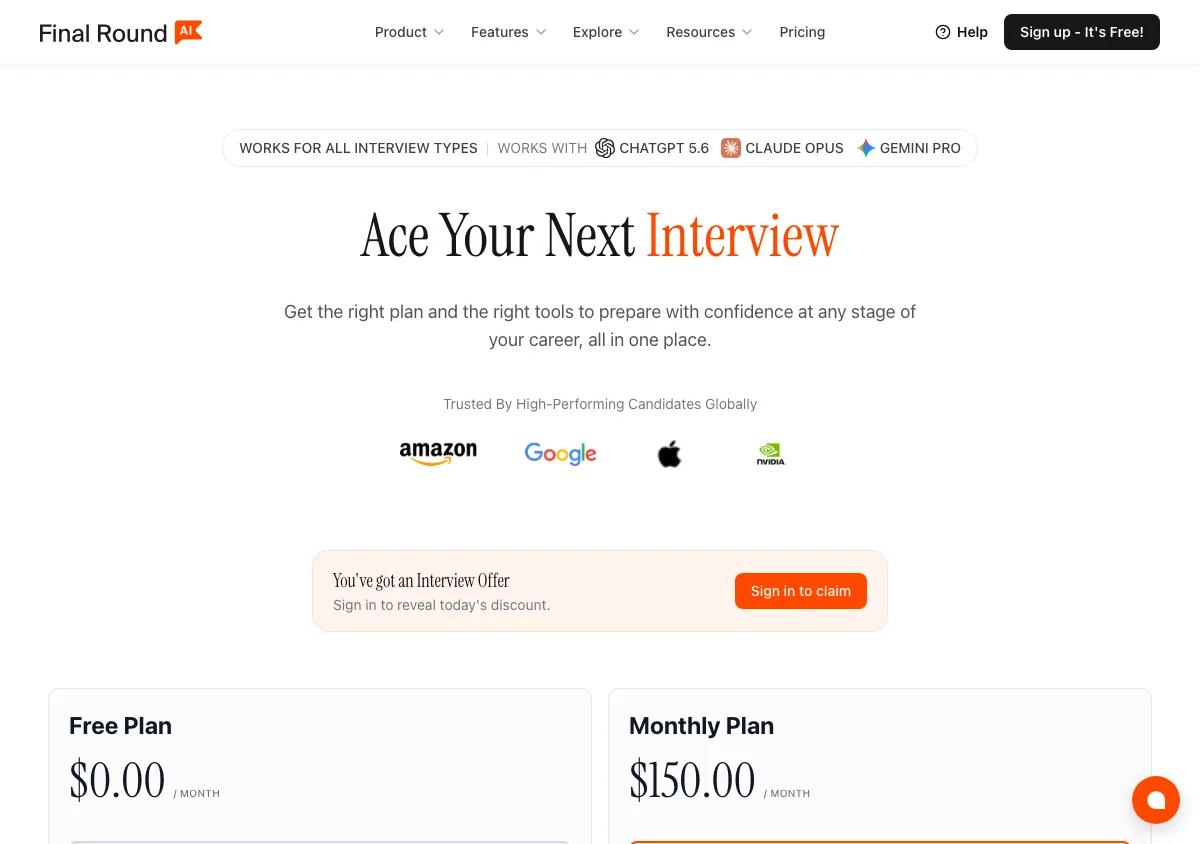
Final Round AI pricing page, captured September 17, 2026. Plans and prices can change; check the vendor's page before buying.
LockedIn AI
Which type it is: a live copilot and a coding-specific assistant sold as one product line, with mock interviews and a phone interview tool attached. It is the clearest example in this guide of a vendor splitting the live copilot type into separate surfaces per round.
Who it suits: candidates whose loop is dominated by algorithm screens and online assessments, and who are comfortable pricing a tier ladder rather than one number.
Pros
- Genuinely coding-first. If most of your loop is technical, its assessment-specific tooling is better targeted than a general copilot.
- The credits plan, $69.99 a month for 400 Copilot minutes or 800 minutes of mock practice, fits the occasional user better than any monthly subscription in this guide.
- A 2-hour per-interview allowance, which is long enough for the system design round it is likely to be used in.
- It publicly labels its plans as "Optimized for technical interviews," which is honest positioning rather than claiming to do everything.
Cons
- The plan ladder hides where stealth lives. Basic is $54.99 per month on sale or $39.99 per month billed quarterly, but Stealth Mode and LockedIn Duo are on Professional, at $119.99 per month on sale or $79.99 per month quarterly. The free plan (unlimited 5-minute sessions, up to 60 minutes a day) has no stealth either.
- The "Money-back guarantee" badge is not the refund policy. The refund policy page makes monthly and quarterly plans non-refundable once started and gives annual plans a partial refund only within 7 days.
- Its "116ms response time" headline is a vendor claim with no published method behind it, so do not buy on that number.
- Behavioral and non-technical rounds are not its strength.
Price
$54.99 per month on Basic (on sale, $109.98 regular), or $39.99 per month billed every three months at $119.97 per charge. Professional, with Stealth Mode and Duo, is $119.99 per month (on sale, $239.98 regular) or $79.99 per month quarterly. Credits are $69.99 per month, and Lifetime Pro is $999.50 once, per the official pricing page on October 11, 2026. It runs on desktop, on the web, and as a phone app. See our InterviewMan vs LockedIn AI comparison.
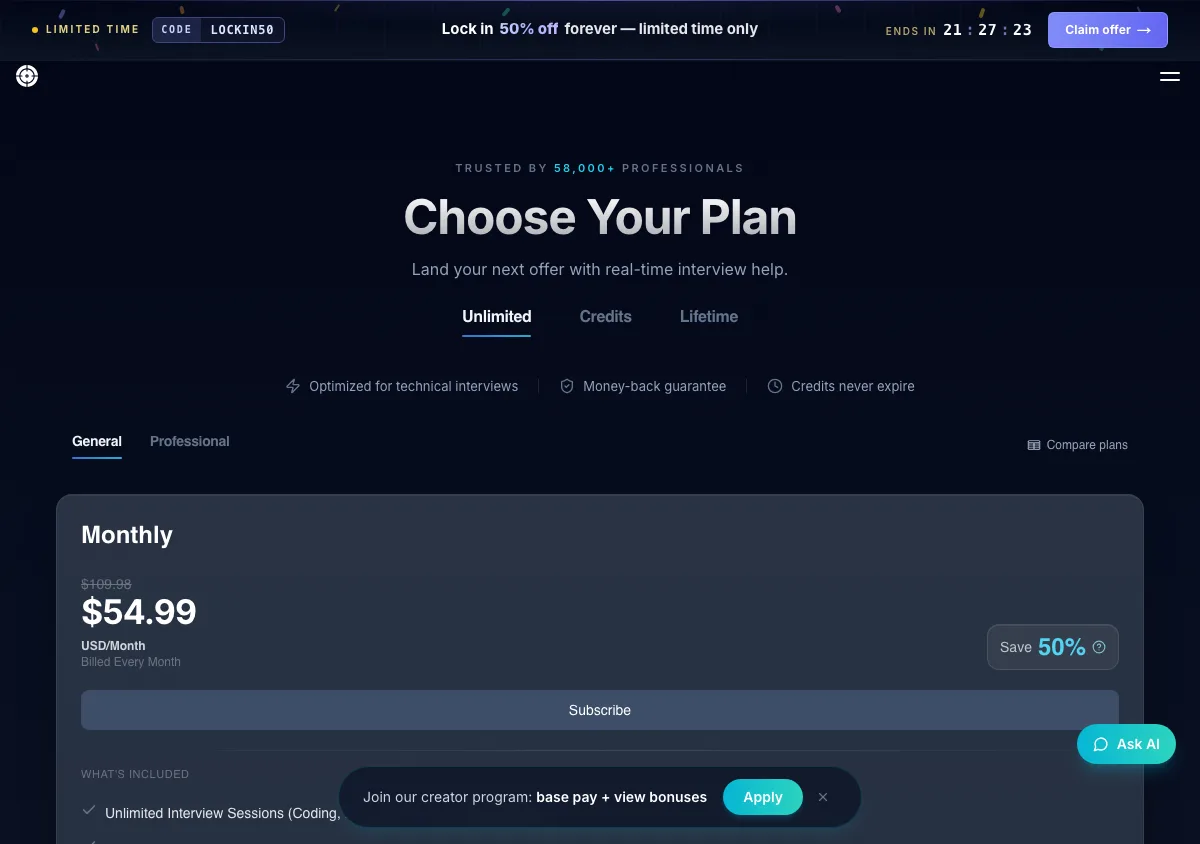
LockedIn AI pricing page, captured September 17, 2026. Plans and prices can change; check the vendor's page before buying.
Cluely
Which type it is: none of the four, strictly. It is a general live-meeting overlay for calls, notes, sales conversations and homework, and interviews are one use case among many. It is in this guide because candidates buy it as if it were a live copilot.
Who it suits: someone who wants one assistant across their working week. It suits an interview-only buyer least well of anything here, because the interview-specific machinery (answer structures, round presets, assessment workflow) simply is not there.
Pros
- The $19.99 Pro tier, $11.99 per month on annual billing, is the cheapest live overlay in this roundup, with unlimited AI responses and unlimited meeting notes.
- It is unusually transparent about the commercial boundary: the pricing table states which tier includes being "completely hidden to meeting screen sharing software," rather than blurring the line.
- Genuinely useful outside interviews. If you want one assistant for client calls, lectures, and interviews, nothing else here competes.
- A free Starter tier lets you test the interface before paying anything.
Cons
- Screen-share concealment is only on Pro + Undetectability, at $149.99 per month or $44.99 per month billed annually. For a candidate whose main requirement is hiding during a screen share, that is the real price, and month to month it is the most expensive plan in this guide.
- Not interview-specific. No STAR/CAR structuring, no interview-type presets, no coding-assessment workflow.
- The refund policy runs for 24 hours, requires video evidence that the product did not work, and excludes both Windows 10 machines and, pointedly, being detected by screen-sharing software. The failure mode that matters to an interview buyer is the one it will not refund.
Price
Starter free. Pro is $19.99 per month, or $11.99 per month annually. Pro + Undetectability is $149.99 per month, or $44.99 per month annually. A separate mobile tier costs $8 per week or $144 per year, so this is no longer a desktop-only product. Per cluely.com/pricing on September 17, 2026. Our InterviewMan vs Cluely comparison covers the gap in detail.
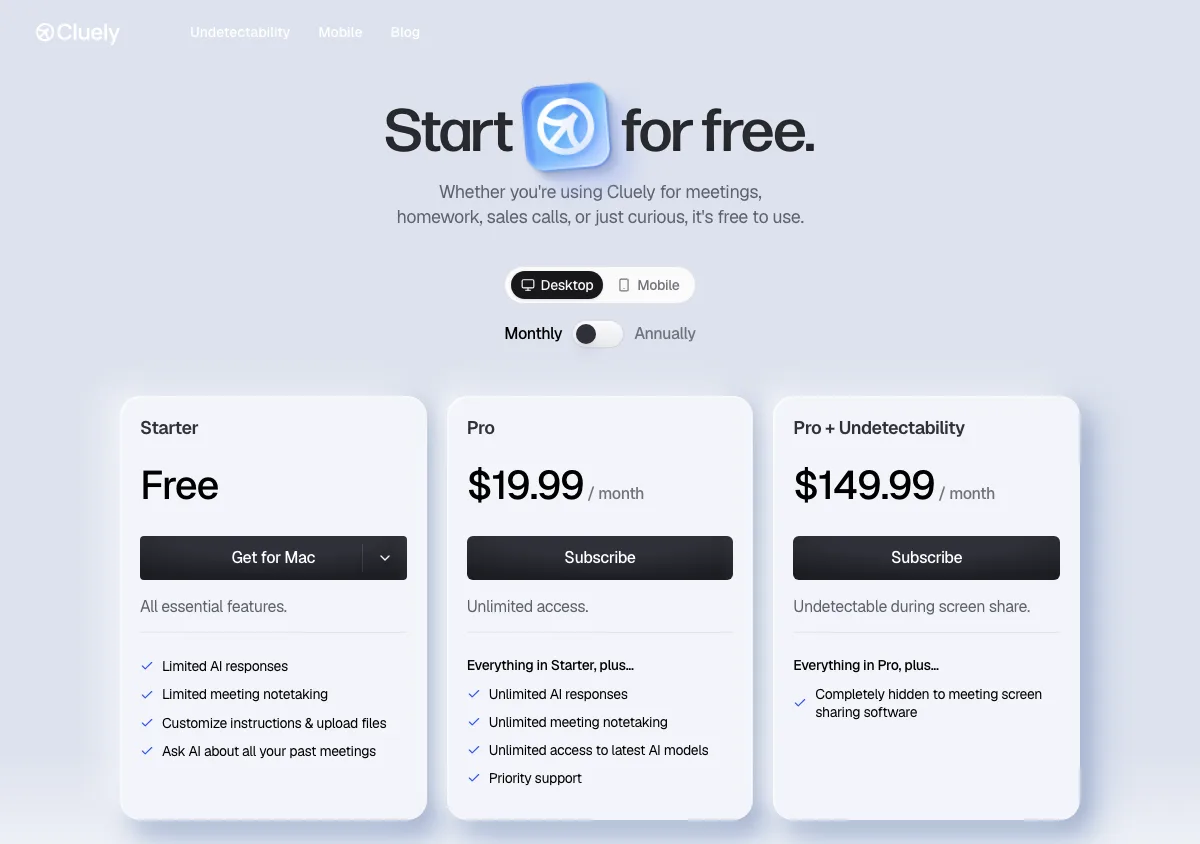
Cluely pricing page, captured September 17, 2026. Plans and prices can change; check the vendor's page before buying.
Sensei AI
Which type it is: a live copilot plus a preparation toolkit, delivered through the browser rather than a native app. That delivery choice is the whole story: a browser tab is a visible object during a screen share in a way a native overlay is not.
Who it suits: a price-sensitive candidate whose rounds are conversational rather than screen-shared, and who is willing to commit to a year.
Pros
- $24 per month on annual billing is competitive, and the free tier includes real 15-minute copilot sessions rather than a demo.
- The AI Resume Builder, AI Story Editor, and a customization suite are included on the free tier, so preparation costs nothing.
- Pro adds a Coding Copilot and industry knowledge base add-ons, which broadens it past behavioral help.
- It integrates with most video conferencing platforms, including Zoom, Microsoft Teams, and Google Meet.
Cons
- $89 per month on month-to-month billing is one of the highest monthly rates here. The cheap number requires a year of commitment up front.
- It runs in the browser. That means a tab exists during your interview, and a request to share your entire screen leaves you seconds to react.
- The pricing page does not state a refund policy.
Price
Free tier at $0 with 15-minute copilot sessions. PRO at $89/month, or $24/month billed annually, on senseicopilot.com. See InterviewMan vs Sensei AI.
Verve AI
Which type it is: a live copilot delivered as a desktop app that hides from screen share and as a Chrome extension, with mock interviews, resume tools, and auto-apply on the side. Same type as InterviewMan and LinkJob AI.
Who it suits: anyone who has never used a copilot and wants to find out whether the category works for them before spending anything.
Pros
- The free plan gives 3 copilot sessions of 15 minutes each, which is enough to judge whether the category works for you before paying.
- Session limits are stated numerically on the pricing page rather than hidden behind the word "unlimited": Standard is 5 sessions of 60 minutes, Pro is unlimited sessions of 90 minutes each.
- Pro includes a coding solver and an assessment copilot, so it is not behavioral-only.
- Stealth is listed as a Standard-plan feature rather than a premium add-on.
Cons
- The Standard plan's five-session cap is low for an active job search where a single loop can be four rounds, and every session stops at 60 minutes (90 on Pro).
- The price jumps once you need more: Pro is $84.99 per month on monthly billing.
- Refunds are only given for a technical problem on Verve's side or a plan that was never used.
Price
Free tier with three 15-minute sessions. Standard is $44.99 per month, or $16.99 per month billed yearly (60 sessions a year). Pro is $84.99 per month, or $34.99 per month billed yearly, per vervecopilot.com/pricing on October 11, 2026. See InterviewMan vs Verve AI.
LinkJob AI
Which type it is: a live desktop copilot, same type as ours, sold on a dimension nobody else competes on: which language model you get.
Who it suits: a buyer who treats the model as the product. If you would rather pay more for a frontier model than less for a fast small one, this is the only tool in the guide that lets you make that choice before handing over money.
Pros
- It names the exact AI models available on each tier, from Claude Haiku and Gemini Flash on monthly up to Claude Opus, GPT-5.6 Sol, and Gemini Pro on yearly. Nobody else here does this, including us.
- It claims local processing, and it has an active Discord and WhatsApp community, which is real support value for a solo job seeker.
- The yearly plan at $29.99/month is a 70% discount off the monthly rate, and there is a lifetime option for people who expect a long search.
- A money-back guarantee applies to first-time purchases of the quarterly and yearly plans.
Cons
- Month to month it costs $99.99, and monthly plans plus all renewals and upgrades are explicitly non-refundable. Only a first-time quarterly or yearly purchase carries the money-back guarantee.
- The model transparency cuts the other way at the bottom of the ladder: the cheap tiers are cheap because the models are lighter.
- The headline $29.99 only exists if you commit to a full year, which is a long bet on a search you hope is short.
Price
Four billing periods, and the type of product you get changes with them, because the model roster changes: $99.99 per month monthly, $69.99 per month quarterly ($209.97), $29.99 per month yearly ($359.88), and $999.99 once for lifetime, which is the only tier with the full roster. Per linkjob.ai/pricing on September 17, 2026. We wrote a full LinkJob AI review and a head-to-head comparison.
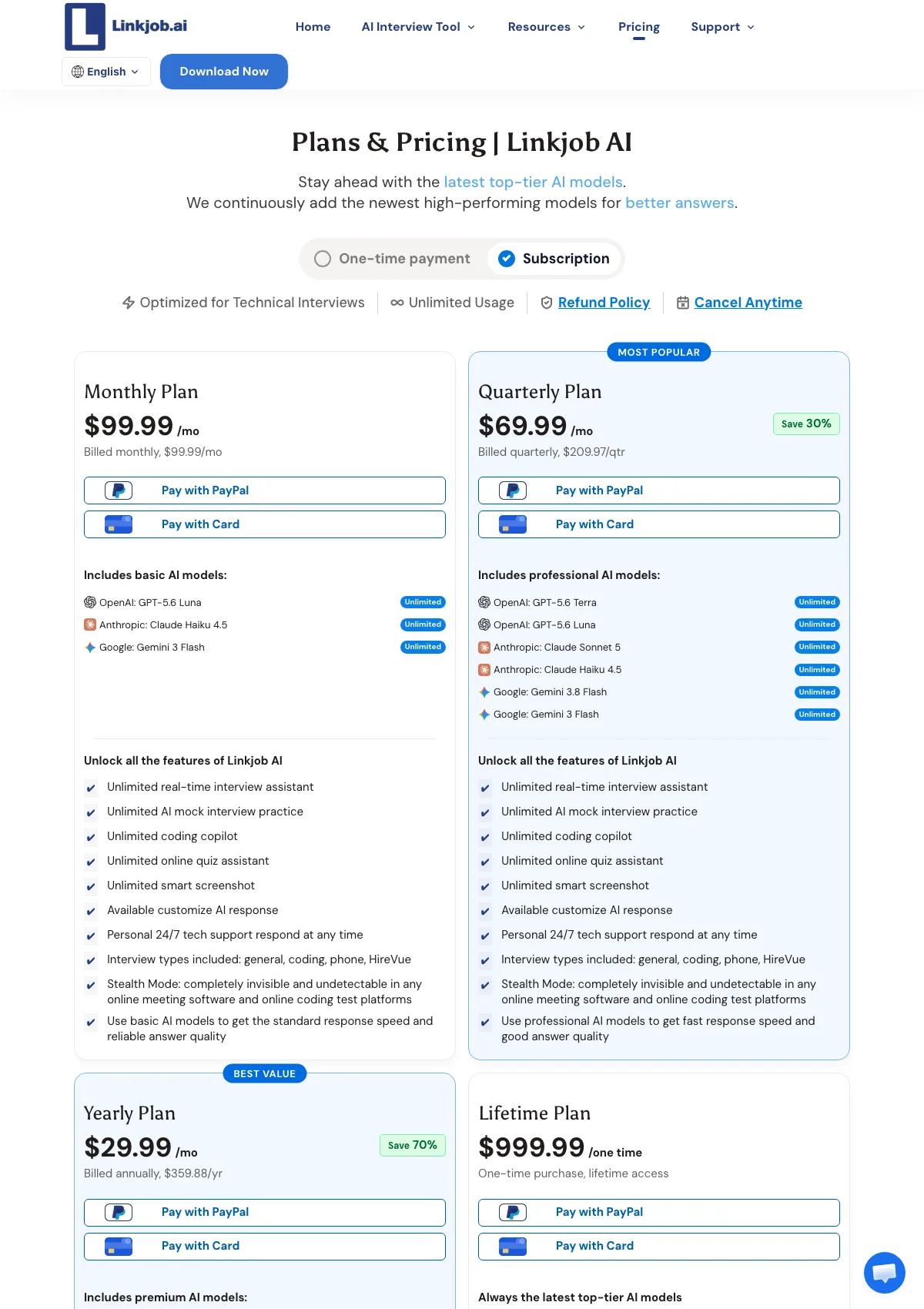
LinkJob AI pricing page, captured September 17, 2026. Plans and prices can change; check the vendor's page before buying.
Exponent Practice (formerly Pramp)
The odd one out, and deliberately so. It is peer-to-peer mock interview practice: you get matched with another candidate, one of you interviews, then you swap.
Pros
- Free. The site states plainly that "all new Pramp sessions are hosted on Exponent Practice. It's still free and even better."
- A human partner is better rehearsal than any AI scorer, because humans interrupt, ask follow-ups, and go quiet when your answer is boring.
- Covers data structures and algorithms, product management, behavioral, system design, frontend, and data science.
- Zero policy risk. Nothing runs during a real interview, so there is nothing to disclose or hide.
Cons
- No live help. If you freeze in the real interview, it does nothing for you.
- Partner quality is random. Some sessions are excellent, some are with someone less prepared than you.
- Scheduling has friction: you need a partner in a compatible time slot.
Price
Free, at pramp.com, now redirecting to Exponent Practice. See InterviewMan vs Pramp for how practice and live help differ.
How to choose an AI interview helper: a checklist
Run down this list before you pay anything. In our experience it eliminates most of the bad purchases.
- What rounds are actually in your loop? Write them down. If three of five are behavioral or system design, a coding-only tool cannot help you.
- Where does the answer appear? Native desktop overlay, browser tab, or second device. A browser tab is one full-screen share request away from being visible.
- Is stealth included or is it an upsell? At Cluely it is an upsell: $19.99 against $149.99 per month, or $11.99 against $44.99 per month if you pay yearly, so the gap is $33 per month on annual billing and $130 per month if you buy month to month. LockedIn AI does the same thing by putting Stealth Mode on Professional rather than Basic. Check before you subscribe, not at checkout.
- What is the session limit, in minutes and in count? "Unlimited sessions" and "unlimited session length" are different claims. Verve publishes both numbers. Read the fine print on any plan that does not.
- Can you test it before paying? Final Round AI says outright there is no free trial for live sessions. Verve and Sensei both give real free sessions. We give a minute-limited free trial with no card.
- What is the refund policy, in the terms rather than on the badge? The badge and the policy often disagree. LockedIn AI advertises a money-back guarantee but its refund page makes monthly and quarterly non-refundable once started. Cluely gives 24 hours, wants video evidence, and excludes detection by screen-sharing software. Final Round AI gives 72 hours on first-time yearly purchases, with a usage condition and contradictory wording on renewals. LinkJob AI refunds first-time quarterly and yearly only. Interview Coder and Stealth Interview refund nothing at all.
- Which platforms do you actually interview on? If Webex, Amazon Chime, or Lark appear in your loop, a Chrome-only tool will fail you on the day.
- Does it run on your interview machine? If your interview is on a managed corporate laptop, no overlay is safe. Use a second device or do not use a tool.
- Can you explain the answer afterwards? Any answer you cannot defend in a follow-up question is a liability, not an asset.
- Does it fit the round's rules? Check the written assessment terms. This is the only item on the list where the wrong answer can cost you the offer after you have accepted it.
What AI interview software costs in 2026
The spread in this category is larger than in almost any other consumer software market. On month-to-month billing, the same broad promise costs anywhere from $19.99 to $299.
At the top: Interview Coder lists $299 per month for a coding-only desktop tool with 1,000 usage credits, or $799 for lifetime access, and refunds none of it. Final Round AI is $150.00 month to month. Cluely's undetectability tier is $149.99 per month. LinkJob AI's monthly plan is $99.99. Sensei AI's monthly is $89. Verve AI Pro is $84.99. LockedIn AI's Basic plan is $54.99, and its Professional tier, the one with Stealth Mode, is $119.99.
At the bottom, on annual billing: Sensei AI drops to $24, Final Round AI to $25.00, LinkJob AI to $29.99, Cluely Pro to $11.99, and InterviewMan is $12 per month at $144 per year, or $129.60 per year with the student discount. Free tiers exist at Cluely, Verve AI, Sensei AI, Final Round AI, and here, and Exponent Practice is free outright.
Three things to notice about that spread.
The annual discount is the whole story. Every vendor advertises the annual per-month number and buries the monthly one. Final Round AI's gap is the widest: $25.00 against $150.00, a six times difference on the same plan. Sensei AI's is 73 percent. LinkJob AI's is 70 percent. If you expect a search of two months, the annual price is not your price.
Stealth pricing is where the traps live. Cluely at $19.99 and Cluely at $149.99 are the same product with one feature toggled, and on annual billing the same toggle is $11.99 against $44.99. LockedIn AI runs the same structure between its Basic and Professional tiers. We include our stealth features on every plan, and Final Round AI includes Stealth Mode with Pro, but you have to read the tier tables to know that.
Coding-only tools are priced like full products. Interview Coder at $299 per month covers one round type. Whether that is worth it depends entirely on whether your offer hinges on a single technical screen.
Cheaper picks across the market are collected in the 5 cheapest interview assistants and best AI interview apps in 2026.
Frequently asked questions
What is an AI interview assistant?
An AI interview assistant is software that helps you during or before a job interview. Live versions transcribe the interviewer's speech, detect the question, and stream a suggested answer to your screen in real time. Others run only beforehand, as mock interview partners, resume builders, or answer preparation tools.
How does a real-time AI interview assistant work?
It runs five stages: microphone capture, streaming speech-to-text, question detection from the transcript, answer generation from your profile and the job context, then incremental display of the answer as it is written. Streaming display is the stage that matters most, because it lets you start speaking before the full answer exists.
Are AI interview assistants detectable?
Screen-capture exclusion reliably hides an overlay from software screen sharing and recording, but Microsoft's own documentation states there is no guarantee of protection, and a phone camera pointed at your monitor defeats it. Assessment platforms detect tab switching, copy-paste, and multiple monitors rather than hidden native apps. In practice, human interviewers notice long pauses and off-camera eye movement far more often than any software flags a tool.
Is it legal to use an AI interview assistant?
Using one is not itself illegal in most jurisdictions, but it can violate the terms of an assessment you agreed to, which is grounds for withdrawing an offer. Rules differ by company and by round: Anthropic allows Claude for polishing application materials but states no AI assistance is allowed in live interviews unless told otherwise. Read the written assessment terms before you accept them.
How much does an AI interview assistant cost in 2026?
Prices run from free to $299 per month. Cluely charges $19.99 for Pro and $149.99 for its undetectability tier, falling to $11.99 and $44.99 on annual billing. Final Round AI is $150.00 month to month or $25.00 per month on a year. LinkJob AI charges $99.99 monthly or $29.99 on yearly billing. Sensei AI charges $89 monthly or $24 annually. InterviewMan is $30 monthly or $12 per month on annual billing, and $129.60 per year for students. Free tiers and minute-limited free trials are common.
What is the difference between an AI interview assistant and an interview copilot?
In practice the terms are used interchangeably by vendors. When there is a distinction, "copilot" usually means the live, in-call product specifically, while "assistant" is the broader category that also covers mock interview practice, resume tools, and coding helpers. Check which one a vendor is actually selling before you subscribe.
Can an AI interview assistant help with coding interviews?
Yes, but through a different input path. Coding problems arrive as text on screen, not as spoken questions, so the assistant reads them from a screenshot analyzed by a vision model rather than from audio. Note that these tools suggest code; they do not compile, execute, or submit it, and proctored assessments frequently prohibit outside assistance entirely.
Which AI interview assistant is best for beginners?
If you have never used one, start with a free tier before paying. Verve AI gives 3 sessions of 15 minutes, Sensei AI gives 15-minute copilot sessions, and InterviewMan has a minute-limited free trial with no credit card required. For pure practice with no policy risk at all, Exponent Practice (formerly Pramp) is free and puts you in front of a real human.
See also
- Live AI interview help: how real-time assistance works
- Interview copilot tools explained
- Stealth interview AI: how undetectable tools actually work
- The 7 most undetectable interview assistants in 2026
- How companies detect AI cheating in interviews
- Which companies allow or ban AI in interviews in 2026
Ready to Ace Your Next Interview?
Join 570,000+ professionals using InterviewMan to get real-time AI assistance during their interviews.
