

Search for an undetectable AI interview assistant and every result claims the same thing. The claims are not equivalent. Some describe a window the operating system genuinely excludes from screen capture. Some describe a browser extension that survives a narrow tab share and nothing else. One is a paid add-on: Cluely charges an extra $130 a month for it on monthly billing, or an extra $33 a month if you pay for the year.
This page ranks seven tools by how their stealth actually works, not by how loudly they say "undetectable". We build InterviewMan, so read our pick with that in mind. Every price and claim below links to its source.
Key takeaways:
- Undetectable is a spectrum, not a switch. Screen-capture exclusion, process hiding, focus behavior, and second-device setups defeat different checks, and no tool defeats all of them.
- Stealth pricing varies by more than 10x: InterviewMan includes it at $12/month on annual billing, Cluely charges $149.99/month for it ($44.99/month if you pay yearly), LockedIn AI puts it on a $119.99/month tier ($79.99/month quarterly), and Interview Coder lists $299/month.
- Read the refund policy before the feature list. Cluely's terms exclude "being detected by screen-sharing software" from refund eligibility, and Interview Coder says "All sales are final."
- Proctoring platforms mostly do not scan your running processes. HackerRank's Proctor Mode analyzes periodic screenshots, webcam gaze, and tab-switch events instead.
- The things that get people caught are usually not the software: reciting an answer, a second monitor, a phone in the webcam frame, and unnaturally perfect delivery.
- Undetectable never means invisible network traffic. Every cloud assistant, ours included, sends data to a server, and a monitored corporate laptop can see that.
Last tested: October 11, 2026. Prices checked on each vendor's pricing page on that date.
The 7 undetectable AI interview assistants compared
This page is about one question: what is the actual mechanism, and what happens to it when the interviewer asks you to share your whole desktop. So that is what the table shows. Platform lists, session caps, and refund clauses for all of these tools sit in the full seven-column comparison in best invisible AI for interviews in 2026, which is our canonical roundup.
| Tool | Stealth mechanism | On a full-desktop share | Price on annual billing |
|---|---|---|---|
| InterviewMan | Two mechanisms on one plan: an operating-system capture-exclusion overlay, and a two-device Stealth Mode where the answers render on a phone or second browser | Survives both ways. The overlay is excluded by the compositor, and in Stealth Mode there is nothing on the shared machine to capture | $12/month ($144/year), stealth included; $10.80/month for students |
| Interview Coder | Capture exclusion plus click-through, a disguised process name, and no Dock or Activity Monitor presence | Survives, and additionally generates no focus-change event when you use it | $799 one time, or $299/month |
| LockedIn AI | A separate "LockedIn Duo" session that lives outside the video call rather than a named window-exclusion flag | Vendor says the interviewer "sees only you and your normal screen share"; no named mechanism to verify | $79.99/month quarterly on Professional, which is the tier that carries Duo and Stealth Mode |
| Final Round AI | Capture exclusion, on by default on Pro, and no bot joins the call as a participant | Survives, and nothing appears in the attendee list either | $25/month billed yearly |
| Beyz AI | Native desktop capture exclusion, with OS floors of macOS 14+ or Windows 11 22H2+ | Survives on a supported OS. The version floors exist because the Windows flag degrades on older builds | $24.99/month billed semi-annually |
| LinkJob AI | Stealth Mode, described only in marketing terms as "completely invisible and undetectable in any online meeting software" | Claimed to survive. No mechanism is named, so there is nothing to check the claim against | $29.99/month ($359.88/year), or $999.99 lifetime |
| Cluely | Capture exclusion, sold as a paid add-on rather than a base feature | Survives only if you bought the Undetectability tier. Pro on its own does not | $11.99/month for Pro, plus the jump to $44.99/month for Pro + Undetectability |
The ranking below is ordered by stealth strength, not by overall value. Our broader value ranking, which weighs price and interview coverage more heavily, is in best invisible AI for interviews in 2026.
Ready to ace your next interview?
InterviewMan gives you real-time AI answers during live interviews — undetectable on Zoom, Meet, and Teams.
Try InterviewMan FreeHow detection actually works in 2026
Almost every article on this topic waves at "proctoring software" without saying what it checks. Here is the actual list, from the platforms' own documentation.
Screen-capture exclusion is a supported operating-system feature, not a hack. Both desktop platforms ship a documented way for an app to opt one of its windows out of capture, and the meeting apps have no way to override it, because they are on the receiving end of the same capture path.
- On macOS, the flag is an
NSWindow
property set to none. Screenshots and screen sharing both skip the window.sharingType - On Windows, it is
withSetWindowDisplayAffinity
. Microsoft's wording: "the window is displayed only on a monitor. Everywhere else, the window does not appear at all."WDA_EXCLUDEFROMCAPTURE - Zoom, Google Meet, Microsoft Teams, and the built-in system recorders all capture through those paths, which is why a correctly excluded window is absent from the stream rather than blacked out or blurred.
Microsoft attaches two limits to the Windows flag on the same page, and they are the reason we will not call any of this a guarantee. It "works only when the Desktop Window Manager(DWM) is composing the desktop", so a machine that falls back to basic composition loses the protection. And unlike a security feature or digital rights management, there is "no guarantee" the content is strictly protected, with a photograph of the screen given as the example. Treat it as a reliable answer to a software capture and no answer at all to a camera.
Screenshot analysis is how the big platforms look for tools. HackerRank's Proctor Mode captures periodic screenshots and analyzes them for unauthorized tools, tutorial websites, external AI assistants, browser extensions, collaboration tools, and screen recorders. This is the key detail: it is looking at pictures of your screen, which is exactly what capture exclusion removes the window from. A browser extension, by contrast, is enumerable inside the browser and shows up in ways an excluded native window does not.
Focus and tab events are logged, not inferred. Proctor Mode automatically flags and logs attempts to exit full-screen mode or switch browser tabs. Secure Mode adds full-screen enforcement, tab-switch alerts, copy and paste restriction, and a multiple monitor check, and produces integrity reports rating violations High or Medium. This is why "click through" behavior matters: a window that never takes focus cannot generate a focus-change event.
Webcam signals are analyzed, not just recorded. Proctor Mode uses AI to monitor candidate presence, warns when the candidate is not visible or multiple faces are detected, "detects and flags mobile phones and tablets in the candidate's webcam feed", and analyzes eye and head movements. A second phone next to your laptop is a specific thing this is built to catch.
Behavioral signals get combined into a score. CodeSignal's fraud detection analyzes "solution similarity, telemetry, and copy-paste activity" and identifies "patterns that may indicate AI-assisted behavior, which are often missed by basic plagiarism checks". Those signals feed a Suspicion Score with an integrity breakdown, and there is separate identity verification against a government-issued photo ID. None of that cares whether your overlay is visible.
Process scanning is rarer than the marketing implies. HackerRank's published documentation does not describe scanning running applications or processes; it relies on screenshot analysis and behavioral monitoring. Where a locked-down environment or a company-managed device does inspect processes, the only reliable defense is a genuine second-device setup where nothing related to the assistant runs on the interview machine at all.
Platform-specific detail is in our guides to CodeSignal, HackerRank, Codility, CoderPad, and Karat.
What undetectable does NOT mean
We will apply this to our own product first, because it is the section a vendor has the most incentive to skip.
It does not mean hidden network traffic. InterviewMan sends audio to a server and receives text back. So does every cloud assistant on this list. That traffic is visible to network monitoring, and on a company-issued laptop with a monitoring agent, it is visible with your name attached. We publish this limitation rather than bury it. If the interview happens on a device you do not control, stealth features are not the deciding factor.
It does not mean your typing looks human. Answer text you retype at a constant rhythm with no backtracking is a pattern. Copy and paste activity is explicitly one of CodeSignal's fraud signals, and Secure Mode blocks external paste outright.
It does not mean your eyes are hidden. Webcam gaze analysis is a shipped feature, not a theory. This is the honest argument against two-device stealth in any round with a camera on: your eyes go to the second screen, and that is exactly the movement being analyzed. An on-screen overlay positioned near the code area is the better choice there, and it is why we document moving the overlay with keyboard shortcuts in our undetectability help page.
It does not mean a second monitor is safe. HackerRank's Secure Mode runs a multiple monitor check. The extra display is a flag by itself.
It does not mean the answer is right. No tool on this list executes your code, and ours does not either. A confidently wrong answer delivered fluently fails the interview more completely than a visible overlay would.
Ready to ace your next interview?
InterviewMan gives you real-time AI answers during live interviews — undetectable on Zoom, Meet, and Teams.
Try InterviewMan FreeIt does not mean a track record is a guarantee. InterviewMan reports zero confirmed detections across 570,000+ users, and Interview Coder claims "Zero documented cases of users being detected". Both are track-record claims. Neither is a technical guarantee, and any vendor treating one as the other is misleading you.
For the wider context on what companies are actually doing about this, see how companies detect AI cheating in interviews and which companies allow or ban AI in interviews in 2026.
1. InterviewMan: the only tool here with two stealth modes
InterviewMan ships both stealth approaches on every paid plan, which is why it takes the top slot on this list rather than the one with the longest feature bullets.
Standard Mode is the overlay: excluded from screen-capture and recording APIs, hidden from the dock, taskbar, and app switcher, and toggled with keyboard shortcuts so the mouse never travels to a window that is not supposed to exist. This is the right mode when a webcam is on, because your eyes stay on the interview screen.
Stealth Mode is the two-device setup: the desktop app runs hidden on the interview machine while answers appear on a phone, an Android or iOS app, or a second browser. This is the mode that defeats a proctoring tool scanning running applications, because there is nothing on the interview machine for it to find in the visible layer.
On the feature count, we will hold ourselves to the same standard we apply to everyone else on this page. We advertise "20+" counter-measures on macOS. What is actually published is our undetectability help page, which describes four groups of them rather than listing all twenty by name. The full itemised list is not public, so read "20+" as a vendor count, not as documentation you can audit.
Meeting coverage runs to six apps: Zoom, Google Meet, Microsoft Teams, Amazon Chime, Webex, and Lark. On the assessment side it works with HackerRank, CodeSignal, Codility, and CoderPad, as long as the assessment runs on your own machine rather than a locked-down remote desktop.
Price
$30/mo month to month, or $12/mo billed annually at $144/year. There is a free trial that does not ask for a credit card. If you are a student, our student discount takes 10% off the yearly plan, bringing it to $129.60/year. Terms are on the pricing page.
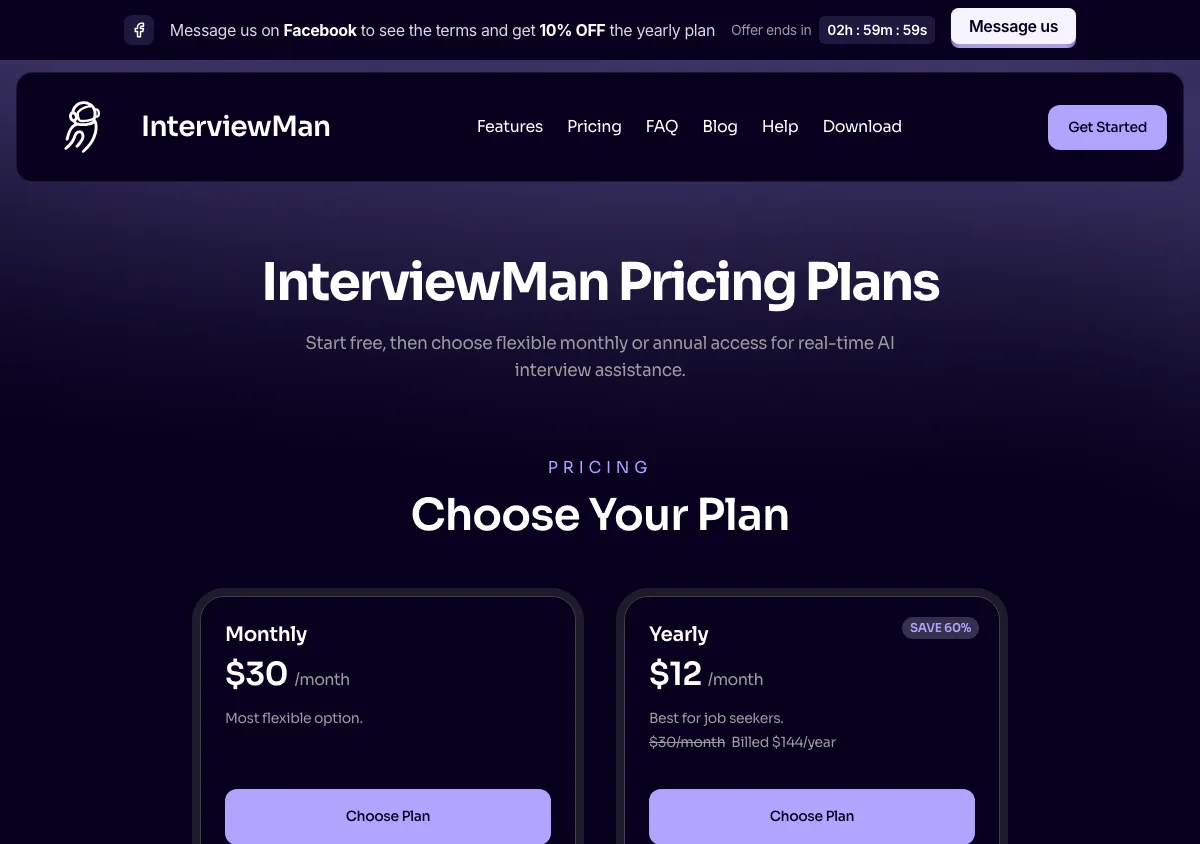
InterviewMan pricing page, captured September 17, 2026. Plans and prices can change; check the vendor's page before buying.
Pros
- Two genuinely different stealth mechanisms in one subscription, so you can match the mode to the round instead of the round to the tool.
- Both modes are included on every paid plan, not sold as an upgrade.
- Five platforms, including iOS and Android clients, which makes the two-device setup practical without owning a second laptop.
- No session cap on paid plans, so a four-hour loop does not cut out mid-round.
- Covers behavioral, coding, system design, and non-technical rounds, with STAR, CAR, SOAR, PAR, and SOARA answer structures and 40+ languages.
- Publishes a written list of what it does not do, including that it cannot hide network traffic.
- Company-reported 4.9/5 from 4025 reviews across 570,000+ users. That figure is ours, collected by us, and not an independent audit.
- The cheapest route to stealth on this page for anyone who can verify student status: $108/year, which is $9/month.
Cons
- We do not publish which AI models power each tier. LinkJob AI does, and if that is your buying criterion, they win it.
- Two-device Stealth Mode has an unavoidable behavioral cost on webcam-monitored rounds. We recommend Standard Mode there, but the trade-off is real and no software removes it.
- The desktop app must host the session. Mobile and web are display clients only.
- No auto-fill, no code execution, no answer submission. This is an assistant, not automation.
Get it: download for macOS, Windows, iOS, or Android.
2. Interview Coder: the most detailed public stealth spec
Interview Coder documents its stealth in more technical detail than anyone else here. Its site lists invisible on dock, invisible in Activity Monitor with a disguised process name, "100% Invisible to Screen-Recording", and "Completely click through" so there are no focus shifts.
That last item is the one that shows real understanding of the threat model. Focus changes are precisely what HackerRank's proctoring logs. A window that never accepts focus cannot generate the event.
Price
$299/month Monthly Pro, listed as reduced from $499. $799 one-time Lifetime Pro, listed as reduced from $1598. A free download with limited features, and 1,000 credits a month on the paid plans.
The pricing page links a refund policy rather than summarising it, and the policy itself is one line long in substance: "Interview Coder operates on a no-refund policy for all purchases", followed by "All sales are final." No window, no exceptions, no usage test. On an $799 lifetime licence that is the entire risk transferred to you at checkout.
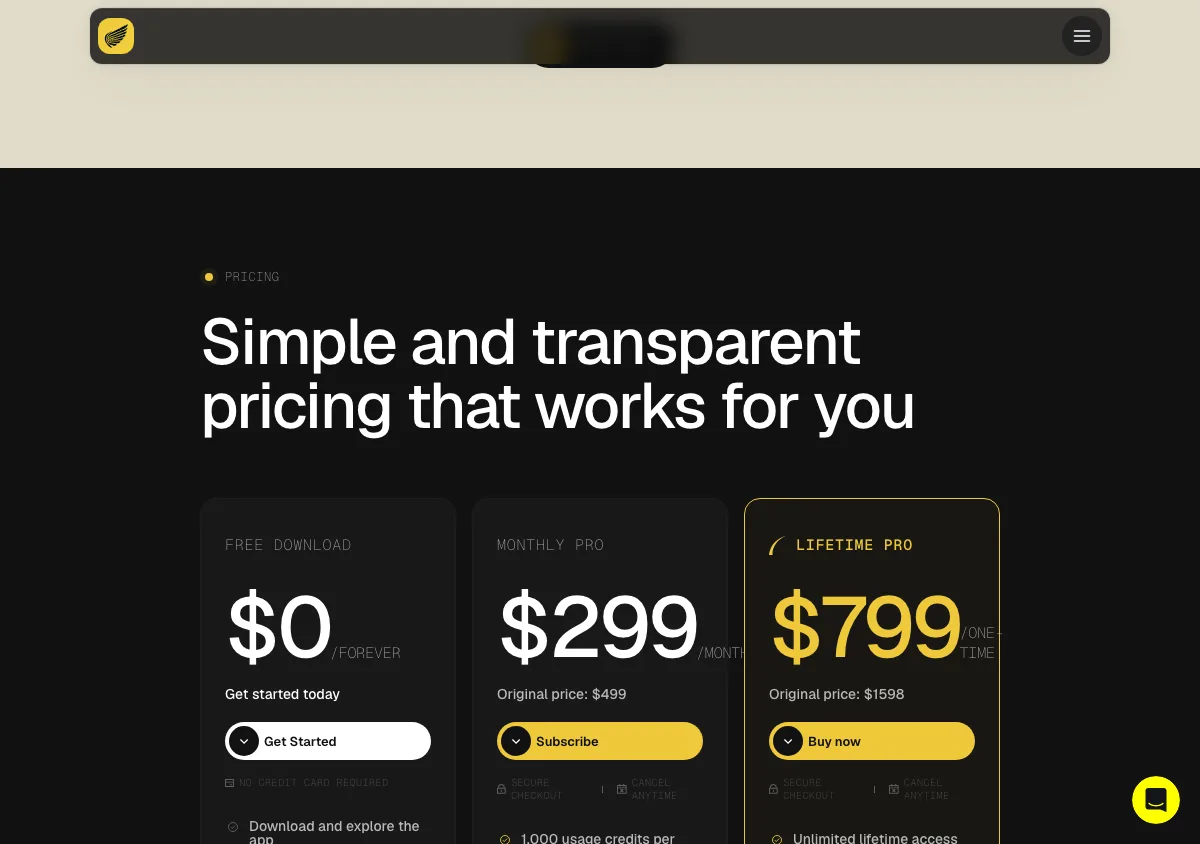
Interview Coder pricing page, captured September 17, 2026. Plans and prices can change; check the vendor's page before buying.
Pros
- Best public documentation of the mechanism, in specifics rather than adjectives.
- Click-through behavior directly addresses focus-event logging, which most competitors do not mention at all.
- A $799 lifetime license removes the subscription question if you interview repeatedly across years.
- Supports Teams, Zoom, Meet, Chime, and Webex, plus HackerRank, CoderPad, and Codility.
Cons
- $299/month is the highest recurring price in this roundup by a wide margin, roughly 25 times InterviewMan's annual rate.
- Coding rounds only. A loop with behavioral and system design rounds needs a second tool and a second bill.
- No refunds of any kind. Their policy page says the company "operates on a no-refund policy for all purchases" and that "All sales are final." Paired with the highest prices in the roundup, that makes this the least forgiving purchase here.
- Like ours, its "zero documented cases" line is a track record, not a guarantee.
3. LockedIn AI: speed, and a different definition of hidden
LockedIn AI frames stealth differently from everyone else. Rather than describing an excluded window, it describes a separate session: the "LockedIn Duo session" is not the interview's video call, and the vendor says "the interviewer sees only you and your normal screen share. There are no LockedIn AI overlays."
Duo is not on the entry plan. It sits on the Professional tier alongside Stealth Mode, at $119.99/month month to month or $79.99/month billed quarterly. If you buy the cheaper Basic plan expecting the stealth behavior described above, you will not get it.
It supports Windows 10+, macOS 13.1+, browsers including Chrome, Edge, Chromium, Opera, and Brave, and a phone app. Its own comparison content advertises a 116ms response time, the fastest figure any vendor here publishes. That is a vendor marketing number and we did not measure it.
Price
Four tiers, and the one number everybody quotes is the one most often misread.
The $39.99/month figure that appears across comparison content, including LockedIn AI's own comparison page, is not a monthly price. It is the Basic tier's quarterly rate, charged as $119.97 every 3 months. Paying month to month on the same tier costs $54.99/month on sale ($109.98 regular), and Basic has no Stealth Mode.
Above it, Professional costs $119.99/month on sale ($239.98 regular), or $79.99/month on quarterly billing, and is the only tier with Stealth Mode and LockedIn Duo. A Credits plan sits alongside at $69.99/month for "400 Copilot minutes a month, or 800 minutes of Mock", and those credits no longer carry over without expiring. A one-time Lifetime Pro licence is $999.50.
Sessions are capped at up to 2 hours per interview. The free plan allows unlimited 5-minute sessions, up to 60 minutes a day, without Stealth Mode.
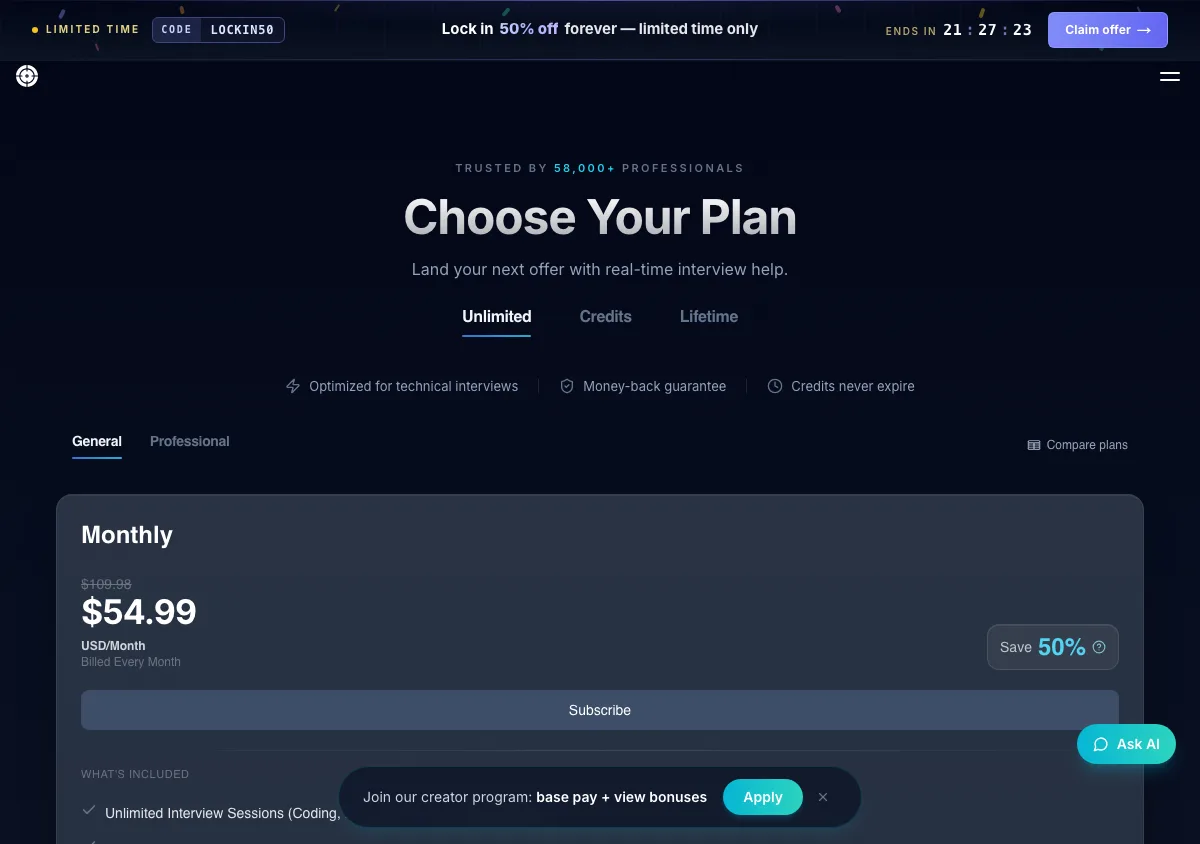
LockedIn AI pricing page, captured September 17, 2026. Plans and prices can change; check the vendor's page before buying.
Pros
- Fastest latency claimed in the category, which reduces the awkward pause that gets people noticed. It is a vendor figure, not a measured one.
- Widest browser support of any tool here.
- A one-time Lifetime Pro licence at $999.50 for people who interview on and off for years.
- Free tier with no credit card, so the workflow can be tested first.
- Strong depth on technical rounds, with a dedicated coding assistant and an online-assessment helper.
Cons
- Stealth is an upsell. Getting Duo and Stealth Mode means the Professional tier, which is $79.99/month at best and $119.99/month at worst. That is between six and ten times what InterviewMan charges annually for stealth included in the base plan.
- The money-back badge does not match the refund policy. The pricing page displays a money-back guarantee. The refund policy page says monthly and quarterly plans are non-refundable once started, and that only annual buyers get a partial refund, within 7 days. The badge is not a general policy and should not be read as one.
- Sessions now stop at up to 2 hours. Earlier pricing pages said 1.5 hours, so the number has moved before. Either way, a full onsite loop will not fit in one session.
- The stealth description is about session separation rather than a named capture-exclusion mechanism, so there is less to verify.
Head to head detail is in LockedIn AI vs Cluely.
4. Final Round AI: stealth you can check before you pay
Final Round AI writes the clearest stealth description of any vendor in this roundup: "Hidden from shared screens, absent from recordings, no bot joins your call, silent, it never speaks for you."
The "no bot joins your call" clause is a real distinction. Meeting-assistant products that join as a participant appear in the attendee list, which is the most obvious detection route there is. It also states that Stealth Mode is "on by default" on Pro rather than a setting you have to hunt for.
Price
On its pricing page, Pro is shown as "$25+/mo" with "Save up to 40%" on longer billing. The $0 free tier includes the desktop app on macOS and Windows. The page states: "There is no free trial, live sessions need an active Pro subscription."
The subscription page has the numbers the plus sign is hiding: $150.00/month month to month, or $25.00/month billed yearly, which is $300 for the year. It runs on Windows, Mac, and the web, with no phone apps. Their own pricing blog post still quotes $90/month and has not been updated, so do not shop from it.
Refunds: a 72-hour money-back guarantee on first-time yearly purchases. The terms add a usage test, which is where most claims will fail: you must have used fewer than 2 interview sessions each strictly over 30 minutes. Their FAQ and terms also contradict each other on whether renewals are covered.
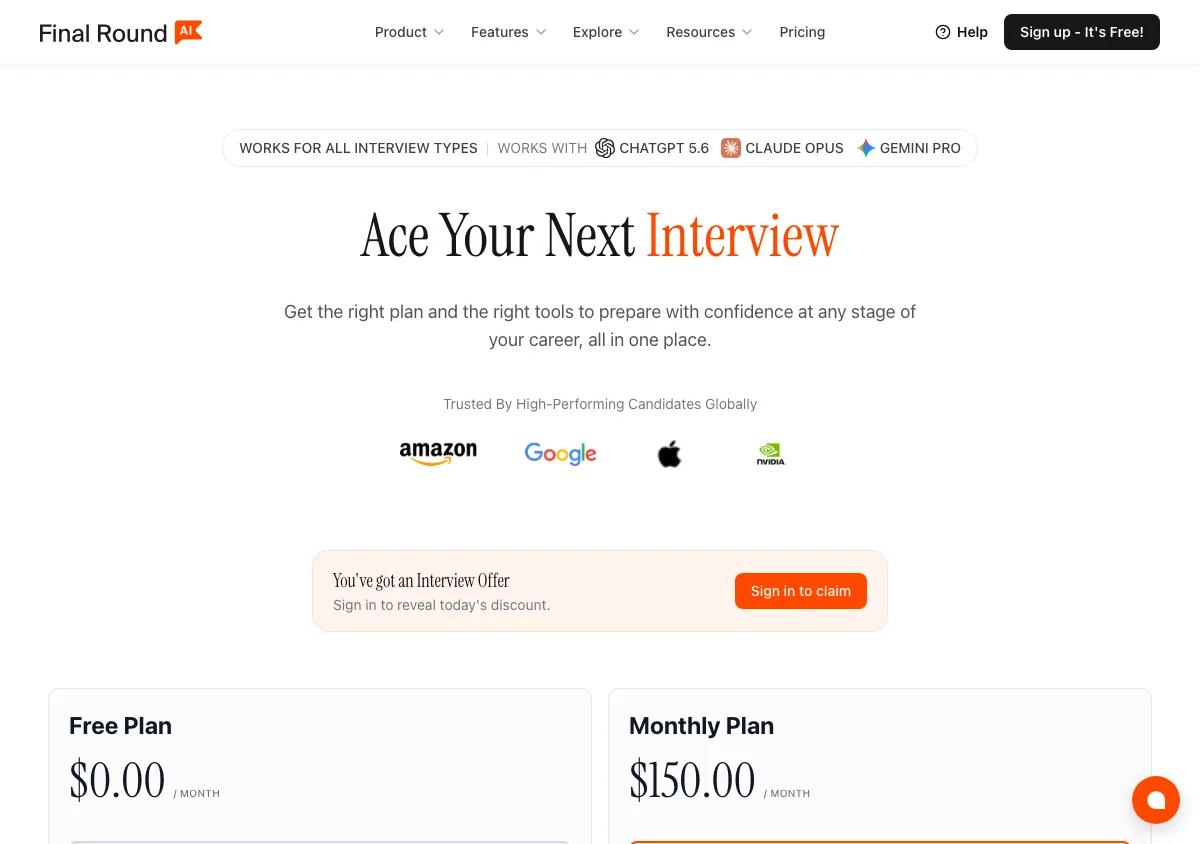
Final Round AI pricing page, captured September 17, 2026. Plans and prices can change; check the vendor's page before buying.
Pros
- Only tool here whose free plan includes the desktop app, so you can install it and run your own screen-share test before spending anything.
- Stealth on by default removes a configuration mistake as a failure mode.
- Unlimited live CoPilot sessions on Pro.
- Covers resume work, job-description parsing, and practice interviews alongside the live copilot.
- Honest about the absence of a free trial for live sessions instead of implying one exists.
Cons
- "$25+/mo" is not a price. Behind the plus sign is a $150/month month-to-month rate, six times the yearly figure.
- The refund guarantee has a usage test attached and only covers first-time yearly purchases. Their own FAQ and terms disagree about renewals, so get it in writing.
- Their own pricing article is out of date, which makes the real price harder to pin down than it should be.
- The product is broad, so you pay for prep and resume tooling even if you only want live help during calls.
5. Beyz AI: desktop stealth with hard OS requirements
Beyz AI has changed since it was known as a browser-first product. Its site now leads with "Desktop app. Invisible to screen sharing", offers builds for Mac (Apple Silicon), Mac (Intel), and Windows, and requires macOS 14+ or Windows 11 22H2+.
Those version floors are worth reading as a feature rather than an annoyance.
WDA_EXCLUDEFROMCAPTUREPrice
$49.99/month monthly, $32.99/month billed quarterly, and $24.99/month billed semi-annually.
Pros
- Moved from a browser extension to a native desktop app, which is the right architectural direction for stealth.
- The semi-annual rate of $24.99/month is competitive for a desktop-native tool.
- Explicit OS requirements suggest the capture-exclusion path is implemented properly rather than approximated.
- Works with Zoom, Google Meet, and Microsoft Teams.
Cons
- macOS 14+ or Windows 11 22H2+ excludes older machines outright, and interview laptops are often older machines.
- Stealth documentation is thin: one line on the homepage, with no feature-level breakdown to check.
- No refund policy published.
- The lowest rate requires paying six months up front.
6. LinkJob AI: model transparency, non-refundable monthly
LinkJob AI beats us on one thing: its pricing page names the specific AI models included on every tier. That is genuine transparency and we will not pretend otherwise.
Its stealth claim is that the tool is "completely invisible and undetectable in any online meeting software". The word "any" goes further than the underlying operating-system APIs support, and further than we would claim about our own app.
Price
The ladder runs from $99.99/mo if you pay month to month, down to $69.99/mo on a quarterly term charged at $209.97, down again to $29.99/mo on a yearly term charged at $359.88, with a $999.99 one-time lifetime licence at the top. Each step down the price ladder is also a step up the model ladder, which is the unusual part: the quarterly plan unlocks Professional models, the yearly plan unlocks Premium models, and lifetime adds GPT-6 Astra and Claude Fable 5.1 on top of the yearly roster.
Trial minutes work the same way, as a ladder you climb by doing something for them. Downloading the app gets you 30 minutes. Joining their Discord or WhatsApp community gets you 45.
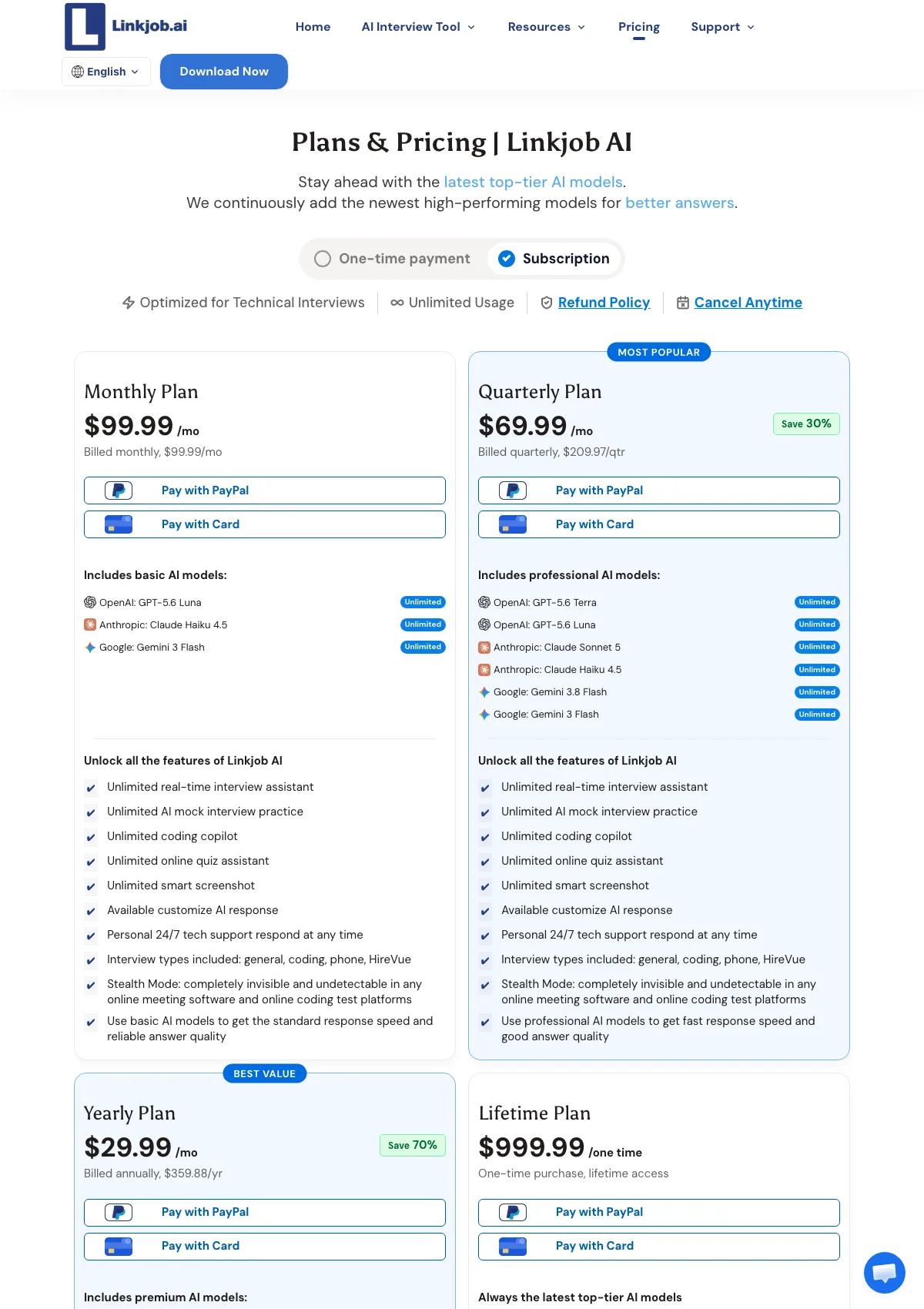
LinkJob AI pricing page, captured September 17, 2026. Plans and prices can change; check the vendor's page before buying.
Pros
- Names the exact model per tier, which nobody else on this list does.
- A lifetime option at $999.99.
- Money-back guarantee on first-time quarterly and yearly purchases.
- An active Discord and WhatsApp community, which is real support that a help center does not replace.
Cons
- The $99.99 monthly plan is non-refundable per their own terms, and it is the second-highest monthly price here.
- "Undetectable in any online meeting software" is a stronger claim than any capture-exclusion API can back.
- Screen-share and stealth behavior is described in marketing language, not in terms of a named mechanism.
Our side-by-side is at InterviewMan vs LinkJob AI.
7. Cluely: the honest one, and the expensive one
Cluely ranks last on stealth for one reason only: its pricing page puts screen-share invisibility on a separate, much more expensive tier. It also deserves credit for saying so instead of blurring the line.
Price
Free Starter. $19.99/month Pro, which does not include undetectability. $149.99/month Pro + Undetectability, adding the feature described as "Completely hidden to meeting screen sharing software".
Pay for a year and both numbers drop hard: Pro becomes $11.99/month and Pro + Undetectability becomes $44.99/month. The page's own meta title uses the lower one, advertising "Pro from $11.99/mo". So the stealth surcharge is $130 a month on monthly billing and $33 a month on annual, which is a different buying decision depending on how you pay. Cluely also now sells a mobile tier at $8/week or $144/year, so describing it as desktop-only is out of date.
The refund policy is the part to read before the feature table. There is a 24-hour window, you must supply video evidence that the product is not working, and two exclusions are written in: Windows 10 machines, and "being detected by screen-sharing software". Read that last one slowly. The tier you are buying exists to stop screen-sharing software from seeing the app, and the refund policy will not cover you if screen-sharing software sees the app.
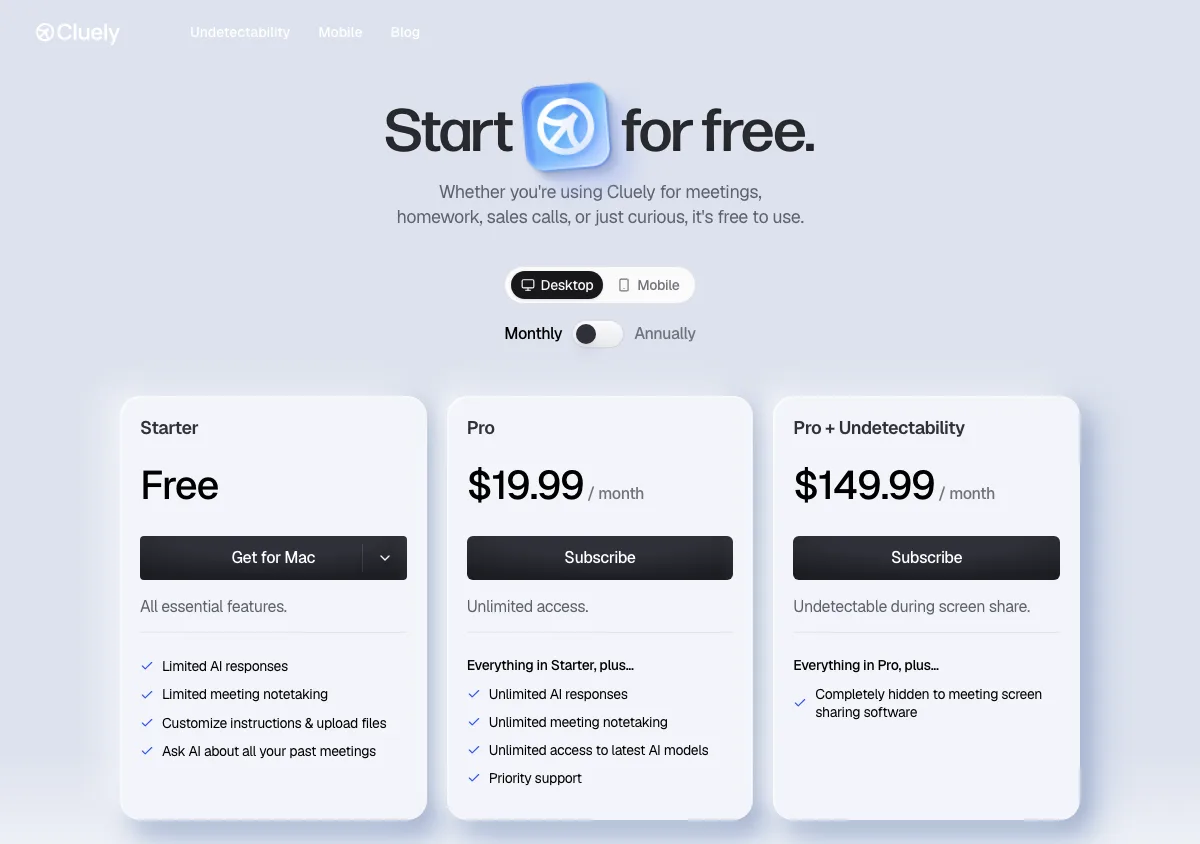
Cluely pricing page, captured September 17, 2026. Plans and prices can change; check the vendor's page before buying.
Pros
- The most transparent pricing table in the category on exactly the question that matters: which plan is actually hidden.
- Cheapest paid entry anywhere in this roundup if you do not need screen-share invisibility: $19.99/month month to month, and $11.99/month on annual billing.
- The best general assistant here for meetings, sales calls, and lectures rather than interviews alone.
- A genuinely free Starter tier with no expiry.
- A phone client exists now, sold on its own weekly or yearly plan, so the desktop-only label no longer fits.
Cons
- $149.99/month is more than twelve times InterviewMan's $12/month annual rate. Even on annual billing, $44.99/month is about 3.7 times what we charge, for a product that is not interview-specific.
- Many buyers pay $19.99 assuming Pro is the complete product and find the gap during a screen share.
- No interview-specific workflow: no coding-assessment support, no STAR or CAR answer structures, no interview-type routing.
- The refund policy excludes the exact failure you are paying to avoid, alongside a 24-hour deadline, a video-evidence requirement, and a blanket exclusion for Windows 10.
How to choose an undetectable AI interview assistant
Work through these in order.
- Whose laptop is it? If the interview happens on a company-managed device, stop. Network monitoring and device management beat every stealth feature on this page. Use a personal machine or skip the tool.
- Is the webcam on? If yes, prefer an on-screen overlay over a two-device setup. Gaze analysis and phone detection in the webcam frame are shipped features, not hypotheticals.
- What kind of rounds? Coding only makes Interview Coder or Stealth Interview, which starts at $49/month, reasonable. A mixed loop with behavioral and system design rounds needs a tool that covers all of them, which is where an interview copilot that handles every round type saves you a second subscription.
- How long is the loop? Check for per-session caps before you buy, not after. LockedIn AI stops at up to 2 hours per interview, which covers a single round and not a full onsite day. A cap that expires halfway through a system design round is worse than no tool at all.
- What happens if it fails? Read the refund terms, and read the policy page rather than the badge on the pricing page. They differ more than you would expect:
- Interview Coder: no refunds. "All sales are final."
- LockedIn AI: money-back badge on the pricing page, but monthly and quarterly are non-refundable once started, and annual gets only a partial refund within 7 days.
- Cluely: 24 hours, video evidence required, and "being detected by screen-sharing software" is excluded.
- Final Round AI: 72 hours on first-time yearly purchases, subject to a usage test of fewer than 2 sessions each over 30 minutes.
- LinkJob AI: monthly is non-refundable; the guarantee covers first-time quarterly and yearly only.
- Beyz AI: no refund policy published on the site.
- Test it yourself. Set up a call with a friend, share your full desktop, have them record, and check the recording frame by frame. Then check Activity Monitor or Task Manager. Do this before the real interview, every time you update the app or your operating system.
If you are earlier in the process and still comparing categories, start with how AI interview assistants work or practice first with AI mock interviews.
Frequently asked questions
What is the best undetectable AI interview assistant in 2026?
We rank InterviewMan first because it is the only tool here that includes two different stealth mechanisms on every paid plan: an overlay excluded from screen-capture APIs and a two-device Stealth Mode where nothing renders on the interview machine. We build it, so weigh that accordingly. Interview Coder publishes the most detailed stealth specification, and Final Round AI is the only one that lets you install the desktop app and test it for free.
Can interviewers actually see an undetectable AI overlay?
Not through a normal screen share, if the tool sets the operating system's capture-exclusion flag correctly. On macOS that is the NSWindow sharingType property, and on Windows it is SetWindowDisplayAffinity with WDA_EXCLUDEFROMCAPTURE. Both exclude the window from screenshots and shared or recorded video. Neither protects against a camera pointed at your screen, and Microsoft states the feature is not a security guarantee.
Do HackerRank and CodeSignal detect AI interview assistants?
They detect signals, not the tool itself. HackerRank's Proctor Mode analyzes periodic screenshots for unauthorized tools, browser extensions, and screen recorders, logs tab switches and full-screen exits, and analyzes webcam eye and head movement. CodeSignal combines solution similarity, telemetry, and copy-paste activity into a Suspicion Score and looks for patterns suggesting AI-assisted work. A window excluded from screen capture does not appear in the screenshots, but behavior still does.
Does undetectable mean the tool hides my network traffic?
No, and any vendor implying it does is wrong. Every cloud AI assistant sends audio or screen data to a server and receives answers back. That outbound traffic exists and is visible to network monitoring tools, which matters most on company-managed laptops. InterviewMan publishes this as a stated limitation rather than hiding it.
Is a two-device setup safer than an on-screen overlay?
It depends on the round. A second device defeats anything that inspects the interview machine, including a full-desktop share and a process scan, because nothing about the assistant is running visibly on that computer. It is worse when a webcam is on, because your eyes move to a second screen and proctoring systems specifically flag mobile phones and tablets in the webcam feed. Use the overlay for camera-on rounds and the second device for locked-down assessments.
How much should an undetectable AI interview assistant cost?
The working range in 2026 is $12 to $50 per month for a tool that includes stealth in the base price. InterviewMan is $12 per month on annual billing, and $10.80 per month for students on the student discount. Beyz AI is $24.99 per month billed semi-annually, LinkJob AI is $29.99 per month billed yearly, and Final Round AI is $25 per month billed yearly.
Above that band, the price is usually buying something other than stealth. LockedIn AI's Basic tier is $39.99 per month only on quarterly billing, or $54.99 month to month on sale, and its stealth features are not on that tier at all: they start at $79.99 per month quarterly on Professional. Cluely charges $44.99 per month annually for its undetectability tier and $149.99 month to month.
Interview Coder is $299 per month, or $799 once. In those cases the extra money buys breadth, speed, or a lifetime licence rather than better hiding.
Do any of these tools guarantee I will not be caught?
None of them can, and the honest ones do not try. InterviewMan reports zero confirmed detections across 570,000+ users and Interview Coder claims zero documented cases, but both are track records rather than technical guarantees. The most common way candidates are caught has nothing to do with software: reciting an answer word for word, long unnatural pauses, or an answer that does not match how the candidate talks about their own experience.
What is the difference between invisible and undetectable?
In practice, invisible refers to the visual layer: the window does not appear in a screen share, a recording, the dock, or the taskbar. Undetectable is a broader and less honest word, because it implies nothing anywhere can spot the tool, including process scans, network monitoring, extension enumeration, and behavioral analysis. Treat every "undetectable" claim as a claim about the visual layer unless the vendor names the specific mechanism.
See also
Ready to Ace Your Next Interview?
Join 570,000+ professionals using InterviewMan to get real-time AI assistance during their interviews.
