

"Invisible" is the most abused word in this category. Every vendor uses it, almost none define it, and the definitions that do exist are not the same thing. One tool means "our window is excluded from the operating system's screen-capture API". Another means "we run on your phone, so there is nothing on your laptop to see". A third means "we are invisible, but only if you pay the $149.99 tier".
We build InterviewMan, so read our pick with that in mind. Every price and claim below links to its source. Where we could not verify something ourselves, we say so instead of guessing.
Key takeaways:
- Invisible means three different things: an overlay excluded from screen capture, a second device that never touches the interview machine, and a browser extension that is only hidden from a tab share. Only the first two survive a full-desktop share.
- Price gaps are enormous for the same job: Cluely charges $19.99/month for its Pro plan but $149.99/month once undetectability is added, and on annual billing those become $11.99 and $44.99 per month. Interview Coder lists $299/month.
- Cluely's refund policy explicitly excludes "being detected by screen-sharing software" from refund eligibility. If the one feature you are paying for fails in the one way that matters, you are outside the policy. That is the single most useful line for a stealth buyer on this page.
- Session caps matter more than most buyers notice. LockedIn AI now caps a single interview at up to 2 hours, and Parakeet AI's credit packs are billed in hours rather than months.
- Refunds are not standard. LinkJob AI's monthly plan is non-refundable, LockedIn AI's monthly and quarterly plans are non-refundable once started, Interview Coder operates a flat no-refund policy, and InterviewBee refunds only when its own product fails during a live session.
- Nothing on this list hides network traffic, typing rhythm, or where your eyes go. Any vendor implying otherwise is overselling.
Last tested: October 11, 2026. Prices checked on each vendor's pricing page on that date.
The 8 best invisible AI tools for interviews at a glance
| Tool | Price (monthly / annual) | Stealth approach | Platforms | Session limits | Refund policy | Best for |
|---|---|---|---|---|---|---|
| InterviewMan | $30/mo, or $12/mo billed annually ($144/yr); free trial without a credit card; students get 10% off yearly | Overlay excluded from screen-capture APIs and hidden from dock, taskbar, and app switcher, plus a two-device Stealth Mode | macOS, Windows, iOS, Android, web | No session cap on paid plans | Refund policy published; see our pricing page | Candidates running a full loop of behavioral, coding, and system design rounds |
| LockedIn AI | Basic $54.99/mo on sale ($109.98 regular), or $39.99/mo billed every 3 months ($119.97 per charge), no stealth; Professional $119.99/mo on sale ($239.98 regular) or $79.99/mo quarterly; $999.50 Lifetime Pro; free plan with unlimited 5-minute sessions, up to 60 minutes a day, no stealth | Desktop app plus browser client and a phone app; Stealth Mode and "LockedIn Duo" sit on the Professional tier, where the vendor says the interviewer "sees only you and your normal screen share" | Windows 10+, macOS 13.1+, Chrome, Edge, Chromium, Opera, Brave, phone app | Up to 2 hours per interview | Monthly and quarterly non-refundable once started; annual gets a partial refund within 7 days | Coding-heavy loops where response speed is the priority |
| Final Round AI | Free $0 (setup only, no live help); $150/mo month to month; $25/mo billed yearly ($300/yr); free tier includes the desktop app | Stealth Mode keeps CoPilot windows out of screen shares and recordings, on by default on Pro | macOS and Windows desktop app, web; no phone apps | "Unlimited live Interview CoPilot sessions" on Pro | 72-hour money-back guarantee on first-time yearly purchases, subject to a usage test | Job seekers who also want resume and prep tooling in one subscription |
| LinkJob AI | $99.99/mo; $69.99/mo billed $209.97/quarter; $29.99/mo billed $359.88/yr; $999.99 lifetime | Stealth Mode, described as "completely invisible and undetectable in any online meeting software" | Desktop app on Windows, macOS, and Linux | Unlimited real-time assistant on all paid tiers | Money-back guarantee on first-time quarterly and yearly purchases; monthly is non-refundable | Buyers who want the exact AI model named per tier |
| Cluely | Free Starter; Pro $19.99/mo or $11.99/mo billed annually; Pro + Undetectability $149.99/mo or $44.99/mo billed annually | Screen-share invisibility sold as a separate tier: "Completely hidden to meeting screen sharing software" | Desktop, plus a separate mobile tier at $8/week or $144/year | Not published as an interview-specific cap | 24-hour window, video evidence required; explicitly excludes "being detected by screen-sharing software" and excludes Windows 10 machines | General meetings, sales calls, and lectures rather than interviews alone |
| InterviewBee | Free plan; one-time "Interview Packs" from $29, described as "One-time payment. No subscription. No auto-renewal." | "Invisible Interview Mode", described as "Completely invisible during screen sharing" | Desktop AI assistant with stealth on Windows only (Mac listed as coming soon), plus web | Free plan: 1 live assistant session and 1 mock capped at 15 minutes. Pack sizes above $29 are only visible after signup | Refunds only when the product "materially failed to work during an active live interview" | Someone with two or three interviews booked and no ongoing need |
| Parakeet AI | $78.00/week; $149.90/month; $599.90/year; "Prepare Only" $45.90/mo or $15.33/mo annually; credit packs from $38.00 | Lists five behaviors: invisible on screen share, hidden from the Dock, undetectable in Activity Monitor, invisible during tab switching, cursor undetectability | Windows, macOS, Chrome, mobile browser | Unlimited call time on subscriptions; credit packs are sold in hours; free plan of 10 sessions up to 10 minutes each, no card | 7-day window, unused purchases only, one refund per person; unused credits are forfeited | Occasional users who prefer paying for hours instead of a subscription |
| Interview Coder | $299/month Pro; $799 one-time lifetime; free download with limited features | Most detailed public spec: invisible on dock, invisible in Activity Monitor, "Completely click through", process name disguised | macOS, Windows | Not published | "No-refund policy for all purchases", and "All sales are final" | Coding rounds only, for someone who wants a lifetime license |
Sources for every figure in this table are linked in the sections below. Prices move, and several of these vendors run promotional rates, so check the checkout page before you pay.
How we tested
The honest version of a testing methodology says what was actually run and what was read. Here is ours.
Ready to ace your next interview?
InterviewMan gives you real-time AI answers during live interviews — undetectable on Zoom, Meet, and Teams.
Try InterviewMan FreeWe ran this five-step check on InterviewMan itself, on macOS and on Windows:
- Zoom, full-desktop share. Start a Zoom call with a second account, share the entire desktop, and have the second account record. This is the hardest case, because a full-desktop share captures everything the compositor draws.
- Google Meet, browser tab share. Share a single Chrome tab containing a coding assessment. A tab share is the easiest case to pass and the one most vendor demos use, so passing it proves very little on its own.
- Microsoft Teams, single window share. Share one application window, then move the overlay across the shared window's bounds to see whether it clips, flickers, or repaints into the stream.
- macOS built-in screen recording. Record with the system recorder, then step through the file frame by frame. Screen sharing and screen recording use overlapping but not identical capture paths, so a tool can pass one and fail the other.
- Activity Monitor and Task Manager. Sort by CPU and by process name and look for the app under its own name, under a generic name, and as a helper process.
Repeat each step twice: once with the assistant idle, once while it is streaming an answer. Rendering behavior can differ between the two.
What we verified ourselves: the five steps above, on InterviewMan only. We did not buy every competitor's top tier and run their software through the same harness, and we are not going to publish results we did not produce.
What comes from vendor documentation: every price, session limit, platform list, refund term, and stealth claim in the table above and in the sections below. Each one is quoted from the vendor's own page and linked so you can check it. When a vendor makes a claim we could not confirm, we label it as a claim.
If you want to run step 1 through 5 on any tool yourself, do it with a friend on a second account before your interview, not during it. Our guide to how companies detect AI cheating in interviews covers what the other side of the call actually sees.
What "invisible" actually means on macOS and Windows
Three different mechanisms hide behind the same marketing word.
1. Operating-system screen-capture exclusion. Both major desktop platforms give applications a supported way to opt a window out of capture. On macOS, an
NSWindowsharingTypeSetWindowDisplayAffinityWDA_EXCLUDEFROMCAPTUREThis is the mechanism behind most tools that say "invisible on screen share", including InterviewMan's Standard Mode.
2. A second device. Nothing renders on the interview machine at all, because the answers appear on a phone or a second browser. This defeats anything that inspects the interview machine, including a full-desktop share and a process scan. The trade-off is your eyes: you are looking at a second screen, and a webcam sees that.
InterviewMan's Stealth Mode works this way, with the desktop app acting as a hidden server and a phone or the web client showing the answers. The details are in our undetectability help page.
3. A browser extension. Cheapest to build, weakest in practice. An extension lives inside the browser, so it is exposed to anything that enumerates extensions, and its UI is drawn by the page or the browser rather than by a window the operating system can exclude. It can survive a narrow tab share and fail a desktop share.
Read a vendor's stealth wording against these three categories and most of the ambiguity disappears. We go deeper on this in stealth interview AI: how undetectable tools actually work.
1. InterviewMan: best invisible AI for interviews overall
InterviewMan listens to live interview audio, detects the question, and streams an answer to a floating overlay. It covers behavioral, coding, system design, and non-technical rounds in the same subscription, and it runs on five platforms.
Two stealth modes ship on every paid plan. Standard Mode is the overlay: excluded from screen-capture and recording APIs, hidden from the dock, taskbar, and app switcher, and toggled with keyboard shortcuts so you never move the mouse to a window that should not exist. Stealth Mode is the two-device setup: the desktop app runs hidden on the interview machine while answers appear on a phone or a second browser, which is the only approach on this page that survives a proctoring tool scanning running applications.
It covers Zoom, Google Meet, Microsoft Teams, Amazon Chime, Webex, and Lark, plus browser-based assessments on HackerRank, CodeSignal, Codility, and CoderPad taken on your own machine.
Ready to ace your next interview?
InterviewMan gives you real-time AI answers during live interviews — undetectable on Zoom, Meet, and Teams.
Try InterviewMan FreePrice
$30/mo month to month, or $12/mo billed annually at $144/year. There is a free trial without a credit card. Students get 10% off the yearly plan, which brings it to $129.60/year, through our student discount. Current terms are on the InterviewMan pricing page.
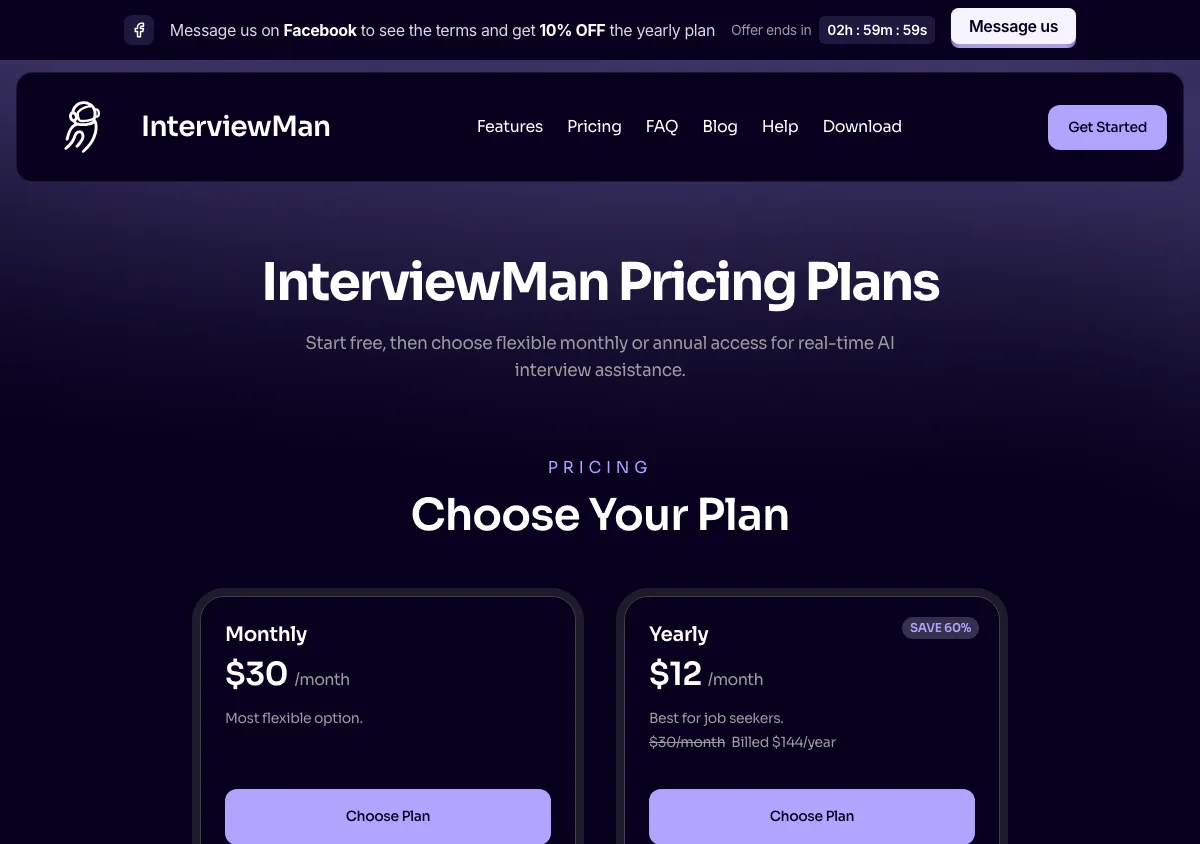
InterviewMan pricing page, captured September 17, 2026. Plans and prices can change; check the vendor's page before buying.
Pros
- Cheapest per-month rate of any full-featured tool here on annual billing, at less than half LinkJob AI's yearly rate and roughly a quarter of Cluely's undetectability tier on annual billing ($12 against $44.99).
- Both stealth approaches are included on every paid plan rather than gated behind an upgrade. Cluely and LockedIn AI both put their stealth feature on a higher tier.
- No session cap on paid plans, so a four-hour onsite loop does not cut off mid-round.
- Five platforms, including iOS and Android clients that make the two-device setup practical without a second laptop.
- We advertise "20+" counter-measures on macOS. Our undetectability help page describes four groups of them rather than itemising all twenty, so treat the number as a vendor count until we publish the full list. The page does spell out what the product cannot do.
- Company-reported 4.9/5 from 4025 reviews across 570,000+ users, with zero confirmed detections reported. That is a track record we collect ourselves, not an independent audit and not a technical guarantee, and we say so on the box.
Cons
- We do not publish which underlying AI models we use, per tier. LinkJob AI does, and if model choice is your buying criterion, that is a real point against us.
- Two-device Stealth Mode means your eyes leave the interview screen. On a webcam-monitored round, that is a behavioral tell no software fixes. Standard Mode is the better choice there.
- It does not type or submit answers, does not run code, and does not hide network traffic. If you wanted automation, this is not it.
- Prerequisite for Stealth Mode is a desktop host: mobile and web cannot run a session on their own.
Try it: download the desktop and mobile apps, or read what users say in our InterviewMan reviews roundup.
2. LockedIn AI: fastest response, coding-first
LockedIn AI is the most technically ambitious competitor here. It pairs a desktop app with browser support across Chrome, Edge, Chromium, Opera, and Brave, and its site lists Windows 10+ and macOS 13.1+ as requirements. Its own comparison content advertises a 116ms response time, which is the fastest number any vendor on this list publishes.
Its stealth framing is unusual and worth quoting: the vendor describes a "LockedIn Duo session" separate from the video call, where "the interviewer sees only you and your normal screen share. There are no LockedIn AI overlays." Read the tier before you read the feature: LockedIn Duo and Stealth Mode are on the Professional tier, at $119.99/month month to month or $79.99/month billed quarterly. They are not part of the cheaper Basic plan that most write-ups quote.
Price
The pricing page sets out four ways to pay.
- Basic: $54.99/month month to month on sale ($109.98 regular), or $39.99/month billed every 3 months, which is $119.97 per charge. No Stealth Mode. The $39.99 figure that circulates in comparison content, including LockedIn AI's own comparison page, is the quarterly rate, not a monthly price.
- Professional: $119.99/month month to month on sale ($239.98 regular), or $79.99/month billed quarterly. This is the tier that carries Stealth Mode and LockedIn Duo.
- Credits: $69.99/month for "400 Copilot minutes a month, or 800 minutes of Mock". The older "credits never expire" line no longer applies.
- Lifetime Pro: $999.50 one time.
There is also a free plan with unlimited 5-minute sessions, up to 60 minutes a day, without Stealth Mode. Session length is capped at up to 2 hours per interview. Besides the desktop app and browser support, LockedIn AI also has a phone app.
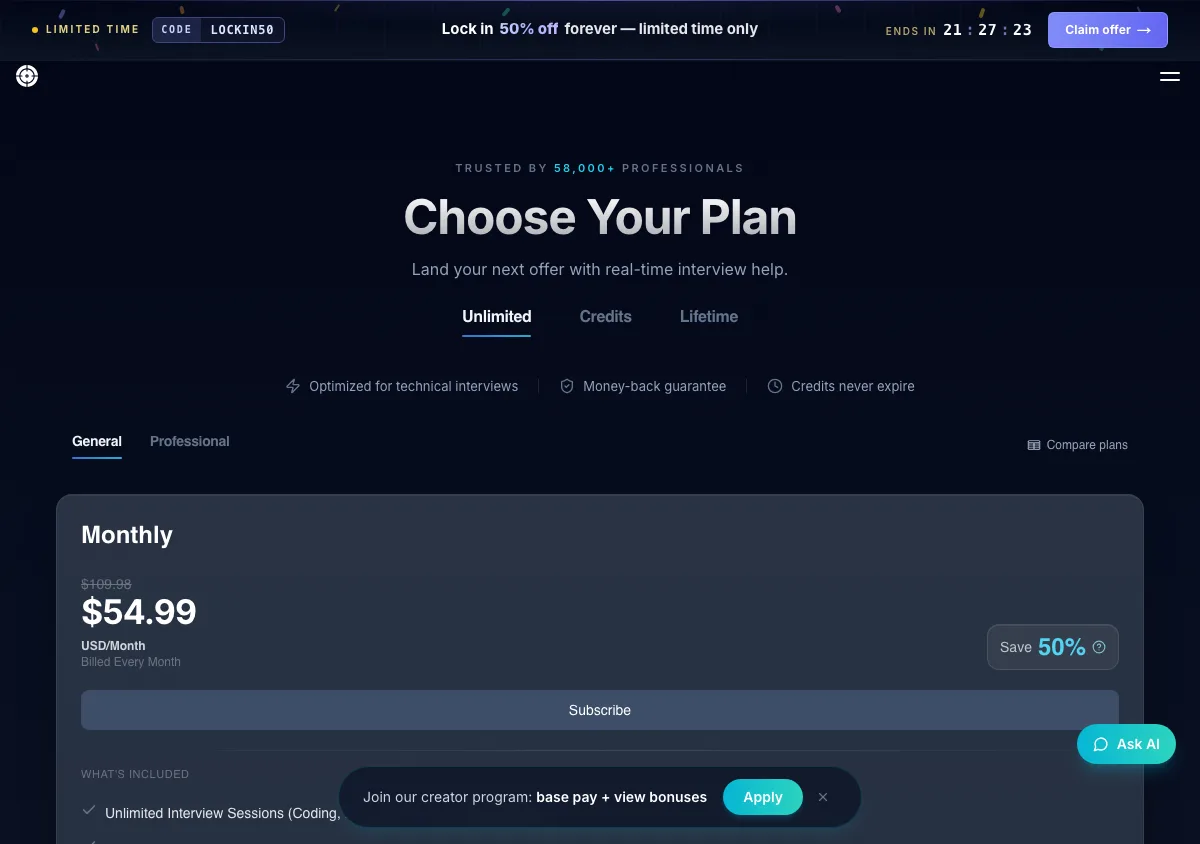
LockedIn AI pricing page, captured September 17, 2026. Plans and prices can change; check the vendor's page before buying.
Pros
- Fastest latency claimed in the category, at a vendor-stated 116ms, which matters when the recruiter is watching you pause. We did not measure it ourselves.
- Widest browser support: Chrome, Edge, Chromium, Opera, and Brave.
- Four clearly separated ways to pay, including a one-time $999.50 Lifetime Pro licence for people who expect to interview on and off for years.
- Free tier with no credit card required (unlimited 5-minute sessions, up to 60 minutes a day, no stealth), so you can test the workflow before paying.
- Genuinely strong on technical rounds, with a coding assistant and an online-assessment helper as first-class products.
Cons
- The stealth feature is on the expensive tier. Stealth Mode and LockedIn Duo start at $79.99/month on quarterly billing and $119.99/month month to month, which is six to ten times InterviewMan's $12/month annual rate for the same job.
- The money-back badge is not a money-back policy. The pricing page shows a money-back guarantee, but the refund policy page says monthly and quarterly plans are non-refundable once you start using them, and only annual buyers get a partial refund, and only within 7 days. Read that page before you read the badge.
- Session length is capped at up to 2 hours per interview. That is enough for most single rounds and not enough for a full onsite loop run in one sitting. Earlier versions of the pricing page said 1.5 hours, so the cap has moved before and may move again.
- The Credits plan at $69.99/month now buys a fixed 400 Copilot minutes rather than open-ended use, and the credits no longer carry over indefinitely.
- Behavioral and non-technical rounds are supported, but the product's center of gravity is clearly coding.
See our full LockedIn AI vs Cluely breakdown for how the two compare head to head.
3. Final Round AI: best free tier, stealth on by default
Final Round AI is the broadest product on this list. It spans resume work, job-description parsing, prep checklists, practice interviews, and a live Interview CoPilot, and its pricing page puts the desktop app on macOS and Windows in the free tier, which is unusual and genuinely useful.
Its Stealth Mode description is the clearest writing any vendor here produces: "Hidden from shared screens, absent from recordings, no bot joins your call, silent, it never speaks for you." The "no bot joins your call" line is a real differentiator, because meeting-notetaker products that join as a participant are visible in the attendee list.
Price
The pricing page shows Pro as "$25+/mo" with "Save up to 40%" on longer billing terms, and a $0 free tier that includes the desktop app. The page states plainly: "There is no free trial, live sessions need an active Pro subscription."
The real numbers are one click further in, on the subscription page: $150.00/month month to month, or $25.00/month billed yearly, which is $300 for the year. So "$25+/mo" is the yearly rate and the month-to-month rate is six times that. The app runs on Windows, Mac, and the web, with no phone apps. Their own pricing blog post still quotes $90/month and is out of date.
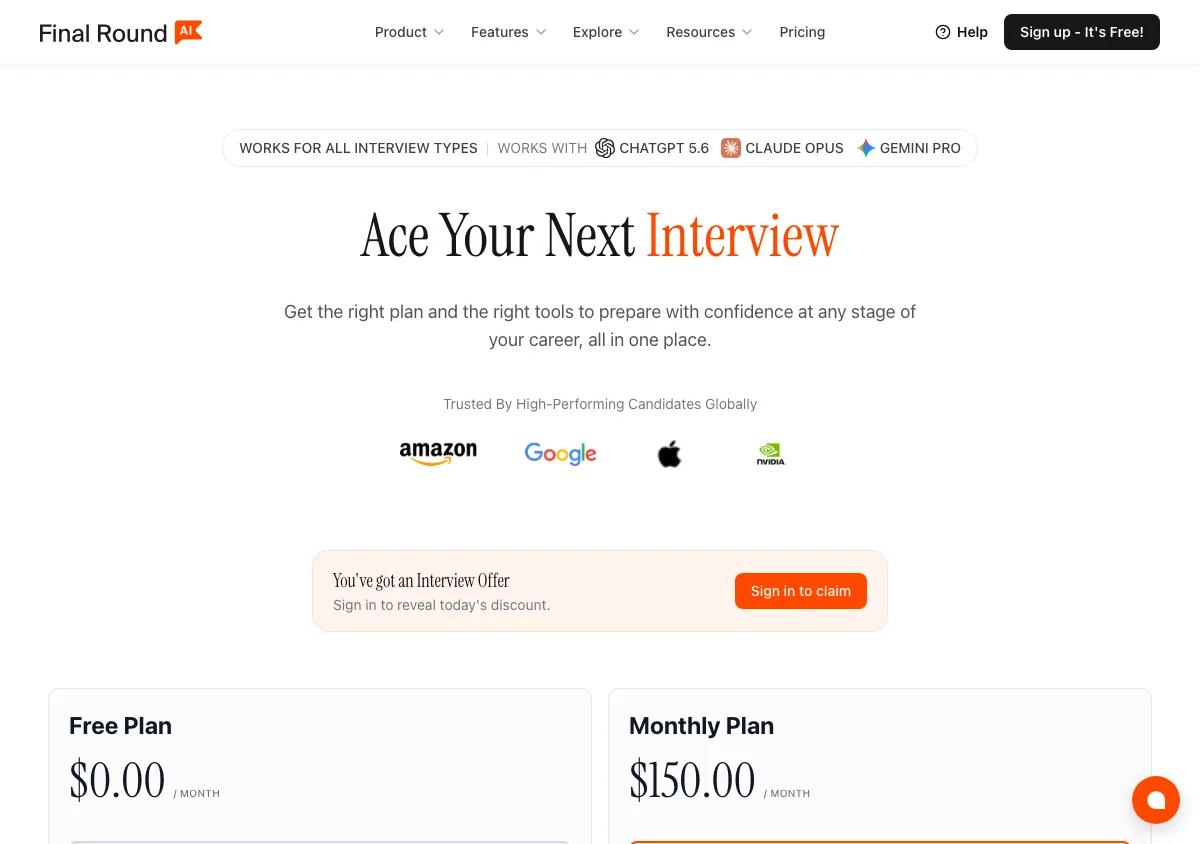
Final Round AI pricing page, captured September 17, 2026. Plans and prices can change; check the vendor's page before buying.
Pros
- Only tool here that gives you the desktop app on a free plan, so you can install and verify the stealth behavior before paying.
- Stealth Mode is "on by default" on Pro rather than an add-on you have to find and enable.
- Unlimited live CoPilot sessions on Pro, with no per-interview clock.
- Covers the whole job search, not just the interview hour, which is worth real money if you are also rewriting a resume.
- Publishes the honest limit that live sessions require a paid subscription, instead of dangling a trial that does not exist.
Cons
- "$25+/mo" is not a price. The plus sign hides a month-to-month rate of $150, which is the highest monthly figure on this page after Interview Coder.
- The refund terms come with a usage test. Final Round AI offers a 72-hour money-back guarantee on first-time yearly purchases, but its terms qualify it: you must have used fewer than 2 interview sessions each strictly over 30 minutes. Their FAQ and their terms also contradict each other on whether renewals qualify, so get the answer in writing before you renew.
- Their own pricing blog post is stale, which makes it easy to shop the wrong number.
- The product's breadth is also its cost: you are paying for auto-apply and resume tooling even if you only want live help.
4. LinkJob AI: names the exact model on every tier
LinkJob AI does one thing better than everyone else on this page, including us: its pricing page lists the specific AI models included on each tier by name, so you know what you are buying. The yearly plan lists frontier models across four providers. Nobody else here is that specific.
Its stealth claim is that the app is "completely invisible and undetectable in any online meeting software". That is a broader claim than the underlying operating-system APIs can support, and we would treat the word "any" as marketing.
Price
$99.99/mo monthly; $69.99/mo billed $209.97 per quarter; $29.99/mo billed $359.88 per year; $999.99 lifetime. The free trial is 30 minutes on download, and 45 minutes if you join their Discord or WhatsApp.
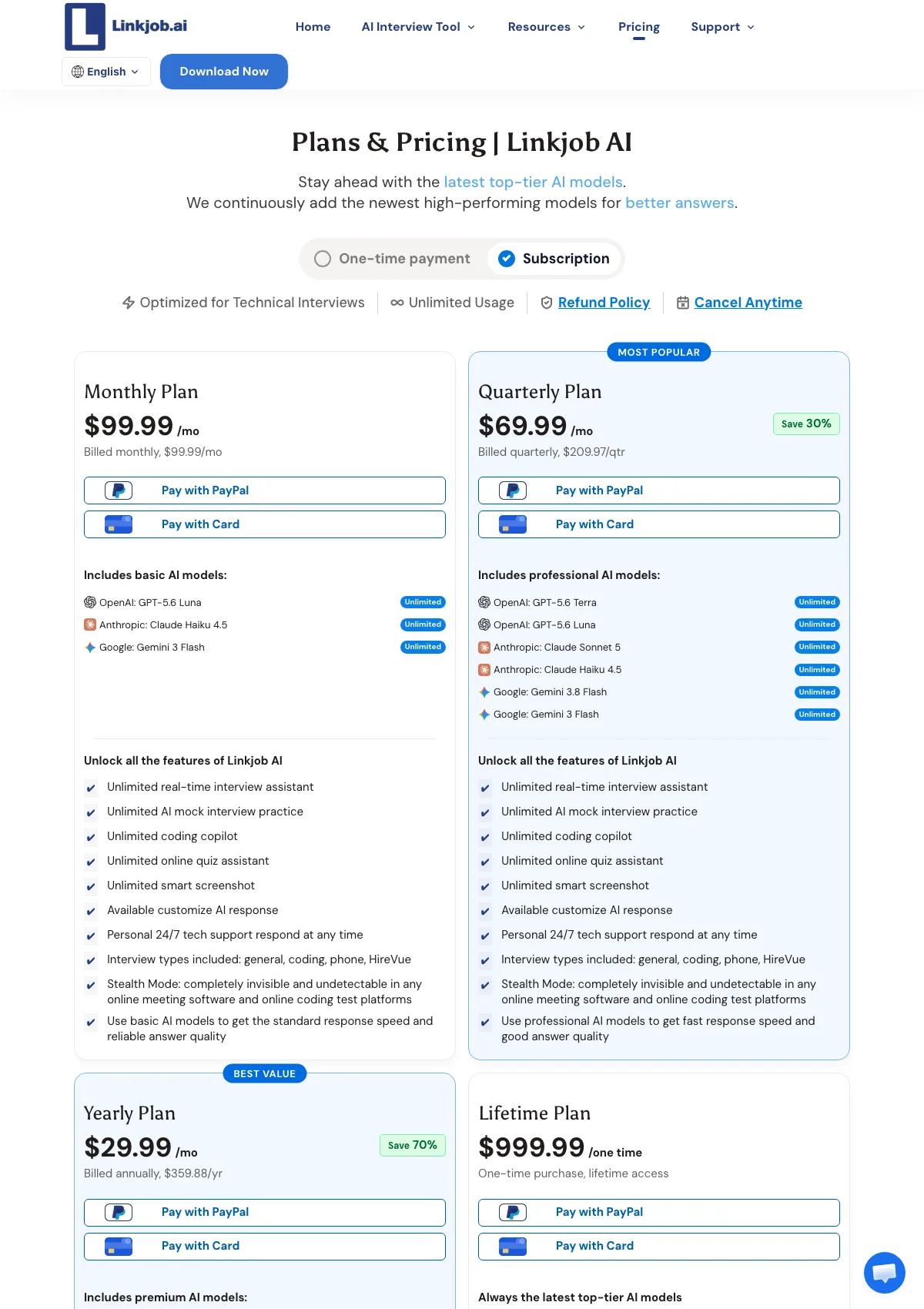
LinkJob AI pricing page, captured September 17, 2026. Plans and prices can change; check the vendor's page before buying.
Pros
- Best model transparency in the category, per tier, by name.
- A lifetime option at $999.99 for people who expect to be interviewing on and off for years.
- Money-back guarantee on first-time quarterly and yearly purchases.
- An active Discord and WhatsApp community, which is real support value that a help center does not replace.
- Their published articles are heavy on screenshots, so you can see the product before buying.
Cons
- The $99.99 monthly plan is the most expensive recurring monthly rate here outside Interview Coder and Parakeet AI, and it is non-refundable per their own terms.
- "Undetectable in any online meeting software" overstates what any capture-exclusion API guarantees.
We put the two products side by side in InterviewMan vs LinkJob AI.
5. Cluely: cheapest entry, most expensive stealth
Cluely is a general live-assistance product for meetings, calls, homework, and interviews, and it is the most honest vendor here about where invisibility sits in its lineup. Its pricing page puts screen-share invisibility on a separate tier and says so plainly.
Price
Free Starter. $19.99/month Pro, which does not include undetectability. $149.99/month Pro + Undetectability, which adds the feature described as "Completely hidden to meeting screen sharing software".
Annual billing changes the picture a lot. On a yearly term, Pro drops to $11.99/month and Pro + Undetectability drops to $44.99/month, which is what the page's own meta title means by "Pro from $11.99/mo". So the gap between "assistant" and "hidden assistant" is $130/month if you pay monthly and $33/month if you pay for the year. There is also a separate mobile tier at $8/week or $144/year, so Cluely is no longer desktop-only.
The refund policy is short and strict, and the exclusions matter more than the window. You have 24 hours to ask, you must supply video evidence that the product is not working, and the policy explicitly rules out refunds for "being detected by screen-sharing software". It also excludes Windows 10 machines. Read that twice if undetectability is the reason you are buying: the failure mode you are paying to avoid is the one failure mode the policy will not cover.
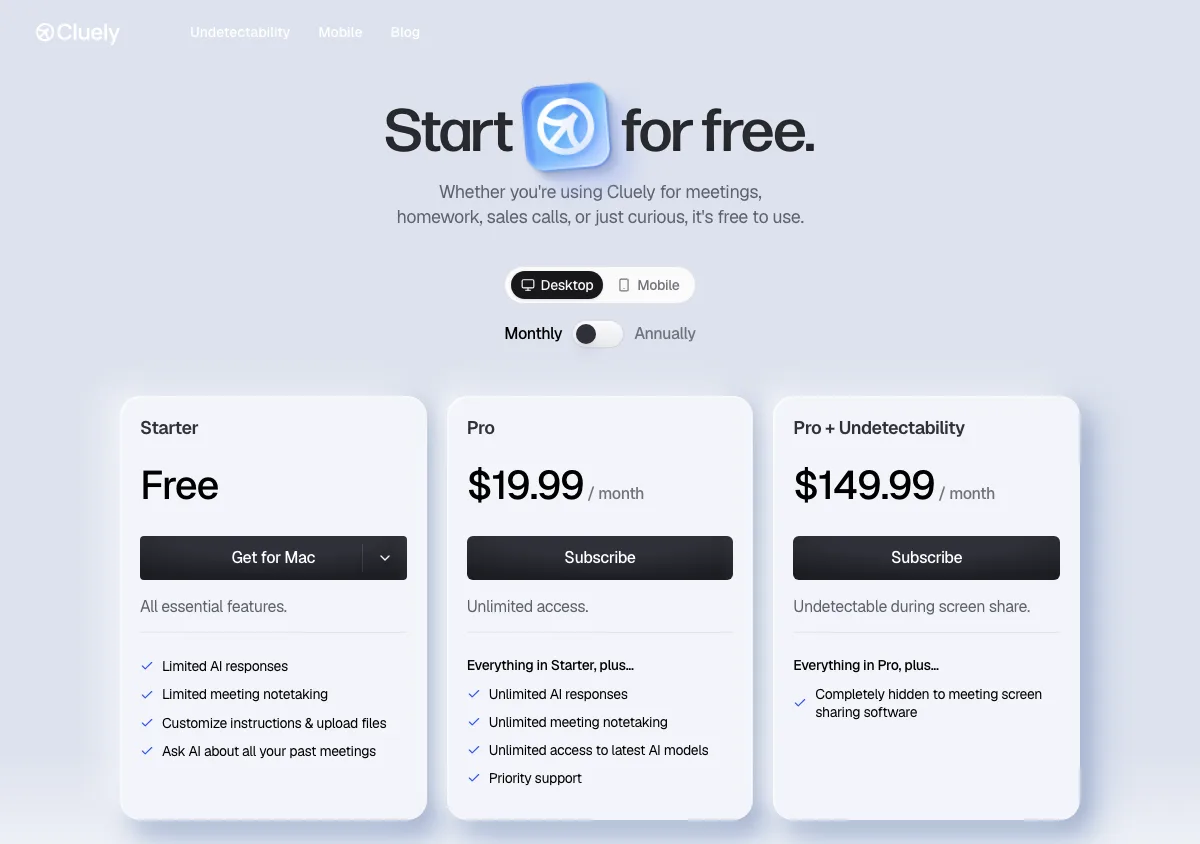
Cluely pricing page, captured September 17, 2026. Plans and prices can change; check the vendor's page before buying.
Pros
- Cheapest paid entry point on this list at $19.99/month month to month, and $11.99/month on annual billing, if you do not need screen-share invisibility. That annual rate is the lowest paid figure anywhere on this page.
- Best choice if interviews are only one of several things you want live help with: meeting notes, sales calls, and lectures are first-class use cases.
- Unusually transparent about the stealth boundary. Most vendors blur it; Cluely draws the line on the pricing table.
- A genuinely free Starter tier with no time limit on the account.
- Now covers mobile as well as desktop, on a separate $8/week or $144/year plan.
Cons
- $149.99/month for the feature that matters to interview candidates is more than twelve times InterviewMan's $12/month annual rate. Pay Cluely yearly and the stealth tier is $44.99/month, which is still about 3.7 times our annual rate, for a product that is not built around interviews.
- The Pro plan's name implies completeness it does not have. Many buyers pay $19.99 and discover the gap during a screen share.
- The refund policy excludes exactly the failure you are insuring against. A 24-hour window, mandatory video evidence, no cover for "being detected by screen-sharing software", and no cover on Windows 10.
- Not interview-specific: no coding-assessment workflow, no answer structures like STAR or CAR, no interview-type routing.
6. InterviewBee: pay for the interviews you actually have
InterviewBee has dropped subscriptions entirely. It now sells one-time packs of interviews, which is the right shape for someone with three interviews booked and no ongoing need. Its pricing page is the only one in this roundup with no recurring plan on it at all.
Its stealth feature is called Invisible Interview Mode, described as "Completely invisible during screen sharing, even the interviewer won't know", and there is a separate desktop AI assistant for coding rounds. That desktop app, the one with stealth, runs on Windows only for now; the Mac version is listed as coming soon.
Price
There are two things to buy.
- Free plan. 1 live assistant session and 1 mock interview, capped at 15 minutes.
- Interview Packs. One-time purchases starting at $29 USD. The page is explicit about what that means: "One-time payment. No subscription. No auto-renewal. Taxes included."
The old $39 Starter, $69 Pro and $129 Champion monthly tiers no longer exist. Plenty of comparison articles still quote them, so check the live page before you budget.
One transparency point worth flagging: only the $29 entry pack is priced in public. The larger packs are behind a signup at app.interviewbee.ai, so you have to create an account before you can see what the next step up costs. Every other vendor on this page puts its full ladder on a public page.
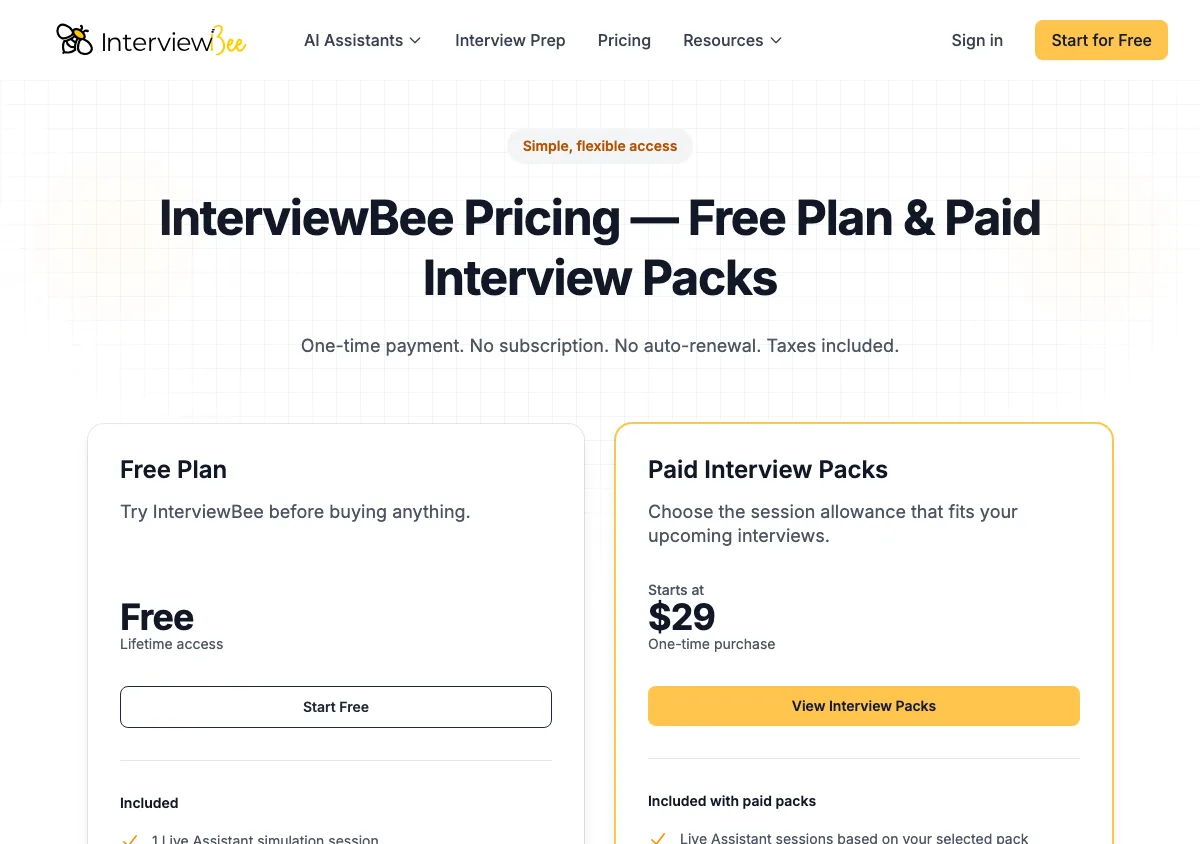
InterviewBee pricing page, captured September 17, 2026. Plans and prices can change; check the vendor's page before buying.
Pros
- The free plan includes a real live assistant session, not just a mock, so you can test it in an actual low-stakes call.
- No subscription and no auto-renewal, stated in those words on the pricing page. Nothing renews behind your back after you get the offer.
- A $29 entry price is the lowest one-time spend on this page, and cheaper than a single month of almost every subscription here.
- Mock interviews are bundled rather than sold separately, which pairs well with our AI mock interview practice approach.
Cons
- You cannot compare it properly without signing up. Only the $29 starting price is public; the bigger packs are behind an account, which makes a price comparison impossible from the outside.
- One-time packs stop being cheap once you interview regularly. If you are in a loop that runs for months, a $12/month annual subscription costs less than repeat pack purchases.
- The refund policy is narrow. Their terms say InterviewBee "generally does not provide refunds", with exceptions only where the product "materially failed to work during an active live interview or mock interview session due to an issue attributable to InterviewBee". Unused sessions are not refundable.
- No published detail on how the invisibility is implemented, so you cannot check the claim against the capture-exclusion APIs above.
- Mac users are left out of the hidden desktop app for now, since it ships on Windows only.
7. Parakeet AI: hours, not subscriptions
Parakeet AI is the only tool here with a serious pay-per-use option. Its pricing page sells credit packs measured in hours alongside conventional subscriptions, and it runs as a desktop app on Windows and macOS plus a Chrome and mobile-browser client.
It also publishes the most granular stealth list of any competitor: invisible on screen share, hidden from the Dock, undetectable in Activity Monitor, invisible during tab switching, and cursor undetectability. Cursor behavior is a detail almost nobody else names, and it matters: a mouse pointer that jumps to an invisible window is a visible tell.
Price
Subscriptions: $78.00/week, $149.90/month, $599.90/year, all with unlimited call time. The yearly figure is shown on the page as $49.99/month. There is also a cheaper "Prepare Only" plan at $45.90/month, or $15.33/month on annual billing, which covers preparation rather than live interview help.
Credit packs: $38.00 for a single credit, $59.00 for 3 credits, $118.00 for 6 credits plus 2 free, which is 8 credits in total, and $177.00 for 9 credits plus 6 free, which is 15 credits in total. Standard usage is billed at 0.5 credit per 30 minutes. The bonus credits are the whole point of the larger packs: the paid credits stay at a similar unit price and the free ones do the discounting.
You can try it before paying anything. Parakeet's free plan gives 10 sessions of up to 10 minutes each, with no card.
The refund terms are in the terms rather than on the pricing page, and they are tighter than the word "refund" suggests. There is a 7-day window, it covers unused purchases only, any unused credits are forfeited when the refund is processed, and you get one refund per person. Buyers in the EU waive the usual 14-day withdrawal right the moment a session starts.
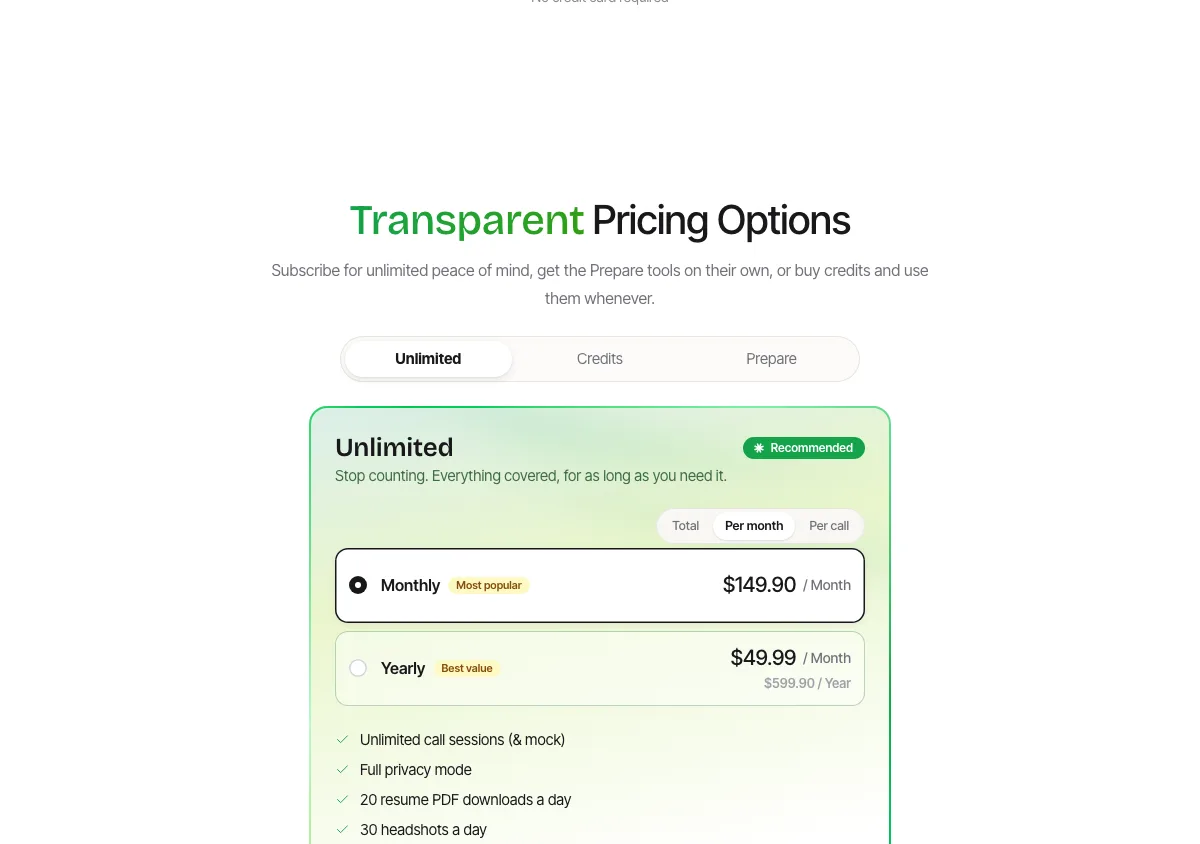
Parakeet AI pricing page, captured September 17, 2026. Plans and prices can change; check the vendor's page before buying.
Pros
- Credit packs mean a candidate with one interview pays $38 instead of a month of subscription.
- 10 free sessions of up to 10 minutes each, with no card, so you can check the stealth behavior on your own machine before spending.
- Names cursor undetectability and tab-switching invisibility explicitly, which shows the team has thought past the obvious case.
- Works as a desktop app and in the browser, including a mobile-browser client for a second-device setup.
- Unlimited call time on subscriptions, with no per-interview cap.
- A "Prepare Only" plan at $15.33/month annually gives you the prep side without paying live-assistant prices.
Cons
- $149.90/month is the second-highest recurring price here, and $599.90/year is over four times InterviewMan's $144/year.
- The refund window is 7 days and covers unused purchases only, one per person, with unused credits forfeited. If the tool fails in an interview, you have already used it, so the policy does not reach you.
- Credit math is easy to get wrong. The larger packs are advertised as bonuses rather than discounts: 6 credits plus 2 free for $118, and 9 credits plus 6 free for $177. Work out the cost per credit before you compare them with the single-credit price.
8. Interview Coder: the most detailed stealth spec, at the highest price
Interview Coder publishes the most specific public stealth documentation on this page. Its site lists: invisible on dock, invisible in Activity Monitor, "Completely click through" so there are no focus shifts, "100% Invisible to Screen-Recording", and a disguised process name. It lists Teams, Zoom, Meet, Chime, and Webex on the meeting side and HackerRank, CoderPad, and Codility on the assessment side.
Click-through is a real engineering detail: a window that does not take focus cannot trigger a focus-change event, and focus changes are exactly what HackerRank's Secure Mode flags.
Price
$299/month Monthly Pro, down from a listed $499. $799 one-time for Lifetime Pro, down from a listed $1598. A $0/forever free download with limited features. Paid plans include 1,000 credits a month.
The refund policy is the bluntest on this page and the easiest to miss, because the pricing page only links to it. In their words: "Interview Coder operates on a no-refund policy for all purchases", and "All sales are final." At $799 for the lifetime licence, that is the whole risk sitting on you.
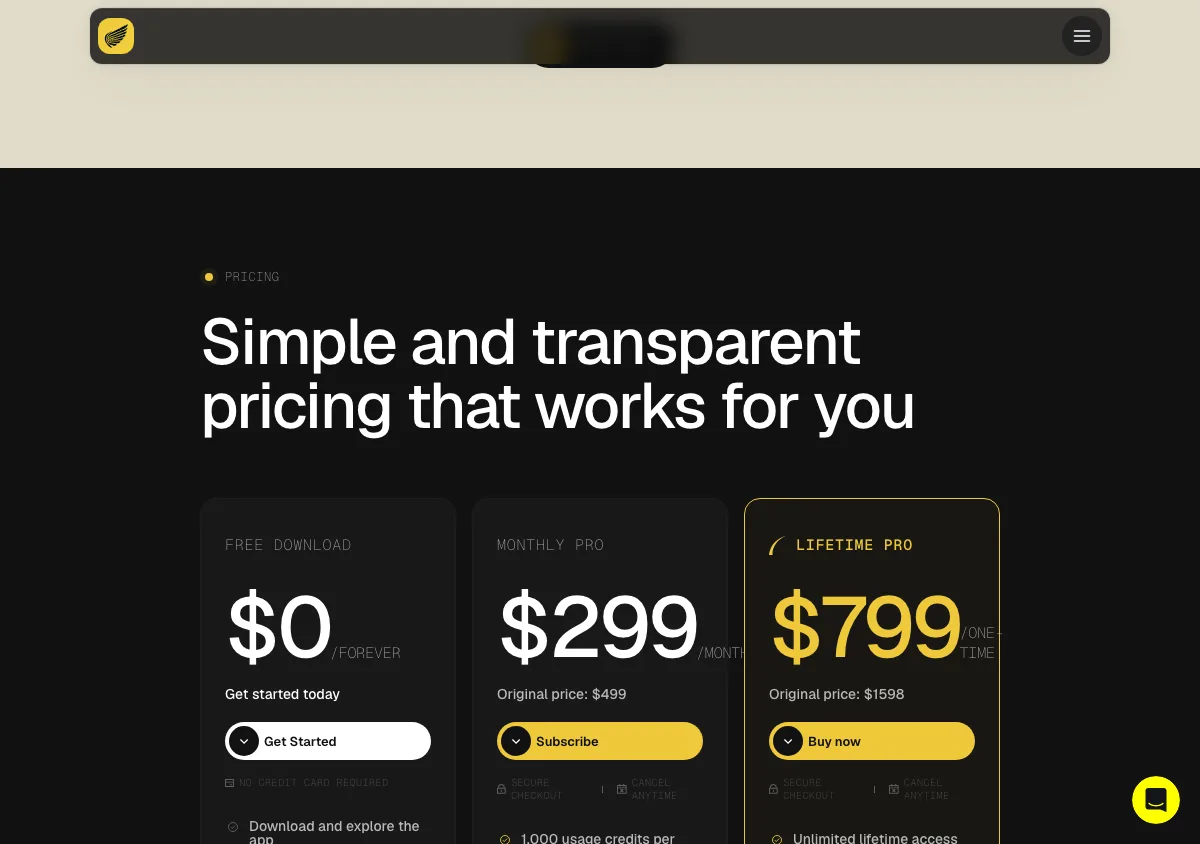
Interview Coder pricing page, captured September 17, 2026. Plans and prices can change; check the vendor's page before buying.
Pros
- Best public documentation of how the stealth actually works, in specifics rather than adjectives.
- Click-through behavior is a genuine advantage against focus-based proctoring signals.
- The $799 lifetime license ends the subscription question permanently if you interview repeatedly over years.
- Broad platform coverage on both meeting apps and coding-assessment sites.
Cons
- $299/month is by a wide margin the highest recurring price in the category, roughly 25 times InterviewMan's annual rate for a narrower product.
- Scope is coding rounds. A loop with behavioral and system design rounds needs a second tool.
- "Zero documented cases of users being detected" is a track-record claim, exactly like ours, and should be read as one.
- No refunds, at all. The policy page says Interview Coder "operates on a no-refund policy for all purchases" and that "All sales are final." Combined with the highest prices in the category, that makes it the riskiest purchase here if the tool does not suit you.
Also considered: Beyz AI and Stealth Interview
Two more tools nearly made the list.
Beyz AI now ships a real desktop app rather than the browser-first setup it was known for. Its site says "Desktop app. Invisible to screen sharing" and offers builds for Mac (Apple Silicon), Mac (Intel), and Windows, requiring macOS 14+ or Windows 11 22H2+. Pricing shows $49.99/month, $32.99/month billed quarterly, and $24.99/month billed semi-annually. The semi-annual rate is competitive, and the hard OS requirements are a fair trade for a cleaner capture-exclusion implementation. It missed the main list only because its stealth documentation is thinner than the eight above.
Stealth Interview is coding-focused and prices at $49/month Starter, $150 per 6 months Premium, and $250 per year Hunter, per its pricing page. Each tier names its included models: Starter gets GPT-5.6 Luna and Terra, while Premium and Hunter add GPT-5.6 Sol, Claude Sonnet 5, and Claude Opus 5. The $250/year rate is one of the cheaper annual figures in the category, and it is a reasonable pick for a purely technical loop.
Two things keep it off the main list. There is no free tier and no free trial, so the first thing you can do is pay. And its terms are absolute: "All sales, including renewals, are final and non-refundable upon completion of the purchase transaction", with subscriptions auto-renewing unless you cancel. Buying blind with no refund route is a harder sell than the price suggests.
What invisible AI cannot hide
This is the section most roundups skip, so we will be blunt about our own product too.
Network traffic. Every cloud AI assistant sends audio or screenshots to a server and receives text back. That traffic exists. On a managed corporate laptop with monitoring, or a network that logs outbound connections, it is visible. InterviewMan does not hide it and neither does anything else here. If the interview is on a company-issued machine, no overlay trick solves that.
Where your eyes go. HackerRank's Proctor Mode "analyzes the candidate's eye and head movements captured by the webcam", flags mobile phones and tablets in the webcam feed, and warns when the candidate is not visible or multiple faces are detected. A second phone propped next to your laptop is exactly what that is built to catch. This is the strongest argument for using an on-screen overlay rather than a second device whenever a webcam is on.
Multiple monitors. HackerRank's Secure Mode includes a "Multiple monitor check". A second display is a signal on its own, regardless of what is on it.
Behavioral patterns. CodeSignal's fraud detection analyzes "solution similarity, telemetry, and copy-paste activity" and looks for "patterns that may indicate AI-assisted behavior". Perfectly structured answers delivered at inhuman speed with no false starts are a pattern. Reading an answer word for word is the most common way people get caught, and it is not a software problem.
Screenshot analysis. Proctor Mode "captures periodic screenshots and analyzes them for unauthorized tools, tutorial websites, external AI assistants, browser extensions, collaboration tools, and screen recorders". Capture exclusion helps here, because an excluded window does not appear in the screenshot. An extension in the extension list does.
The physical world. Microsoft's own API documentation says capture exclusion is not a security feature and gives "no guarantee" of protection where "someone takes a photograph of the screen". Nothing here helps in an in-person interview.
For platform-by-platform detail, see our detection guides for CodeSignal, HackerRank, and CoderPad.
Which one should you pick
- A full loop with behavioral, coding, and system design rounds: InterviewMan, on the $12/month annual plan, for unlimited sessions and both stealth modes on one bill.
- Coding rounds only, and you interview every year: Interview Coder's $799 lifetime license, or Stealth Interview at $250/year if you want to spend less.
- Two interviews this month and nothing after: an InterviewBee Interview Pack from $29 with no subscription attached, or a Parakeet AI credit pack at $38 for one hour.
- You want the model named before you pay: LinkJob AI's yearly plan at $29.99/month.
- Interviews plus meetings, sales calls, and classes: Cluely Pro at $19.99/month, or $11.99/month on annual billing, accepting that screen-share invisibility is not included at that price and costs $44.99/month annually on top.
- You want to install and check the stealth before paying anything: Final Round AI's free tier, which includes the desktop app. Parakeet AI's 10 free 10-minute sessions and InterviewMan's free trial also need no card.
- Fast responses on technical questions matter most: LockedIn AI, budgeting for the Professional tier at $79.99/month quarterly if you want Stealth Mode, and for a 2-hour cap per interview.
- A student on a budget: InterviewMan's student discount, which takes the yearly plan to $129.60/year for students.
If you are still deciding what kind of tool you need at all, start with what an interview copilot does or our overview of AI interview helper options.
Frequently asked questions
What is the best invisible AI for interviews in 2026?
We rank InterviewMan first because it includes both an overlay excluded from screen capture and a two-device Stealth Mode on every paid plan, has no session cap, and costs $12/month on annual billing. We build it, so weigh that. Final Round AI is the strongest free option because its no-cost tier includes the desktop app, and LockedIn AI is the better pick if raw response speed on coding questions is your priority.
How does invisible AI stay hidden during a Zoom screen share?
The common method is an operating-system capture-exclusion flag. On macOS, an NSWindow's sharingType can be set so the window is excluded from screenshots and screen sharing. On Windows, SetWindowDisplayAffinity with WDA_EXCLUDEFROMCAPTURE means the window appears on the physical monitor and nowhere else. Zoom, Google Meet, and Microsoft Teams all capture through those system paths, so an excluded window does not enter the stream.
Is invisible AI in an interview actually undetectable?
No tool is undetectable in every sense, and any vendor saying otherwise is overselling. Capture exclusion hides a window from screen shares and recordings. It does not hide outbound network traffic, a second monitor, webcam-visible eye movement, or an answer that sounds recited. Microsoft's own documentation states that display affinity is not a security guarantee.
Which invisible AI tools work on Google Meet and Microsoft Teams?
All eight tools in this roundup list Zoom, Google Meet, and Microsoft Teams among supported platforms. InterviewMan also covers Amazon Chime, Webex, and Lark. Interview Coder lists Teams, Zoom, Meet, Chime, and Webex, plus HackerRank, CoderPad, and Codility on the assessment side. Support for a platform is a vendor claim; test it yourself before the real call.
What is the cheapest invisible AI for interviews?
Cluely Pro is the cheapest paid plan on this list, at $19.99 per month or $11.99 per month on annual billing, but its screen-share invisibility sits on the separate tier that costs $149.99 per month, or $44.99 per month billed annually. Among tools that include invisibility in the base price, InterviewMan at $12 per month on annual billing is the cheapest, and $10.80 per month for students on the student discount, followed by Beyz AI at $24.99 per month billed semi-annually and Stealth Interview at $250 per year.
If you only need one interview covered, an InterviewBee Interview Pack at $29 or a Parakeet AI credit at $38 costs less than any month of subscription.
Do interview AI tools have session time limits?
Some do. LockedIn AI caps a single interview at up to 2 hours, which is the clearest published cap in this roundup. Parakeet AI's credit packs are measured in hours, billed at 0.5 credit per 30 minutes. InterviewBee's free plan gives 1 live assistant session and 1 mock capped at 15 minutes, with longer use sold as one-time Interview Packs from $29. InterviewMan and Final Round AI both advertise no per-session cap on paid plans.
Can proctoring software see an invisible AI overlay?
It depends on the method. HackerRank's Proctor Mode captures periodic screenshots and analyzes them for unauthorized tools, browser extensions, and screen recorders. A window excluded from capture does not appear in those screenshots, but a browser extension does appear in an extension list. Tools that inspect running processes on the machine are defeated only by a genuine second-device setup where nothing runs on the interview computer.
Do these tools offer refunds if the AI fails during an interview?
Rarely, and the terms vary a lot. The short answer is that almost every policy here is written to exclude the situation you are worried about.
- LinkJob AI: monthly is non-refundable. A money-back guarantee applies to first-time quarterly and yearly purchases only, and not to renewals or upgrades.
- LockedIn AI: the pricing page shows a money-back badge, but the refund policy page says monthly and quarterly plans are non-refundable once started, and only annual buyers get a partial refund, within 7 days.
- InterviewBee: refunds only when its product materially failed during an active live session, and never for unused sessions.
- Cluely: a 24-hour window, video evidence required, and the policy explicitly excludes "being detected by screen-sharing software" and excludes Windows 10 machines.
- Final Round AI: a 72-hour money-back guarantee on first-time yearly purchases, with a usage test in the terms: fewer than 2 interview sessions each strictly over 30 minutes. Their FAQ and terms disagree about renewals.
- Parakeet AI: a 7-day window covering unused purchases only, one refund per person, with unused credits forfeited. EU buyers waive the 14-day withdrawal right once a session starts.
- Interview Coder: no refunds. The policy page says it "operates on a no-refund policy for all purchases" and that "All sales are final."
See also
Ready to Ace Your Next Interview?
Join 570,000+ professionals using InterviewMan to get real-time AI assistance during their interviews.
