

A stealth interview AI is an assistant that listens to your live interview and shows answers on your screen without appearing in the video feed the interviewer sees. That is the promise on every landing page in this category. The distance between that promise and what the software actually does at the operating system level is where candidates get caught.
Key takeaways:
- "Stealth" is not one feature. It is four separate mechanisms: screen-capture exclusion, window and app enumeration hiding, process name masking, and second-device mode. Most tools ship one or two of the four.
- Screen-capture exclusion is a documented operating system call on both platforms:
on macOS andNSWindow.sharingType = .nonewithSetWindowDisplayAffinityon Windows. Microsoft states in its own docs that this is not a security feature and offers no strict guarantee.WDA_EXCLUDEFROMCAPTURE- Browser extensions cannot use either call, because the extension draws inside the browser window that is being shared. A native desktop app can.
- "Stealth Interview" is also a competitor brand at stealthinterview.ai, priced at $49 per month. If you searched for that product specifically, jump to the section on it below.
- Prices for stealth range from $12 per month (InterviewMan on annual billing) to $299 per month (Interview Coder). Cluely charges $149.99 per month for the tier that includes undetectability, or $44.99 per month if you pay for a year up front.
- No tool hides network traffic, and no tool fixes a robotic delivery. Both of those are how people actually get flagged.
Disclosure before you read the ranking: InterviewMan is our product and it is one of the six tools below. We put every competitor's price, refund policy and stealth claim next to a link to the page it came from, so you can check our bias against the source rather than take our word for it.
Last tested: September 17, 2026. Prices checked on each vendor's pricing page on that date.
First, a naming problem: "Stealth Interview" is also a product
Searching for "stealth interview AI" returns two different things, and mixing them up wastes an afternoon.
The category. Any AI interview assistant built to stay out of a shared screen. That is what most of this guide covers.
Ready to ace your next interview?
InterviewMan gives you real-time AI answers during live interviews — undetectable on Zoom, Meet, and Teams.
Try InterviewMan FreeThe brand. Stealth Interview is a specific product at stealthinterview.ai. It is a coding-focused desktop assistant for macOS and Windows, and its pricing page lists a Starter plan at $49 per month, a Premium plan at $150 for six months, and a Hunter plan at $250 per year.
If you came here for the brand, we have a dedicated head-to-head at InterviewMan vs Stealth Interview and a roundup of Stealth Interview alternatives. Its own section is further down this page as well. If you came here for the category, keep reading in order.
What "stealth" actually means, in four mechanisms
Vendors use "invisible", "undetectable", "hidden", and "stealth" as if they were synonyms. They describe four different things, and a tool can ship one and skip the other three.
1. Screen-capture exclusion
This is an operating system feature, not a trick. On macOS, an app can set a window's
to NSWindow.sharingType
.noneOn Windows, the equivalent is
with the SetWindowDisplayAffinity
WDA_EXCLUDEFROMCAPTUREWDA_MONITORTwo caveats that vendors rarely print. Microsoft's own page states there is "no guarantee that using SetWindowDisplayAffinity ... will strictly protect windowed content", and gives a photograph of the screen as an obvious counterexample. It also only works while the Desktop Window Manager is composing the desktop. Treat capture exclusion as reliable against software capture, not as a security boundary.
The practical consequence is the one people miss: a Chrome extension cannot call either function. The extension paints inside the browser window, and the browser window is what gets shared. Any tool whose only delivery method is a browser extension has zero screen-capture exclusion by construction.
2. Window and app enumeration hiding
Separate from the video feed, your machine advertises what is running. The macOS Dock and app switcher, the Windows taskbar and Alt+Tab list, and the browser's own extension list are all enumerable. An interviewer who asks you to share your entire desktop rather than one window will see the Dock. An interviewer who asks you to Alt+Tab through your windows will see the switcher.
Hiding here means the app registers as an accessory or background process with no Dock icon, no taskbar entry, and no place in the switcher. It is cheap to implement and a lot of tools do it. It is also the layer that fails most visibly, because it fails in front of a human rather than inside a log file.
3. Process name masking
Some assessment platforms go past the browser. HackerRank's test integrity documentation describes three levels: Secure Mode, which forces full screen, blocks copy and paste, blocks multiple monitors, and alerts on tab switches; Proctor Mode, which adds screenshot analysis, plagiarism detection, and webcam anomaly detection; and a HackerRank Desktop App mode that adds, in their words, "operating system-level monitoring to create a fully locked-down environment".
That last mode is the one that reads your process list. So does any interviewer who says "open Activity Monitor for a second, I want to check your CPU". Process masking means the running process carries a name that does not announce what it is. It matters only in the small share of interviews that use a locked-down desktop client, but in those it is the difference between a pass and an instant end to the round.
4. Second-device mode
The only mechanism that does not depend on winning an arms race on the interview machine. The assistant runs on a phone, tablet, or second laptop, and nothing about it is present in the interview machine's screen, window list, or process list. There is nothing to exclude from capture because there is nothing on that screen.
InterviewMan calls this Stealth Mode, and the setup is documented step by step in our Stealth Mode help page: the desktop app pairs with your phone, you hide the desktop app, and the phone displays the answers. The trade-off is real and worth stating plainly. Your eyes move to a second surface, and interviewers on a webcam notice eye movement. Our undetectability notes cover the counter-move, which is placing the answer surface as close to your webcam line as possible and glancing rather than reading.
How proctoring and screen sharing actually see your machine
Most candidates over-estimate what the far side can see. Here is the honest map.
A plain video call. Zoom, Google Meet, Microsoft Teams, Webex, Amazon Chime. The platform asks the operating system for a video feed of a window or a display and ships it to the other participants. It does not inspect your processes. It does not read your installed apps. What it sends is exactly what the capture API returns, which is why capture exclusion works at all. The risk here is human: your Dock, a notification banner, your eyes, and your delivery.
Ready to ace your next interview?
InterviewMan gives you real-time AI answers during live interviews — undetectable on Zoom, Meet, and Teams.
Try InterviewMan FreeA browser-based assessment. HackerRank, CodeSignal, Codility, CoderPad taken in a normal tab. These run inside the browser and see browser-visible events. Codility's behavioral events detection documentation describes logging focus changes and similar candidate events. As of our last check that page returned a block to our fetcher, so treat the specifics as directional and read it yourself. The pattern across platforms is consistent: they record when you leave the tab, when you paste, how long the gap was, and how the code arrived. We break each platform down in Does HackerRank detect AI tools? and Does Codility track tab switching or detect AI?.
A locked-down desktop client. The minority case, and the only one that inspects your operating system. HackerRank's desktop app mode is the documented example. If you are told to install a proctoring client before the assessment, an overlay on that same machine is the wrong tool. Second-device mode is the only approach that still applies.
A recorded interview. HireVue-style one-way video and recorded live rounds get reviewed later, sometimes frame by frame. A half-second flash of an extension icon during a window switch survives on tape even though nobody reacted on the call. Our HireVue guide covers that format specifically.
The larger point: how companies detect AI cheating in interviews is mostly not a software problem. It is answer quality that does not match the resume, pauses at the wrong moments, and a delivery that sounds recited.
The 6 best stealth interview AI tools in 2026
We picked these six because each one makes an explicit stealth claim you can check, publishes a price, and is actually bought by candidates. Prices and refund terms are from each vendor's own pages on September 17, 2026.
1. InterviewMan: the most stealth layers included at the lowest price
Our own product, so weigh this accordingly. InterviewMan is a real-time interview assistant with two stealth models rather than one. Standard Mode is an overlay on the interview machine that is excluded from screen capture, hidden from the Dock, taskbar, and app switcher, and toggled by keyboard shortcut. Stealth Mode is the two-device setup described above.
It covers coding, behavioral, system design, and non-technical rounds, supports STAR, CAR, SOAR, PAR, and SOARA answer structures, and answers in 40+ languages. It runs on macOS, Windows, iOS, Android, and the web, though in Stealth Mode the desktop is always the host and the phone or web client is always the display.
Pros
- All four stealth mechanisms on every paid plan, and on the minute-limited free trial too. Nothing about stealth is gated behind a higher tier.
- Second-device Stealth Mode, which is the only approach that survives a locked-down proctoring client.
- Cheapest serious option in this list at $12 per month on annual billing, verified on our pricing page.
- Covers the whole loop, not just coding. A recruiter screen, a behavioral round, and a system design round all run on the same subscription.
- Five platforms, so a switch from a laptop round to a phone-friendly setup does not mean buying a second tool. See the download page.
- Explained rather than sloganned: our undetectability page groups the counter-measures into four families and says what each family does.
- Company-reported 4.9/5 from 4025 reviews, 570,000+ users, and zero confirmed detections. Those are our own numbers, not an independent audit, and the detection figure is a track record rather than a technical guarantee.
Cons
- Stealth Mode requires a second device you already own and a pairing step before the interview. If you have not practiced it, the first run will feel awkward.
- Looking at a phone next to your laptop is a behavior an attentive interviewer can read, which is the criticism LinkJob AI makes of us. It is a fair criticism of the mode, and the answer is placement and practice rather than a software fix.
- We do not publish which underlying models power each tier. Competitors do, and if model choice is your deciding factor, that is a genuine gap.
- We advertise "20+" counter-measures but the help page describes four groups of them rather than naming all twenty. Interview Coder publishes an itemized list and we do not, which makes their claims easier to audit than ours.
- No auto-fill, no code execution, no submission on your behalf. The tool shows you an answer, you deliver it.
- Network traffic is not hidden. On a corporate machine with network monitoring, the calls are visible.
Price
$30 per month month to month, or $12 per month billed annually at $144 per year. There is a free trial with limited minutes and no credit card required. Verified students get 25 percent off the yearly plan, which brings it to $108 per year, and 10 percent off monthly: the terms are on our student discount page. Verified on interviewman.com/pricing on September 17, 2026.
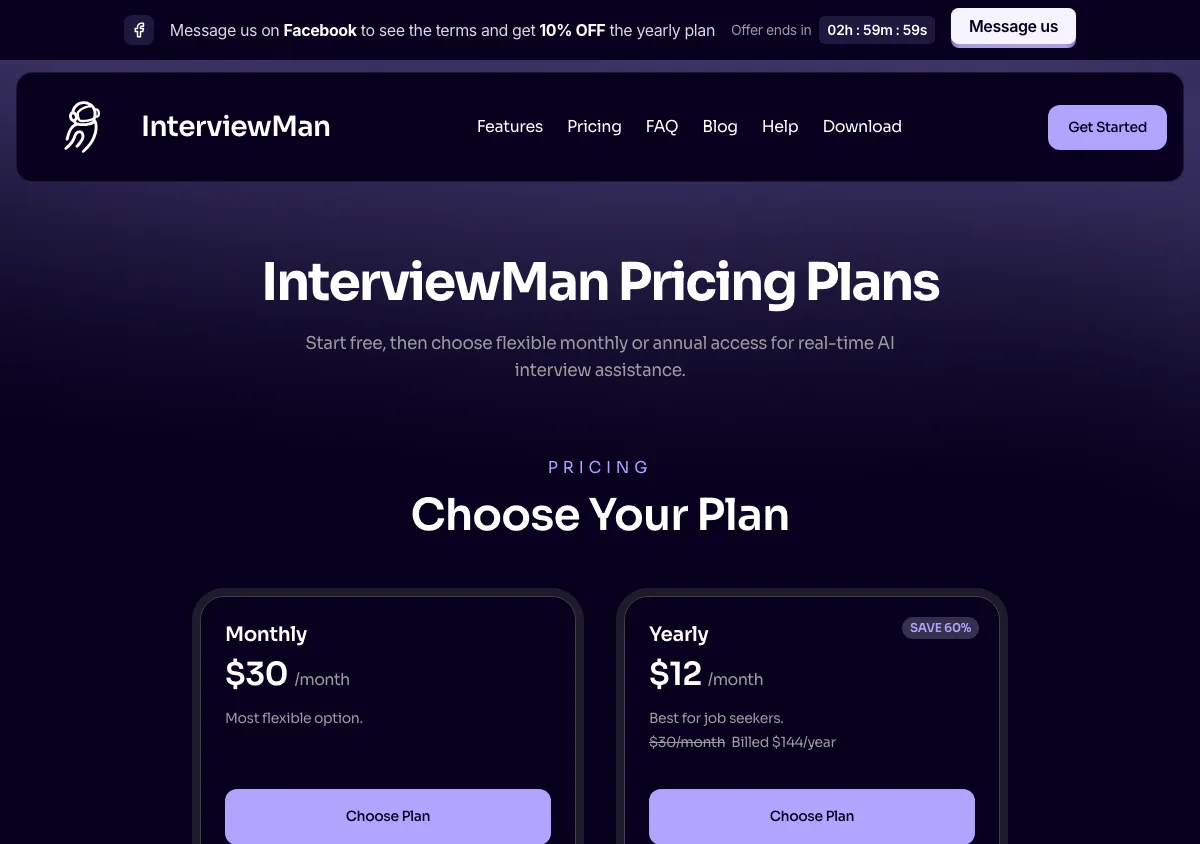
InterviewMan pricing page, captured September 17, 2026. Plans and prices can change; check the vendor's page before buying.
2. LinkJob AI: the most transparent about its models
LinkJob AI is the closest direct competitor to this category of article, and it does several things well that are worth copying. Its pricing page lists the exact AI models available on each tier rather than saying "the latest models", which is unusual and useful.
Pros
- Model transparency per tier. The yearly plan page lists a specific roster including GPT-5.6 Sol, Claude Opus 5, Gemini 3.1 Pro, and Grok 4.6, and the monthly plan is openly limited to a smaller set.
- A generous free trial: 30 minutes on download and 45 minutes for joining their Discord or WhatsApp community.
- An active community channel, which is a real support advantage over a ticket queue.
- A lifetime option at $999.99 for candidates who expect a long search and hate subscriptions.
Cons
- The entry price is steep. $99.99 per month is the monthly rate, and the $29.99 per month headline requires paying $359.88 up front for a year.
- The monthly plan is non-refundable by their own terms, and the money-back guarantee applies only to first-time quarterly and yearly purchases.
- Buying the cheapest model tier means buying the weakest models, which is the flip side of the transparency.
Price
Four ways to buy, and the gap between them is the whole story. Month to month is $99.99. Three months at a time comes to $69.99 per month, charged as $209.97. A year up front comes to $29.99 per month, charged as $359.88. Lifetime is $999.99 once, which is about seven years of our annual rate, so it only pays off if you expect to keep interviewing for years rather than months. Verified on linkjob.ai/pricing on September 17, 2026.
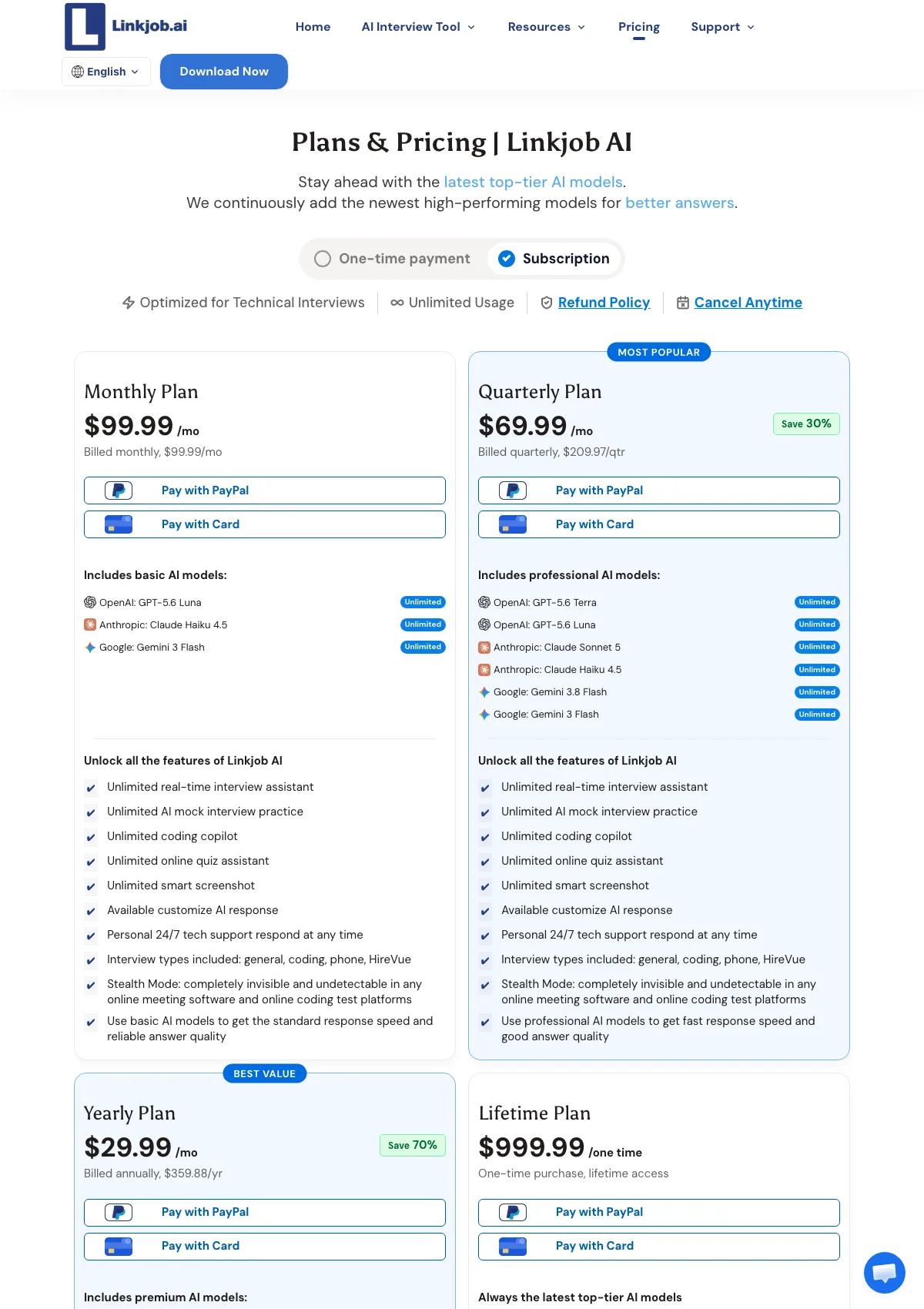
LinkJob AI pricing page, captured September 17, 2026. Plans and prices can change; check the vendor's page before buying.
3. LockedIn AI: the strongest coding and assessment orientation
LockedIn AI is built around technical interviews first. Its product line separates an interview copilot, a coding assistant, an online assessment helper, and mock interviews, which is a cleaner fit than a general assistant if your loop is mostly LeetCode-style rounds.
Pros
- Clear specialization in coding rounds and online assessments, with dedicated surfaces for each rather than one generic overlay.
- Access to multiple model providers, which helps when one model is stronger in a given language.
- A credits plan at $69.99 per month buys 400 Copilot minutes, or 800 minutes of mock practice, which fits someone with two interviews better than a full subscription.
- The session cap is now up to 2 hours per interview, which clears a long system design round with room to spare.
- Mock interview practice is bundled, so preparation and live help live in one place.
Cons
- Stealth Mode is not on the plan most people price out. The General (Unlimited) tier is $54.99 per month, or $39.99 per month if you pay for three months at a time. Stealth Mode and the LockedIn Duo feature sit on the Professional tier at $119.99 per month, or $79.99 per month billed quarterly. If you are buying for stealth, Professional is your real price and it is more than twice the number most roundups quote.
- The "money-back guarantee" badge on the pricing page is not the policy. Its refund policy page says monthly and quarterly plans are non-refundable once the plan has started, and only annual plans get a partial refund, within 7 days of purchase.
- Credits are metered rather than open-ended, so a long search on the credits plan is harder to budget than a flat subscription.
- Behavioral and non-technical rounds are a weaker fit than the coding surfaces.
- Its stealth marketing is broad rather than mechanism-by-mechanism, so you cannot tell from the site which of the four layers you are getting. Its headline "116ms response time" is a vendor claim with no published methodology behind it. Full comparison at InterviewMan vs LockedIn AI.
Price
General (Unlimited) is $54.99 per month month to month, or $39.99 per month billed every three months, which is $119.97 per charge. Professional, the tier that carries Stealth Mode and Duo, is $119.99 per month or $79.99 per month billed quarterly. Credits are $69.99 per month for 400 Copilot minutes, and Lifetime Pro is $999.50 once. Verified on lockedinai.com/pricing and the refund policy page on September 17, 2026.
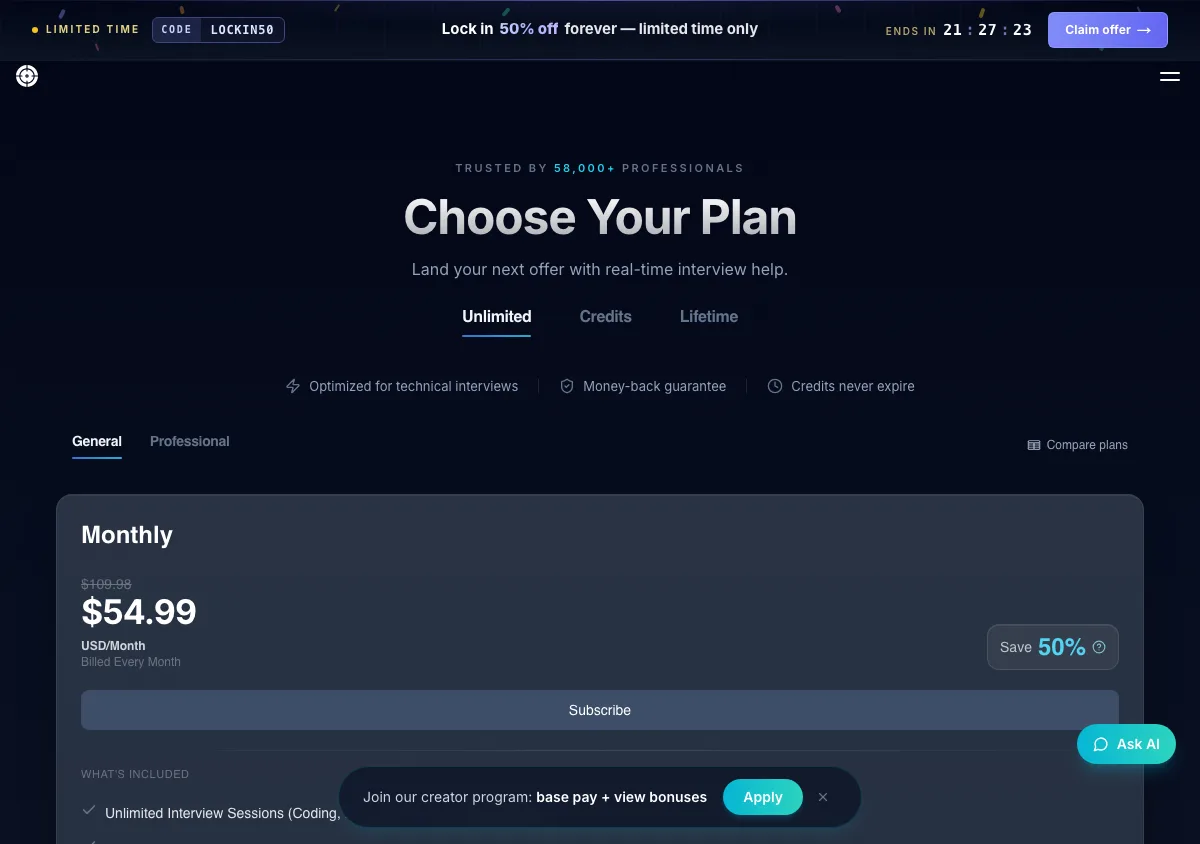
LockedIn AI pricing page, captured September 17, 2026. Plans and prices can change; check the vendor's page before buying.
4. Stealth Interview: the cheap coding-only desktop app
The brand from the top of this page. Stealth Interview is a native macOS and Windows app aimed squarely at live coding rounds, with real-time system audio and support for Google Meet, Zoom, Teams, Webex, CoderPad, HackerRank, CodeSignal, and LeetCode. Its headline claim is "Invisible to screen sharing".
Pros
- Native desktop app rather than a browser extension, which means capture exclusion is at least architecturally possible.
- The clearest price ladder in this list, and the Starter plan already includes unlimited usage rather than metering minutes.
- $250 per year on the Hunter plan is genuinely inexpensive for a full search.
- Named model access per tier on the higher plans, including Claude Sonnet 5 and Claude Opus 5.
Cons
- Coding-first. Behavioral, recruiter, and system design rounds are not what it is built for, so a full loop may need a second tool.
- No mobile or second-device option, so a locked-down proctoring client leaves you with no fallback.
- No free tier and no free trial, so the only way to find out whether it works on your machine is to buy a month.
- Nothing is refundable. Its terms say: "All sales, including renewals, are final and non-refundable upon completion of the purchase transaction." Subscriptions also auto-renew unless you cancel, so a forgotten Hunter plan bills again at $250.
- A small review base compared with the larger tools, which makes the track record hard to evaluate.
Price
$49 per month Starter, $150 for six months Premium, $250 per year Hunter. There is no free tier and no free trial at any level. Verified on stealthinterview.ai/pricing on September 17, 2026.
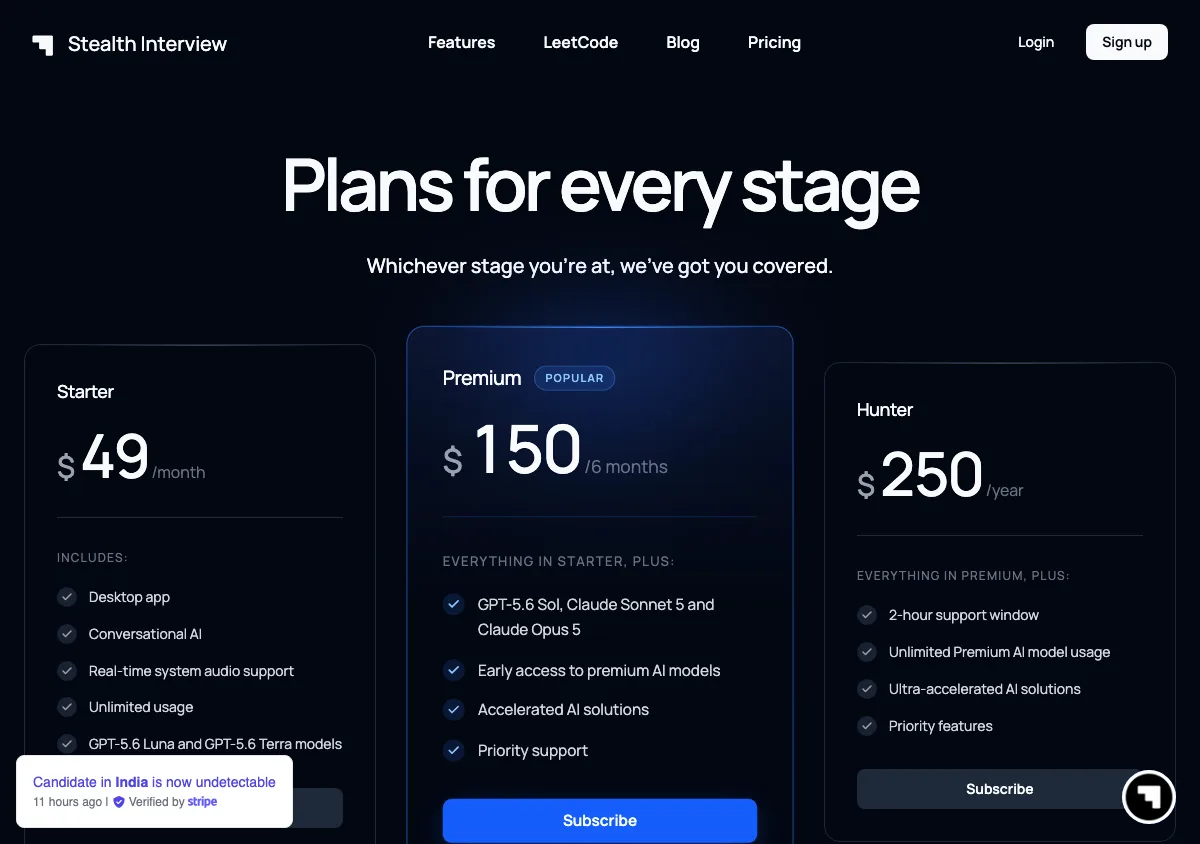
Stealth Interview pricing page, captured September 17, 2026. Plans and prices can change; check the vendor's page before buying.
5. Cluely: stealth exists, but it is the expensive tier
Cluely is the most visible brand in this space, largely because of its origin story. Its co-founder was suspended from Columbia over an earlier interview tool and the company raised $5.3 million in seed funding shortly after, per TechCrunch.
It is a general live-assistance product for meetings, calls, and homework rather than an interview specialist, and its pricing draws a hard commercial line through the stealth question.
Pros
- The broadest use case of anything here. If you want one assistant for interviews, sales calls, lectures, and meetings, Cluely is the only one on this list designed for that.
- Unusually honest pricing structure. It does not pretend the free or base tier is undetectable. The pricing page states plainly that only the top plan is "Completely hidden to meeting screen sharing software".
- Unlimited meeting notes and unlimited AI responses on Pro, which is more than most interview tools offer outside the interview itself.
- A free Starter tier that lets you evaluate the response quality before paying anything.
Cons
- The tier you actually need for interviews is $149.99 per month month to month, or $44.99 per month if you commit to a year. That annual figure is the fair comparison price, and it is still about 3.7 times our $12 per month.
- The $19.99 Pro plan, $11.99 per month on annual billing, includes no screen-share undetectability at all. Buying it for interviews is buying the wrong product.
- The refund window is 24 hours, it asks for video evidence that the product did not work, and it explicitly excludes "being detected by screen-sharing software" from what it will refund. Windows 10 machines are excluded too. The one failure a stealth buyer cares about is the one failure the refund policy names as not covered.
- General-purpose design means no interview-specific structure such as STAR or CAR answer framing.
- There is now a mobile tier at $8 per week or $144 per year, but it is a standalone phone app, not a paired second screen driven by a hidden desktop app. The locked-down proctoring case is still not covered. See InterviewMan vs Cluely for the full breakdown.
Price
Starter free. Pro is $19.99 per month, or $11.99 per month on annual billing. Pro + Undetectability is $149.99 per month, or $44.99 per month on annual billing. The mobile tier is sold separately at $8 per week or $144 per year. Verified on cluely.com/pricing on September 17, 2026.
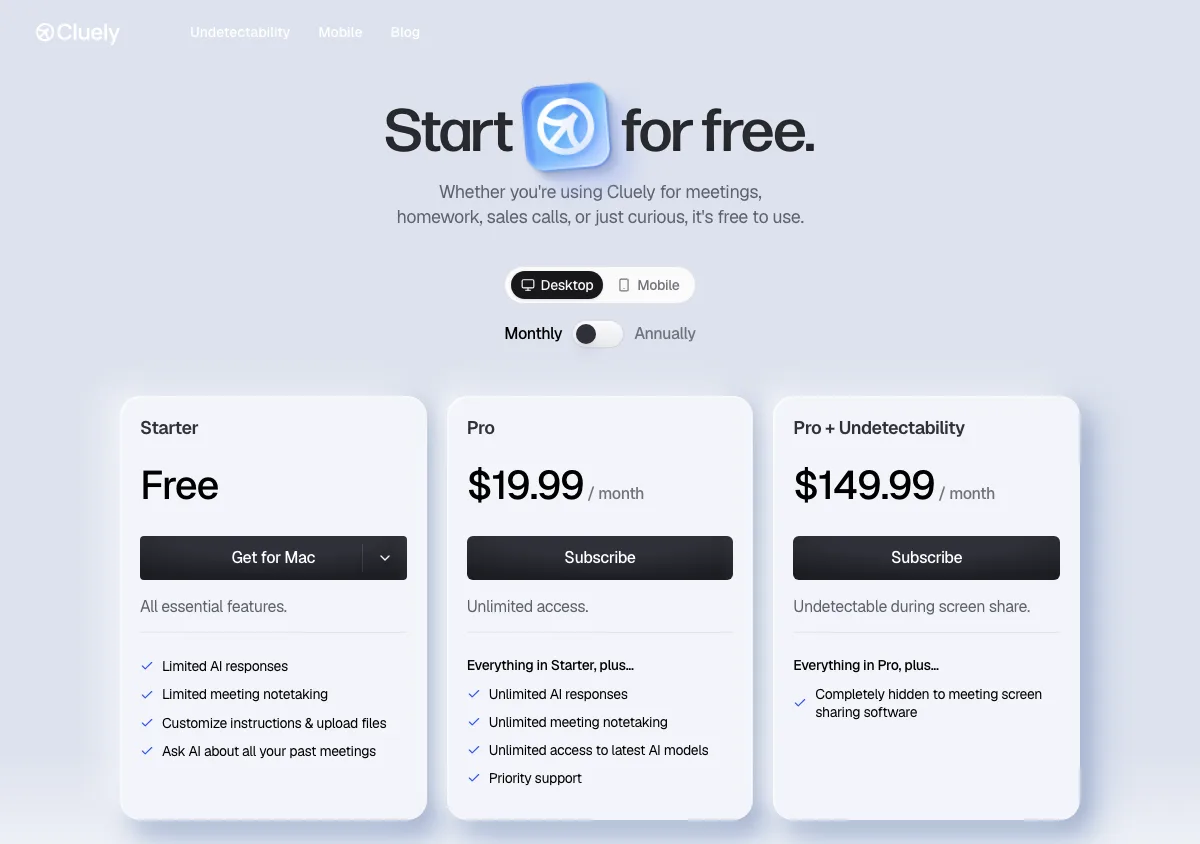
Cluely pricing page, captured September 17, 2026. Plans and prices can change; check the vendor's page before buying.
6. Interview Coder: the most detailed stealth feature list, at the highest price
Interview Coder publishes the longest public stealth checklist in this category. Its site advertises "20+ undetectability features" including invisibility on the Dock and in Activity Monitor, click-through behavior, invisibility to screen recording, and disguised process names, and it claims "Zero documented cases of users being detected or flagged when using this tool properly".
Pros
- The stealth claims are itemized rather than vague, which makes them testable. That is the right way to publish this information and we wish more vendors did it.
- Genuinely broad interview coverage for a tool with coding in its name: system design, behavioral, full-stack, machine learning, consulting, data analysis, trading, and product management are all listed.
- Desktop app for Windows and macOS with wide platform support, including Teams, Zoom, Meet, Chime, Webex, HackerRank, CoderPad, and Codility.
- A lifetime option removes the subscription question entirely for a long search.
Cons
- $299 per month is by a distance the most expensive monthly plan here, and the $799 lifetime price is roughly five and a half years of InterviewMan's annual rate.
- No mobile or second-device client, so the same locked-down proctoring gap applies.
- "When using this tool properly" is doing real work in that zero-detection claim, and the site does not define what improper use looks like.
- Nothing is refundable. Its refund policy states that "Interview Coder operates on a no-refund policy for all purchases" and that "All sales are final." At $299 a month, a plan you cannot return is a strong reason to test the free download hard first.
- The free download is limited enough that a realistic evaluation means paying. Comparison at InterviewMan vs Interview Coder.
Price
$299 per month for Pro, shown against a struck-through $499, or $799 one time for Lifetime Pro, shown against a struck-through $1598. The download itself is free and paid plans include 1,000 credits a month. Verified on interviewcoder.co and its refund policy page on September 17, 2026.
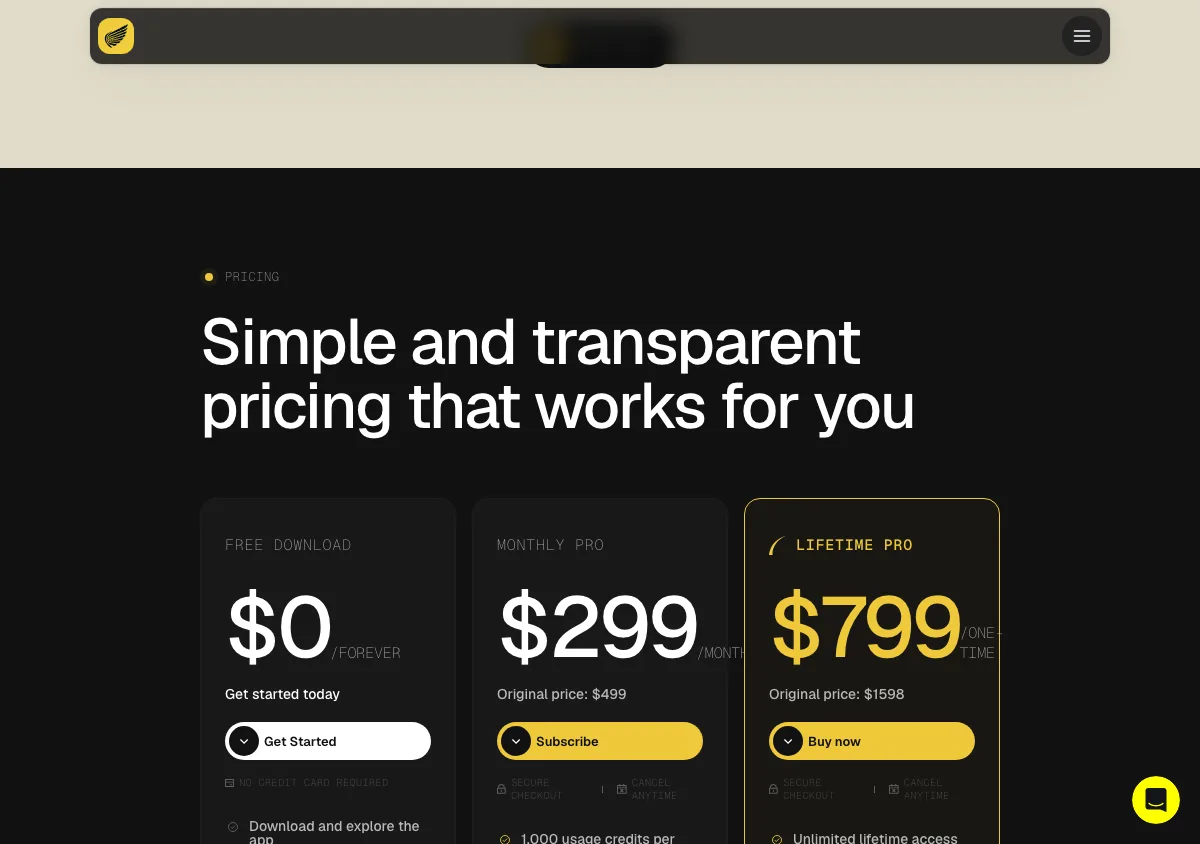
Interview Coder pricing page, captured September 17, 2026. Plans and prices can change; check the vendor's page before buying.
Stealth interview AI comparison table
This table answers one question only, because it is the question this article is about: what mechanism does each tool use to stay out of the picture, and what does the interviewer see if they ask you to share your whole desktop? Prices, refunds, and session caps are in the sections above.
| Tool | How it hides | What a full-screen share shows |
|---|---|---|
| InterviewMan | Capture exclusion, no Dock, taskbar or switcher entry, masked process name, plus a two-device Stealth Mode | Nothing in Standard Mode if exclusion holds on your build. Nothing at all in Stealth Mode, because the answers are on the other device |
| LinkJob AI | Desktop overlay, claims local processing, no published mechanism list | Not documented mechanism by mechanism, so record a test share before you rely on it |
| LockedIn AI | Overlay marketed as private live assistance. Stealth Mode is a Professional-tier feature, not a General-plan one | Depends what you bought. On the General plan you are sharing a desktop with an overlay that was never sold to you as hidden |
| Stealth Interview | Native macOS and Windows app whose headline claim is "Invisible to screen sharing" | Nothing, per the vendor. There is no second-device fallback if the claim fails on your build |
| Cluely | Capture hiding on the top tier only | The $19.99 Pro overlay is visible. Only Pro + Undetectability claims to be hidden, and its refund policy excludes exactly this failure |
| Interview Coder | Itemized list including Dock and Activity Monitor invisibility, click-through, and a disguised process name | Nothing, per its own checklist. The checklist is a vendor claim, not an independent audit |
Two things this table cannot tell you. First, every entry in the right-hand column is a claim by the company that wants your money, including ours, so the 20-minute test later in this article matters more than any row here. Second, a full-desktop share is only one of the ways you get seen: notification banners, a second monitor, and your eyes are all outside the scope of every mechanism listed.
The honest limits: what no stealth interview AI can do
Every product in this category shares the same five blind spots. Anyone telling you otherwise is selling.
Network traffic is visible. Every one of these tools calls an API. On a machine with network monitoring, on a company VPN, or on hardware issued by the employer, those calls show up regardless of what the window is doing. The only reliable answer is to not use one of these on hardware you do not own.
Nothing survives a camera pointed at your screen. Microsoft says as much in the
SetWindowDisplayAffinityDelivery gives you away, not software. An answer that arrives after four seconds of silence, in a register that does not match how you spoke a minute earlier, reads as recited. This is the most common failure mode by a wide margin, and no amount of stealth fixes it. Glance, then say it in your own words.
Answers can be wrong or inflated. A copilot that has your resume can still overstate it. If the tool says you led a team of twelve and your resume says four, and the interviewer has that resume open, that is a worse outcome than a slow answer.
Locked-down clients change the game. When a proctoring desktop client with operating system-level monitoring is installed, overlays on that machine are the wrong tool no matter how good their capture exclusion is. Second-device mode or nothing.
What happens to your money when stealth fails
This is the part of the category nobody writes about, and it is worth two minutes before you pay. If the overlay shows up in a share, most of these vendors owe you nothing.
- Cluely has a 24-hour window, wants video evidence that the product did not work, and its refund policy specifically excludes being detected by screen-sharing software. The failure you are insuring against is the named exclusion.
- Interview Coder does not refund at all: "All sales are final."
- Stealth Interview does not refund at all either, renewals included.
- LockedIn AI shows a money-back guarantee badge, but its refund policy page makes monthly and quarterly plans non-refundable once started, with a partial refund on annual plans inside 7 days.
- LinkJob AI refunds first-time quarterly and yearly purchases only. Monthly plans, renewals, and upgrades are not refundable.
- InterviewMan publishes a refund process on our cancellation policy page, and the free trial exists so you can test the overlay before any money moves.
The practical reading: treat the first month as a test you cannot return, and run that test yourself on the machine you will interview on, not on the vendor's demo video.
There is also a decision that sits before all of this. Company policies vary, some explicitly ban live AI assistance, and some now explicitly permit it. We wrote up the current state in which companies allow or ban AI in interviews and a more direct argument in should you use AI in a job interview?. Read the invitation email before you decide.
How to test any stealth interview AI in 20 minutes
Do not take a marketing page's word for any of the four mechanisms. Test them yourself, on the machine you will actually use, before the round that matters.
- Record a screen share of yourself. Start a Zoom or Meet call with a second account, share your full desktop, record it, and play the file back. If the overlay appears in the recording, capture exclusion is not working on your build.
- Test both share modes. Share a single window, then share the entire display. Some tools pass the first test and fail the second because the Dock or taskbar is visible.
- Alt+Tab and check the Dock. Cycle through your windows on camera the way an interviewer might ask you to. An entry that should not be there is enumeration hiding failing.
- Open Activity Monitor or Task Manager. Scan the process list for anything that names the tool. This is the process masking check.
- Run a full-length session. If a tool caps sessions, find the cap deliberately in practice rather than accidentally in a system design round.
- Rehearse the glance. Have a friend watch you on webcam while you use the tool and ask them, afterwards, whether your eyes moved. That is the test that catches what software cannot.
Anything that fails one of these is exposed on that specific mechanism, whatever the landing page says. The mechanisms are independent, and one failure is enough.
Which one we would pick, and when we would not pick ours
If your loop is coding-only and you want the cheapest native desktop app, Stealth Interview at $250 per year is hard to argue with, as long as you accept that there is no trial and no refund, and Interview Coder's itemized feature list is the most auditable in the category if the price does not bother you.
If you want to choose the exact model behind your answers, LinkJob AI is the only tool here that lets you, and that is a real reason to pick it over us.
If interviews are one of several things you want live help with, Cluely Pro at $19.99 per month, or $11.99 on annual billing, is a reasonable general assistant, as long as you understand it includes no screen-share undetectability at that price and the tier that does costs $44.99 per month even on a year's commitment.
We would pick InterviewMan when the search involves more than coding rounds, when a proctoring client might appear, and when the budget matters, because $12 per month on annual billing includes all four stealth mechanisms with no upcharge. That is our bias, stated plainly, with the prices above so you can check it.
Frequently asked questions
What is a stealth interview AI?
It is an AI assistant that listens to a live interview and shows you answers on your own screen while staying out of the video feed the interviewer sees. Stealth is not a single feature: it combines screen-capture exclusion, hiding from window and app lists, process name masking, and in some tools a second-device mode where nothing runs visibly on the interview machine.
Is stealth interview AI actually undetectable?
No tool should be described as 100 percent undetectable. Screen-capture exclusion is a documented operating system feature, and Microsoft's own documentation says it offers no strict guarantee. Network traffic stays visible, a camera pointed at your monitor sees everything, and a robotic delivery gives you away regardless of software. Treat "zero confirmed detections" claims, including ours, as a track record rather than a guarantee.
Can Zoom, Google Meet, or Microsoft Teams see a stealth AI overlay?
Not if the overlay uses capture exclusion correctly, because those platforms send whatever the operating system's capture API returns and the excluded window is not in it. They do not scan your running processes. The real risks on a plain video call are your Dock or taskbar during a full-desktop share, notification banners, and where your eyes go.
Do browser extensions work as stealth interview AI?
Not for screen sharing. A Chrome extension draws inside the browser window, and the browser window is exactly what gets captured and sent. Neither the macOS nor the Windows capture-exclusion API is available to extension code. If screen-share invisibility is your requirement, you need a native desktop app or a second device.
What is the difference between "stealth interview AI" and the product Stealth Interview?
"Stealth interview AI" is the category of assistants built to stay off a shared screen. Stealth Interview is a specific product at stealthinterview.ai: a coding-focused macOS and Windows app priced at $49 per month, $150 for six months, or $250 per year, with no free tier, no free trial, and terms stating that all sales including renewals are final. Both meanings are common in search, which is why this guide covers each separately.
Does HackerRank or Codility detect stealth AI tools?
In a normal browser tab they see browser-level events: tab switches, paste events, timing, and code similarity. They do not read your process list from a tab. HackerRank's documentation does describe a desktop app mode that adds operating system-level monitoring, and that mode is the exception where an overlay on the same machine is the wrong approach and a second device is the only option.
How much should a stealth AI interview assistant cost?
The spread in September 2026 runs from $12 per month on InterviewMan's annual plan, or $108 per year for verified students, to $299 per month for Interview Coder. Cluely's undetectability tier is $149.99 per month, or $44.99 per month on annual billing, and LinkJob AI's monthly plan is $99.99. Check two things about any quote: whether stealth is included in that plan or sold on a higher one, as it is at both Cluely and LockedIn AI, and whether the billing period behind the headline number is a month, a quarter, or a year.
Will using a stealth interview AI get my offer rescinded?
It can, if the company's policy forbids it and you are caught. Policies now vary widely: some employers explicitly ban live AI assistance, and a growing number explicitly permit or even require AI-enabled rounds. Read the interview invitation and any assessment terms before you decide, and remember that the most common way people are flagged is delivery, not software.
See also
Ready to Ace Your Next Interview?
Join 570,000+ professionals using InterviewMan to get real-time AI assistance during their interviews.
