

We build InterviewMan, so read this InterviewMan review with that in mind. A company reviewing its own product is not neutral, and pretending otherwise would waste your time. Most InterviewMan reviews you will find online are written by competitors who sell a rival tool, which is a different bias rather than no bias, so here is ours stated up front.
What we can do instead is give you the things a sales page usually hides: every price, the exact refund wording, the features that do not work, and the bug we have not fixed yet. Every claim below either links to its source or is marked as a company-reported number.
Last tested: October 11, 2026. Prices checked on each vendor's pricing page on that date.
Key takeaways:
- InterviewMan costs $30/mo monthly or $12/mo on the annual plan ($144/year), with a free trial that gives you limited minutes and needs no credit card. Students get 10% off the annual plan. See the pricing page.
- There is no published no-questions-asked refund window. Our cancellation policy says partial refunds for unused months are "generally not provided," with exceptions handled case by case. That is a real weakness compared with vendors who publish a fixed refund window.
- The desktop overlay is excluded from screen-capture APIs, but there is a documented exception: on macOS with newer Zoom builds the window can appear in a share. Our own troubleshooting page says so, and names the workaround: Zoom 5.17.5 or older.
- It listens through your device microphone, not system audio. That means no headphones, and it is the single most common setup mistake.
- Our 4.9/5 from 4025 ratings is collected inside our own apps, so treat it as company-reported. The ratings you can check yourself are in the stores: 4.9 from 298 reviews on Google Play with more than 10,000 downloads, and 4.9 from 127 ratings on the App Store, both read on September 18, 2026.
- Skip it if you need scored practice drills, system-audio capture, code execution, or a tool for in-person interviews.
The verdict, in one box
What it is: a real-time AI interview assistant that listens to a live interview, detects questions, and streams answers onto a hidden overlay or a second device.
Price: $30/mo, or $12/mo billed annually at $144/year. Free trial with limited minutes, no card required.
Ready to ace your next interview?
InterviewMan gives you real-time AI answers during live interviews — undetectable on Zoom, Meet, and Teams.
Try InterviewMan FreeBest for: remote interviews on Zoom, Google Meet, Microsoft Teams, Webex, Amazon Chime and Lark, plus browser-based assessments on HackerRank, CodeSignal, Codility and CoderPad taken on your own machine. Behavioral, system design and non-technical rounds are covered as well as coding.
Worst for: in-person interviews, proctored exams where you do not control the machine, anyone who wants graded practice, and anyone who wants a published refund guarantee before paying.
Score we would give it honestly: strong on price and breadth, average on polish, weak on published refund terms and on model transparency. If you want the competitive picture instead of our self-assessment, read our InterviewMan vs LinkJob AI comparison and the LinkJob AI review we wrote about them.
What InterviewMan actually is
It is a desktop and mobile app that sits alongside a live interview. The microphone picks up the conversation, a streaming speech-to-text engine transcribes it, the AI decides which parts are questions, and answers appear on screen while they are being written rather than after the whole thing is finished. That last detail matters more than it sounds: a tool that waits to finish generating leaves you staring at nothing for several seconds while a hiring manager watches you.
Question detection runs automatically and has three sensitivity levels, so you can make it more or less eager to treat a sentence as a question. Two other inputs exist for the cases audio cannot handle: a screenshot capture that sends a code block or a system-design diagram to a vision model, and a plain text box where you type the question yourself.
You trigger those two manually. If a reviewer tells you the whole product requires clicking a button after every question, they were most likely using the screenshot path, not live audio.
In category terms it is an AI interview assistant that behaves like an interview copilot: it runs during the call rather than before it. Most InterviewMan reviews that call it a prep tool are describing the wrong product.
Answer shape is configurable. You can pick a structure (STAR, CAR, SOAR, PAR, SOARA), a style (bullets, conversational, or example-driven), a length band (roughly 30 to 50 words, 75 to 125, or 150 plus), and separate languages for the interview and for the answer, with an option to keep technical terms in English. If you want the longer explanation of how this category works in general, we wrote a guide to AI interview assistants that covers competitors too.
Pricing, and what the refund policy really says
Three tiers, all listed publicly on the pricing page:
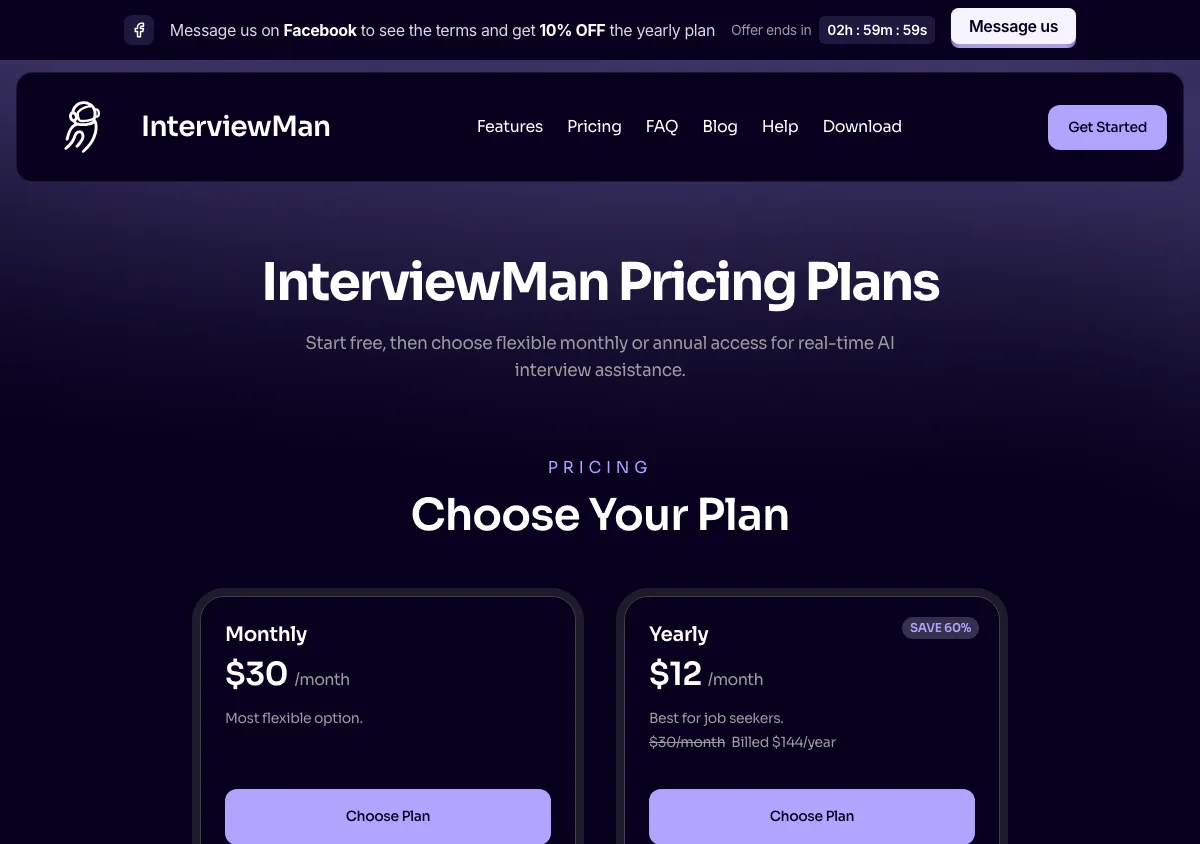
InterviewMan pricing page, captured September 17, 2026. Plans and prices can change; check the vendor's page before buying.
- Free trial. Limited minutes, no credit card. The exact minute allowance is shown in the app.
- Pro Monthly. $30 per month, unlimited minutes and unlimited session length.
- Pro Annual. $12 per month, billed once at $144 per year. Same features as monthly.
If you are a student, the annual plan gets cheaper: 10% off, which comes to $129.60 per year. The conditions are on the student discount page.
Payment goes through Stripe on web and desktop, and through in-app purchases on iOS and Android. If you bought through the App Store or Google Play, you must cancel there, not with us, because the store owns the subscription.
Now the part most vendor reviews skip. Our cancellation policy states that "partial refunds for unused months are generally not provided, but exceptions may be made in certain circumstances." Cancelling stops the next charge and leaves your access alive until the end of the period you already paid for, then the account drops back to free, limited access. There is no published 7-day or 14-day money-back window. If you want one in writing before you pay, we do not currently offer it, and you should weigh that.
For contrast, LinkJob AI's pricing page states a "money back guarantee on first-time purchases" on the quarterly and yearly plans while saying "monthly plans are non-refundable." That is a clearer promise than ours on two of their four tiers and a harder one on the third. Credit where it is due.
How the two modes work
Standard Mode runs on the same machine as the interview. The window is excluded from screen capture and recording APIs, it does not appear in the dock or taskbar or the app switcher, and you drive it with keyboard shortcuts so your mouse never leaves the interview window. The core ones are documented on our keyboard shortcuts page: hide and show with Cmd+B, screenshot with Cmd+H, start and stop listening with Cmd+L, generate with Cmd+Enter, reset the context with Cmd+G, and toggle mouse pass-through with Cmd+I so clicks go through the overlay instead of landing on it.
Stealth Mode is a two-device setup, and it exists because process-scanning proctors do not care what your screen looks like. The desktop app runs hidden on the interview machine and acts as the server. Your phone, tablet, or a second browser shows the answers. You have to pair the two devices before the interview: the stealth mode guide walks through pairing, hiding the desktop app, and using the phone's screenshot button to grab the laptop screen mid-round. Mobile and web cannot host a session on their own, only display one.
Ready to ace your next interview?
InterviewMan gives you real-time AI answers during live interviews — undetectable on Zoom, Meet, and Teams.
Try InterviewMan FreeLinkJob AI's review of us argues that reading from a second device makes you look like you are reading from a cheat sheet. That is a fair ergonomic point and it is why Standard Mode exists: you keep your eyes on one screen and move the overlay over your code area with Cmd plus the arrow keys. Neither mode is free of trade-offs.
Standard Mode keeps your eyes still but lives on the shared machine. Stealth Mode leaves the shared machine clean but moves your eyes. Pick the one that matches what the interviewer can actually see.
The stealth features, in plain words
Our undetectability page organises this as counter-measures against four things platforms look for:
- Screen sharing and screenshots. The desktop overlay is excluded from the capture APIs that Zoom, Google Meet, HackerRank and CoderPad use, so it is on your physical display but not in the stream.
- Asking you to explain the code. Answers ship with every line commented plus a few sentences of reasoning, so you have something to say out loud instead of reading a naked solution.
- Webcam and eye-tracking. You move the overlay directly over your coding area with Cmd and the arrow keys, so your gaze does not drift to a second screen.
- Active tab and cursor monitoring. Toggling visibility with Cmd+B keeps your cursor focus and active tab unchanged, and Cmd+I passes clicks straight through the overlay.
Two honest notes on the marketing around this. First, our own pricing page uses the phrase "100% undetectable stealth mode." That wording is stronger than anything we can prove, and you should read it as marketing rather than as an engineering guarantee. Second, "zero confirmed detections across 570,000+ users" is a track record, not a technical guarantee. It means nobody has sent us a verified case.
It does not mean nobody ever will, and it is not the kind of claim you should bet a final-round interview on without testing the setup first.
There is also a live bug we have not fixed. On macOS with recent Zoom versions, the hidden window can become visible during a share. It is written up on our shows-when-sharing page, which names the workaround: run Zoom 5.17.5 or older. Windows is not affected. If you are on a Mac and your interview is on Zoom, test it with a friend before you rely on it. Our basic checks page has the five-minute dry run.
What InterviewMan cannot do
Bluntly, and this list is on our own llms-full.txt so we cannot quietly walk it back:
- It does not hide network traffic. The app talks to an API. Anything monitoring the network sees requests going out. Stealth here means process-level and screen-level, nothing more.
- It does not type or submit anything for you. No auto-fill, no automation. You read, you think, you type.
- It does not compile or execute code. It writes a solution and comments it. Running it is your job.
- It does not integrate with proctoring platform APIs, and it cannot help inside a locked-down proctored exam on a machine you do not control.
- It does not grade or score your answers. There is a mock practice mode at AI mock interview, but no scored question bank and no rubric feedback. LinkJob AI's criticism that we lack self-paced drills is partly right: practice exists, scoring does not.
- It listens through the device microphone, not system audio. So no headphones, and only one app can hold the mic at a time. If the interviewer's voice comes only through your headset, the app hears nothing. This is a genuine architectural limit, not a setting you can flip.
- It does not work for in-person interviews. Remote only.
Platforms and languages
Native apps for macOS and Windows with the full feature set, native iOS and Android apps that act as Stealth Mode displays, and a web client at web.interviewman.com that can also act as a display. All of them are on the download page. Answers are available in 40+ languages, with separate settings for the language you are interviewed in and the language you want answers in.
The practical rule: the desktop is always the host. If you only own a phone, you cannot run a session.
What real users say
Two kinds of number here: the one we collect ourselves, and the ones the app stores publish.
Company-reported: 4.9 out of 5 from 4025 ratings, collected inside our own apps, across a base of more than 570,000 users. We publish it, we cannot independently verify it for you, and you should discount it the way you discount any first-party number.
In the stores: Google Play shows 4.9 from 298 reviews with more than 10,000 downloads, and the App Store shows 4.9 from 128 ratings, both read on September 18, 2026. That is 4025 ratings from people who paid through a store rather than through us.
You can open both listings from our download page and scroll the one-star reviews yourself. Every quote we publish, from the stores and from our Discord community, is on our reviews page. We chose which quotes to show there, so treat the store listings as the fuller picture.
Reddit is where most real discussion of these tools happens, and it is also where you should be most suspicious, because every vendor in this category seeds threads. We could not fetch Reddit programmatically for this article, so we are not going to quote it. Go and read the search results for InterviewMan on Reddit yourself and apply the same filter you would apply to us: a comment with no specifics is worth nothing, and a comment with a screenshot, a platform name, and a date is worth something.
How InterviewMan compares to LinkJob AI, LockedIn AI, and Final Round AI
| Attribute | InterviewMan | LinkJob AI | LockedIn AI | Final Round AI |
|---|---|---|---|---|
| Monthly price | $30/mo | $99.99/mo | $54.99/mo Basic, $119.99/mo Professional (the tier with Stealth Mode), both sale prices | $150/mo |
| Annual price | $12/mo ($144/yr), $129.60/yr for students | $29.99/mo ($359.88/yr) | No annual rate published; cheapest is $39.99/mo billed quarterly at $119.97 per charge | $25/mo billed annually ($300/yr) |
| Stealth approach | Screen-capture exclusion plus a two-device mode, included on every paid plan | Stealth mode listed on all tiers, local processing claimed | Stealth Mode sits on the Professional tier, not the cheaper Basic tier | Stealth Mode included in Pro |
| Platforms | macOS, Windows, iOS, Android, web | Windows, macOS, Linux | Desktop, web, and phone app | Desktop app on macOS and Windows, plus web; no phone apps |
| Session limits | Unlimited sessions and unlimited session length on paid plans | Unlimited real-time assistant on all paid tiers | Up to 2 hours per interview; the separate Credits plan is $69.99/mo for 400 Copilot minutes or 800 Mock minutes | Unlimited live sessions on Pro |
| Free trial | Free trial with limited minutes, no card | 30 minutes, 45 for joining Discord or WhatsApp | Free plan: unlimited 5-minute sessions, up to 60 minutes a day, no stealth | "There is no free trial, live sessions need an active Pro subscription" |
| Refund policy | No published window, exceptions case by case | Monthly non-refundable, money-back guarantee on first-time quarterly and yearly purchases | Refund policy page: monthly and quarterly non-refundable once started, annual partly refundable within 7 days | 72-hour money-back guarantee on first-time yearly purchases |
| Best for | Cheapest unlimited stealth coverage across five platforms and all interview types | Buyers who want the exact AI model named per tier | Buyers who want a fixed monthly minute budget rather than an always-on subscription | Buyers who want interview help bundled with resume and job-application tools |
Sources: InterviewMan pricing, LinkJob AI pricing, LockedIn AI pricing and their refund policy, Final Round AI pricing, all checked October 11, 2026.
Where each competitor genuinely beats us:
- LinkJob AI names the model on every tier: GPT-class, Claude and Gemini variants listed per plan, with the top models on the yearly and lifetime tiers. We do not publish our model stack at all. If knowing exactly which model answers your question is a requirement, they win that and we lose it. They also run a Discord and WhatsApp community, and their articles are heavily illustrated. Read their pricing yourself before buying, because their monthly plan is $99.99 and non-refundable.
- LockedIn AI sells a Credits plan alongside its subscriptions: $69.99 a month for 400 Copilot minutes, or 800 minutes of mock practice. That is a fixed monthly minute budget rather than an unlimited seat, and it suits someone who wants a hard ceiling on usage and spend. Check the renewal terms before you assume minutes roll over, because the plan is billed monthly. Details on our InterviewMan vs LockedIn AI page.
- Final Round AI bundles resume tooling and job-application help around the live copilot. If you want one subscription for the whole job search rather than the interview alone, that breadth is real. Details on our InterviewMan vs Final Round AI page.
What LinkJob AI's review of us gets right, and what it gets wrong
They rank for "interviewman review," so you have probably read it. Point by point:
"The tab-sharing mode cannot be undetectable during full screen sharing." Correct, and it is not a bug. If you share your entire screen, everything on that screen is shared, including a browser tab. Screen-capture exclusion is a property of the native desktop overlay, not of a web page. Use the desktop app or Stealth Mode when the interviewer asks for a full-screen share.
"Cannot transcribe computer audio, only microphone input." Correct. This is the limitation we would fix first if we could fix one thing. See our basic checks page.
"You have to manually trigger responses." Partly wrong. Live audio question detection is automatic and has three sensitivity levels. Screenshot and typed-text inputs are manual by design, because you do not want a vision model firing on every frame of your screen.
"There was no mention of their AI model." Correct, and it is a fair criticism. We do not publish it.
"Over 20 anti-detection features but only 7 are transparently listed." Half right. The public help page groups the counter-measures by the detection method they defeat rather than listing every implementation detail, and we are not going to publish a full technical inventory that tells proctoring vendors exactly what to look for. But "20+" in marketing next to a four-item public page is a gap, and readers are right to notice it.
"Reddit posts confirm InterviewMan will be detected in HackerRank and CoderPad." Their article does not link the posts, so we cannot check them. What we can tell you is the documented failure mode we do know about, which is macOS plus new Zoom, and that we would rather you test on a mock call than trust either vendor's summary of anonymous comments.
Who should not buy InterviewMan
- You interview in person. The product does nothing for you.
- You need system audio. If the interviewer's voice reaches you only through headphones, the mic hears silence.
- You want a graded practice loop. We have practice, we do not have scoring. A structured plan like our 5-story preparation method will do more for you than any live tool.
- You want a written refund guarantee before paying. Use the free trial to decide instead, or buy from a vendor who publishes a window.
- Your employer or the interviewer has explicitly banned AI assistance. Read which companies allow or ban AI in interviews first. Some firms now invite AI use, others treat it as grounds for withdrawing an offer, and that decision is yours to make with the facts in front of you.
- You only need coding help and nothing else. A coding-only tool may be cheaper for your case. See the best coding interview assistants.
Frequently asked questions
Is InterviewMan worth $12 a month?
If you are actively interviewing and doing remote rounds, the annual plan at $144 a year costs less than one month of several competitors and includes unlimited sessions. Students pay $129.60 a year for the same thing through the student discount. If you are not interviewing right now, run the free trial instead and buy later, because a subscription that sits idle is money you do not need to spend.
Does InterviewMan really stay invisible during screen sharing?
The desktop overlay is excluded from the screen-capture APIs that video and assessment platforms use, so in normal conditions it does not appear in the stream. The known exception is macOS with recent Zoom versions, where it can become visible, with an older Zoom build as the current workaround. Test it on a mock call before an interview that matters.
Can InterviewMan hear the interviewer through my headphones?
No. It captures the device microphone, not system audio, so you should not wear headphones while using it. Only one app can hold the microphone at a time, which also means closing anything else that grabs the mic.
Does InterviewMan offer refunds?
There is no published no-questions-asked refund window. The cancellation policy says partial refunds for unused months are generally not provided, with exceptions considered case by case, and cancelling keeps your access until the end of the period you already paid for. App Store and Google Play purchases must be cancelled through those stores.
What AI models power InterviewMan's answers?
We do not publish the model stack, and that is a legitimate criticism competitors make of us. If naming the model per tier is a requirement for you, LinkJob AI publishes theirs on their pricing page and that is a real advantage for them.
Has anyone been caught using InterviewMan?
We have no confirmed detection reported to us across a base of more than 570,000 users. That is a track record, not a guarantee, and it does not cover the documented macOS and Zoom visibility issue. Anyone claiming a tool in this category is 100 percent undetectable, including our own pricing page copy, is overstating it.
Does InterviewMan work on HackerRank, CodeSignal, Codility and CoderPad?
It works with browser-based assessments on those platforms when you take them on your own machine, because the overlay sits outside the browser. It does not integrate with proctoring APIs and it cannot help inside a locked-down environment on hardware you do not control.
What is the difference between Standard Mode and Stealth Mode?
Standard Mode runs an invisible overlay on the interview machine, which keeps your eyes on one screen but puts the app on the shared device. Stealth Mode runs the desktop app hidden as a server and shows answers on a paired phone, tablet, or second browser, which keeps the shared machine clean but moves your gaze. Stealth Mode requires pairing the devices before the interview starts.
See also
Ready to Ace Your Next Interview?
Join 570,000+ professionals using InterviewMan to get real-time AI assistance during their interviews.
