

Live AI interview help means software that runs during the actual interview, not before it. It listens to the interviewer, decides what the question was, and puts a suggested answer in front of you while the call is still going. That is a different product from a mock interview trainer or a resume writer, and it is judged on two things almost nobody advertises properly: how many seconds pass before useful words appear, and whether the thing shows up when you share your screen.
Last tested: October 11, 2026. Prices checked on each vendor's pricing page on that date.
Key takeaways:
- Live help is judged on latency first. A tool that needs four seconds forces you into visible silence on camera, and interviewers notice that long before any software flags you.
- The delay is structural, not a bug. Streaming transcription only finalizes text after a silence threshold: Deepgram's default endpointing is 10 milliseconds of silence, and vendors raise it to avoid cutting sentences in half.
- Where the answer appears decides your screen-share risk. Zoom, Google Meet, and Microsoft Teams all offer a whole-screen option, and an interviewer can ask for it mid-call.
- The two-device setup removes the overlay from the interview machine entirely. It is the only approach that survives a full desktop share plus process inspection.
- Prices for live help range from $19.99 to $149.99 per month at the same vendor depending on whether stealth is included, or $11.99 against $44.99 on annual billing. InterviewMan is $30 monthly or $12/month billed annually, $129.60 a year for students.
- Behavioral, coding, and system design rounds need different help. Most tools are good at one of the three.
Where this comes from: InterviewMan is our own tool and it is reviewed first below. Latency claims are the easiest thing in this market to make up, so we have marked which numbers are vendor marketing, which are third-party measurements, and which nobody publishes at all, and that includes our own.
What live AI interview help actually looks like on the call
The experience differs a lot by platform, and the platform is usually not your choice.
Zoom. Zoom's own screen sharing documentation lists three sharing modes: the "entire desktop or phone screen," "one or more specific applications," and "a portion of your screen represented by a green border." The risk profile changes completely between the first and the second. If you share one application window, everything else on your machine is invisible to the call by definition. If the interviewer asks you to share your entire desktop, only screen-capture exclusion at the operating system level keeps an overlay off their view.
Ready to ace your next interview?
InterviewMan gives you real-time AI answers during live interviews — undetectable on Zoom, Meet, and Teams.
Try InterviewMan FreeGoogle Meet. Meet's help page is even blunter about the choice. When you present, you "Select A tab, A window, or Your entire screen." Tab sharing is the safest of the three for a candidate, and it is also the one interviewers ask for least often in technical rounds, because they want to watch you switch between an editor and a terminal.
Microsoft Teams. Teams describes its option as "present your entire screen or a window," alongside PowerPoint Live, Excel Live, and Whiteboard modes. The same rule applies. One important operational note from Microsoft's own page: "while your content is loading, participants will briefly see a loading screen indicating that your screen share is starting." That loading gap is where people panic and start closing windows, which is far more visible than the window they were worried about.
Phone screens and recruiter calls. These are the easiest case and the one people prepare for least. No screen is shared at all, so nothing needs to hide from a capture API. What matters is audio capture quality and answer length: recruiter screens move fast, and a 150-word answer on your screen becomes a monologue on the call.
Browser-based coding assessments. HackerRank, CodeSignal, Codility, and CoderPad taken on your own machine are a different problem again. The question does not arrive as speech, so audio pipelines do nothing. You need screenshot capture read by a vision model, or you need to type the problem in.
Our AI interview assistant page covers which of these we support, and the live copilot page explains the in-call behavior specifically.
Latency: the number that decides whether you stall
This is the whole game, and it is the number vendors are quietest about.
A live assistant runs five stages, and each one adds time:
- Audio capture. Cheap, a few milliseconds, unless the tool goes through a virtual audio device that buffers.
- Streaming transcription. The expensive one. Streaming speech-to-text does not emit a final transcript until it decides the speaker stopped. Deepgram's documentation states that "endpointing is enabled by default and set to 10 milliseconds" and that the system "will return transcripts after detecting 10 milliseconds of silence," using a voice activity detector to find pauses "likely to represent an endpoint in speech." Ten milliseconds is aggressive. In practice vendors raise that threshold, because a 10 millisecond setting will chop a sentence in half every time someone pauses to think. Every millisecond added to that threshold is a millisecond you spend waiting.
- Question detection. Deciding which transcript chunk is a question worth answering. Cheap if it is a rule, slower if it is a model call.
- Answer generation. Model time to first token. Bigger models are slower. This is the trade-off buried inside vendors who advertise premium models on premium tiers: the better model may be the slower one.
- Display. This is where the biggest practical win sits and it costs nothing. If the interface renders tokens as they arrive, your first usable words appear while the model is still writing. If it waits for a complete answer, you sit through the entire generation before you see anything.
A latency benchmark you can actually run
You do not need instrumentation. You need a phone and a friend.
- Set up a mock call on the same platform, machine, microphone, and network you will use on the day.
- Have your friend ask a standard behavioral question and start a stopwatch the instant they stop speaking.
- Stop it when the first word you could actually say out loud appears on your screen. Not when generation finishes. When you could start talking.
- Repeat five times with different question types: one short behavioral, one long rambling one, one technical, one interrupted mid-sentence, one where the interviewer says "and also" and adds a second part.
- Write down the worst of the five, not the average. The worst one is the one that happens on the day.
Anything under roughly a second is invisible, because you can cover it with "that's a good question." Anything above three seconds is dead air the interviewer will see, and no amount of software hiding fixes a candidate staring silently at a fixed point off camera.
Test 4 and 5 in that list are the ones that separate tools. Interrupted and compound questions break naive question detection, and that is when a tool either recovers quietly or dumps three unrelated suggestions on your screen at once.
Behavioral, coding, and system design need different help
Treating "live help" as one thing is the second most common buying mistake, after ignoring latency.
Behavioral rounds. Here the assistant is a memory aid, not an author. What you want is a structure and one concrete detail from your own history: a STAR, CAR, or SOAR skeleton with the project name and the number you are supposed to cite. What you do not want is a polished paragraph, because reading a paragraph aloud sounds exactly like reading a paragraph aloud.
We support STAR, CAR, SOAR, PAR, and SOARA, and we default people to short answers of roughly 30 to 50 words for exactly this reason. The STAR method guide covers the structures themselves.
Coding rounds. The input problem is different: the question is text on screen, not speech. Audio pipelines are close to useless. You need screenshot capture analyzed by a vision model, and you need the answer to include reasoning you can narrate, not just a finished function. Bear in mind that live assistants do not compile, execute, or submit code. Ours does not, and neither does anyone else's honestly. See coding interview AI tools and the 10-step coding interview prep guide.
System design rounds. The hardest case for any live tool, and the one people overestimate. System design is a 40-minute conversation with follow-ups that build on your earlier choices. A tool that answers each question independently will contradict what you said five minutes ago, and the interviewer will catch it. What helps here is a checklist prompt: capacity estimates, storage choice, caching layer, failure modes. What does not help is a fresh essay per question. Our system design interview guide is more useful preparation than any live tool.
Ready to ace your next interview?
InterviewMan gives you real-time AI answers during live interviews — undetectable on Zoom, Meet, and Teams.
Try InterviewMan FreeThe practical implication: if you buy a coding-only assistant and three of your five rounds are behavioral and design, you bought the wrong product.
The two-device setup, and when it is worth the hassle
There are two ways to receive live help, and they fail differently.
One device. The assistant runs as an overlay on the same machine as the interview and hides itself from screen capture. On Windows the mechanism is
with SetWindowDisplayAffinity
WDA_EXCLUDEFROMCAPTUREThat works well, and it has documented limits that Microsoft itself publishes: there is "no guarantee that using SetWindowDisplayAffinity ... will strictly protect windowed content, for example where someone takes a photograph of the screen." It also only exists from Windows 10 version 2004 onward, falling back to a blanked window on older builds. And it does nothing about a process list on a machine with device-management software installed.
Two devices. The desktop app runs hidden on the interview machine and the answers appear on a phone or a second browser. Nothing renders on the interview screen at all, so there is nothing for a full desktop share to reveal and nothing for a screen recording to catch.
The honest trade-off, which competitors correctly point out: looking down at a phone reads like reading off a cheat sheet, unless you set it up properly. What makes it work is placement and answer length. Put the second screen directly behind or just under your webcam, in the same eye line as the interviewer's face, and set answers to the short 30 to 50 word setting so you are glancing at a bullet, not scanning a paragraph. Long answers on a second device are what get noticed, not the device.
When is two-device worth it? When the interview is on a managed corporate laptop, when the assessment platform runs proctoring that inventories running applications, or when you have been told the whole desktop will be shared. In an unproctored recruiter screen with no screen share at all, it is unnecessary overhead.
In our implementation the desktop is always the hidden server. iOS, Android, and the web client are display clients only, so a phone-only setup will not work. Full details are on our undetectability page and in stealth interview AI.
The 6 best tools for live AI interview help in 2026
Prices below were read off each vendor's own pricing page on September 17, 2026. Since this article is about the two numbers that decide whether live help works on the day, the table carries those two and nothing else: how fast each vendor says its answers arrive, and how long a session is allowed to run. Prices and refund terms are in the sections below.
| Tool | Answer latency, as stated | Session cap |
|---|---|---|
| InterviewMan | No published millisecond figure. Answers stream token by token, so the first usable words arrive before generation finishes | No length or count cap on paid plans |
| Final Round AI | No published figure | No per-session cap published; live sessions require an active Pro subscription |
| LockedIn AI | "116ms response time" is the vendor's marketing claim, with no published method behind it | Up to 2 hours per interview |
| Cluely | No published figure | No per-interview cap published; unlimited AI responses on Pro |
| Sensei AI | No published figure | Free tier capped at 15-minute sessions |
| LinkJob AI | No vendor figure. A competitor review by Final Round AI measured 4 to 7 second responses, which is a rival's test, not a neutral one | None published as a per-session cap; the free trial starts at 30 minutes |
Four of those six rows come down to "nobody publishes it", which is the honest state of this market: latency is the number that decides whether you stall on camera, and almost nobody prints it. Run the stopwatch test above on a free tier or inside a refund window instead of shopping on claims.
InterviewMan
We built it, so treat this as disclosure rather than a review. It listens to live interview audio, detects questions with three sensitivity levels, and streams answers incrementally as they are generated rather than after generation completes. It covers coding, behavioral, system design, and non-technical rounds, and answers in 40+ languages with separate settings for interview language and answer language.
Latency: we do not publish a millisecond number, and you should distrust anyone who does without a method next to it. What we can say is structural. Transcription runs continuously, the answer streams token by token, and question detection has three sensitivity settings so a rapid-fire screen and a slow conversational round can be tuned differently. The practical effect is that your first usable words arrive while the model is still writing, which is the difference between covering a gap with "let me make sure I understand" and sitting in silence.
Session cap: none on paid plans, neither on length nor on how many interviews you run. A 90-minute system design round plus overrun does not hit a ceiling.
On a full-screen share: in Standard Mode the overlay is excluded from screen capture and absent from the Dock, taskbar and switcher. In Stealth Mode there is nothing on the interview machine to find, because the answers are on a second device.
Pros
- Streaming display rather than wait-for-completion, which is worth more to your perceived latency than any model upgrade.
- Two delivery modes in one subscription, so you can pick per round rather than per purchase.
- Works on phone screens, Zoom, Google Meet, Microsoft Teams, Amazon Chime, Webex, and Lark, plus browser assessments on HackerRank, CodeSignal, Codility, and CoderPad taken on your own machine.
- Screenshot capture with a vision model handles code and diagrams that never get spoken aloud, which is where an audio-only pipeline returns nothing at all.
Cons
- The models behind each tier are not published, so you cannot predict the speed and quality trade-off from the plan page. LinkJob AI can be predicted that way and we cannot.
- No phone-only configuration. A desktop is always the hidden host in the two-device setup, so the fastest path still needs a laptop in the room.
- The usual honest limits apply: network traffic stays visible, nothing is typed or submitted for you, no code is executed, and device-management software on a corporate laptop is outside what any stealth feature touches.
- Remote interviews only. An in-person round has no screen to put anything on.
- The free trial is minute-limited, which is enough to time the latency but not to run a long rehearsal.
Price
$30 per month, or $12 per month billed annually at $144 per year, with a minute-limited free trial and no credit card required. Students pay 10 percent less on the yearly plan, $129.60 per year, through the student discount page. Current figures are on the pricing page, and the apps are on the download page. If you want other people's experience of the speed rather than ours, our review roundup and is InterviewMan legit collect it.
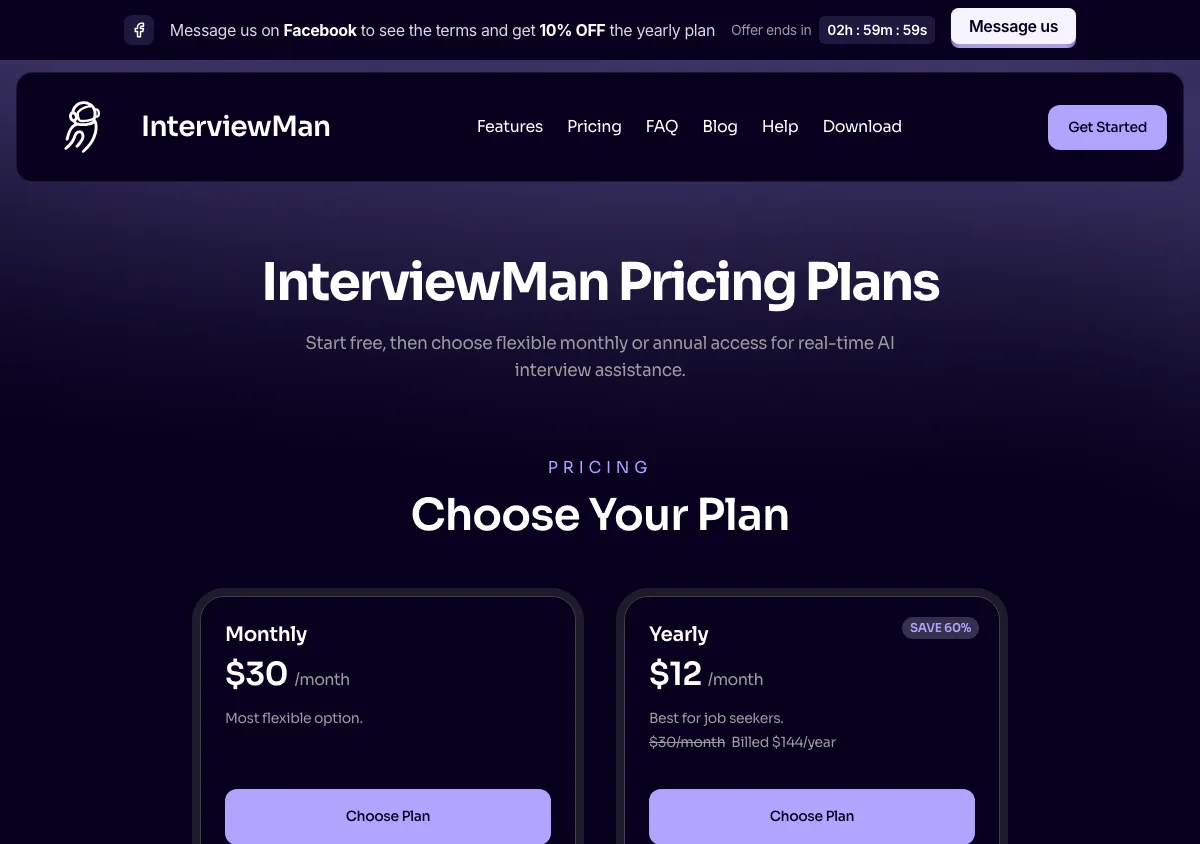
InterviewMan pricing page, captured September 17, 2026. Plans and prices can change; check the vendor's page before buying.
Final Round AI
The broadest product in this group: resume building, job-description parsing, prep checklists, practice interviews, and a live Interview Copilot on a macOS and Windows desktop app plus a web version. There are no phone apps.
Latency: not published. Neither is a measured figure from anyone independent, so the only way to time it is to buy a month and run the stopwatch test yourself, which the no-free-trial rule below makes expensive.
Session cap: no per-session limit is published for the live copilot on Pro.
On a full-screen share: Stealth Mode is included with Pro and switched on by default, so the desktop overlay is intended to stay out of a shared desktop.
Pros
- You do not pay extra for the hiding. Stealth Mode ships with Pro and is on by default, so the tier you buy for the copilot is the tier that covers a full desktop share.
- Auto-capture reads problems off your screen, which is what keeps it useful in a coding round where the question is never spoken.
- Automatic debriefs after each session are a feedback loop almost nothing else in this list offers, and they are the one place where a slow answer costs you nothing.
- The free tier covers the preparation half at no cost, even though it does not let you time the live half.
Cons
- The pricing page states outright: "There is no free trial - live sessions need an active Pro subscription." You cannot test the live copilot without paying first, which is the one feature you most want to time.
- The advertised "$25+/month" is the annual rate. Month to month the same plan is $150.00, published separately on finalroundai.com/subscription-simple, which works out to $300 for a year. Their own pricing blog post still says $90 and is out of date.
- The refund is 72 hours, on first-time yearly purchases only, and the terms attach a usage condition: fewer than 2 interview sessions each strictly over 30 minutes. That is a tight window for a tool you can only evaluate live, and the FAQ and terms disagree about whether renewals count.
- You are paying for resume and application tooling even if you only want live help.
Price
Free plan at $0, for setup only. Month to month is $150.00, and yearly is $25.00 per month ($300 per year), per finalroundai.com/subscription-simple on October 11, 2026. See InterviewMan vs Final Round AI.
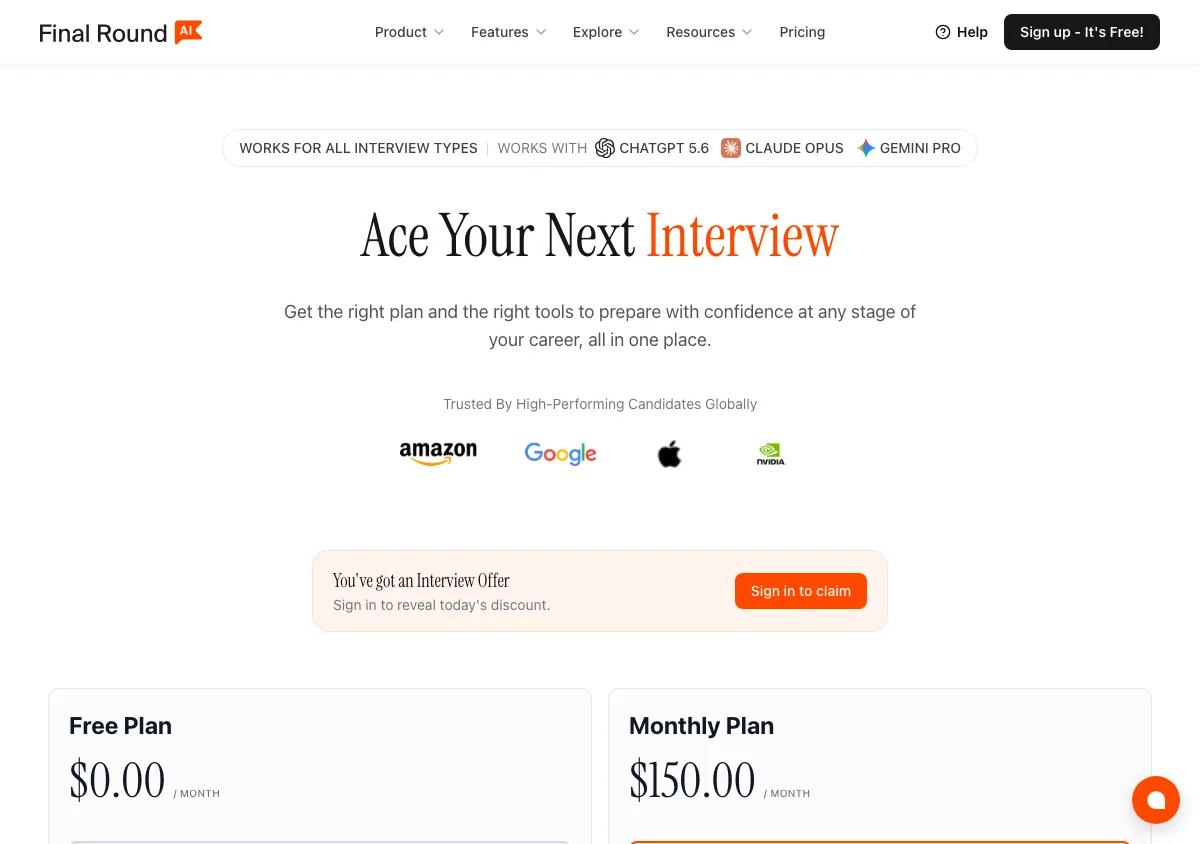
Final Round AI pricing page, captured September 17, 2026. Plans and prices can change; check the vendor's page before buying.
LockedIn AI
The clearest technical-interview specialist here, with a product line that separates an interview copilot, a coding assistant, an online assessment helper, mock interviews, and phone interview tools.
Latency: the only vendor here that prints a number. It advertises a "116ms response time", which is a marketing figure with no published method, no definition of what is being measured, and no independent test behind it. 116 milliseconds is not plausible as end-to-end time from the interviewer's last word to a usable answer, so read it as one internal step rather than the thing this article measures.
Session cap: up to 2 hours per interview on the Unlimited plan. On the credits plan the limit is your minute balance instead: $69.99 buys 400 Copilot minutes a month.
On a full-screen share: this is where the tier matters. Stealth Mode is a Professional-tier feature. On the Basic plan, or the free plan, you are running an overlay that was never sold to you as hidden.
Pros
- Genuinely coding-first. For a loop that is mostly technical screens and online assessments, its tooling is better targeted than a general copilot.
- A 2-hour per-interview allowance, the most generous published cap of any tool in this list that publishes one at all.
- Credits are an honest fit for low volume: 400 Copilot minutes, or 800 minutes of mock practice, for $69.99 a month.
- It has a dedicated phone interview product, which is a round most live tools treat as an afterthought.
Cons
- Minutes are consumed in wall-clock time, so a slow, rambling interviewer burns the same credits as an efficient one. Latency you cannot measure and minutes you are billed for are an awkward combination.
- The money-back guarantee badge is not the policy. Under the refund policy, monthly and quarterly plans are non-refundable once started, and annual plans get only a partial refund within 7 days. There is no window in which you can time it and get your money back.
- Stealth costs more than most roundups say: Basic is $54.99 per month on sale or $39.99 per month quarterly, but Professional, where Stealth Mode and Duo live, is $119.99 per month on sale or $79.99 per month quarterly.
- Behavioral and non-technical rounds are not where it is strongest.
Price
Basic is $54.99 per month on sale ($109.98 regular), or $39.99 per month billed every three months ($119.97 per charge), with no stealth. Professional is $119.99 per month on sale ($239.98 regular) or $79.99 per month quarterly. The free plan gives unlimited 5-minute sessions, up to 60 minutes a day, without stealth. Credits are $69.99 per month for 400 Copilot minutes, and Lifetime Pro is $999.50 once. It runs on desktop, on the web, and as a phone app. Verified on the official pricing page on October 11, 2026. See our InterviewMan vs LockedIn AI comparison.
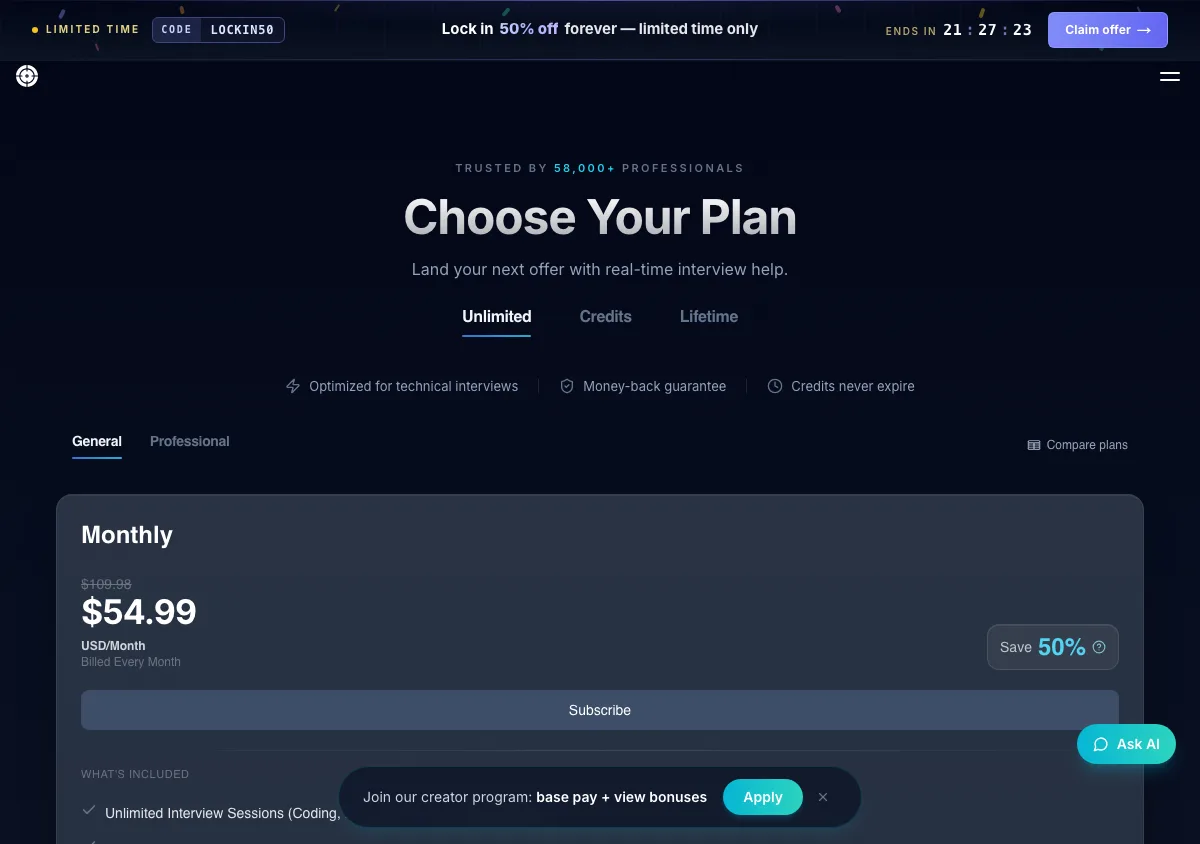
LockedIn AI pricing page, captured September 17, 2026. Plans and prices can change; check the vendor's page before buying.
Cluely
A general-purpose live AI overlay built for meetings, calls, notes, sales conversations, and study. Interviews are one use case among several.
Latency: not published, and not measured independently that we can find. The free Starter tier is the cheapest way to time any tool in this list, so use it.
Session cap: none published per interview. Pro advertises unlimited AI responses and unlimited meeting notes.
On a full-screen share: only Pro + Undetectability claims to be hidden. The $19.99 Pro overlay is visible on a shared desktop, and the refund policy explicitly will not refund you for being detected by screen-sharing software, so a failed share is your loss on either tier.
Pros
- The free Starter tier means you can time this one at zero cost, which makes it the cheapest latency test in this list.
- Response volume is not rationed on Pro: unlimited AI responses and unlimited meeting notes, with no per-interview clock to watch.
- Its pricing table names the exact tier that is "completely hidden to meeting screen sharing software" instead of leaving the boundary vague, which is more than most vendors here do.
- Usable well beyond interviews, so the same subscription earns its keep on client calls and lectures between rounds.
Cons
- Screen-share concealment only exists on Pro + Undetectability, at $149.99 per month or $44.99 per month on annual billing. For a candidate whose main need is hiding during a screen share, the annual figure is the fair comparison, and it is still around 3.7 times our $12 per month.
- It is not interview-specific: no STAR or CAR structuring, no interview-type presets, no assessment workflow.
- The refund policy gives you 24 hours, asks for video evidence that the product did not work, excludes Windows 10 machines, and excludes being detected by screen-sharing software. If you plan to test it under real conditions, you have one day and one excluded failure mode.
Price
Starter free. Pro is $19.99 per month, or $11.99 per month annually. Pro + Undetectability is $149.99 per month, or $44.99 per month annually. There is also a separate mobile tier at $8 per week or $144 per year, so the platform list is no longer desktop-only. Per cluely.com/pricing on September 17, 2026. See InterviewMan vs Cluely and our LockedIn AI vs Cluely comparison.
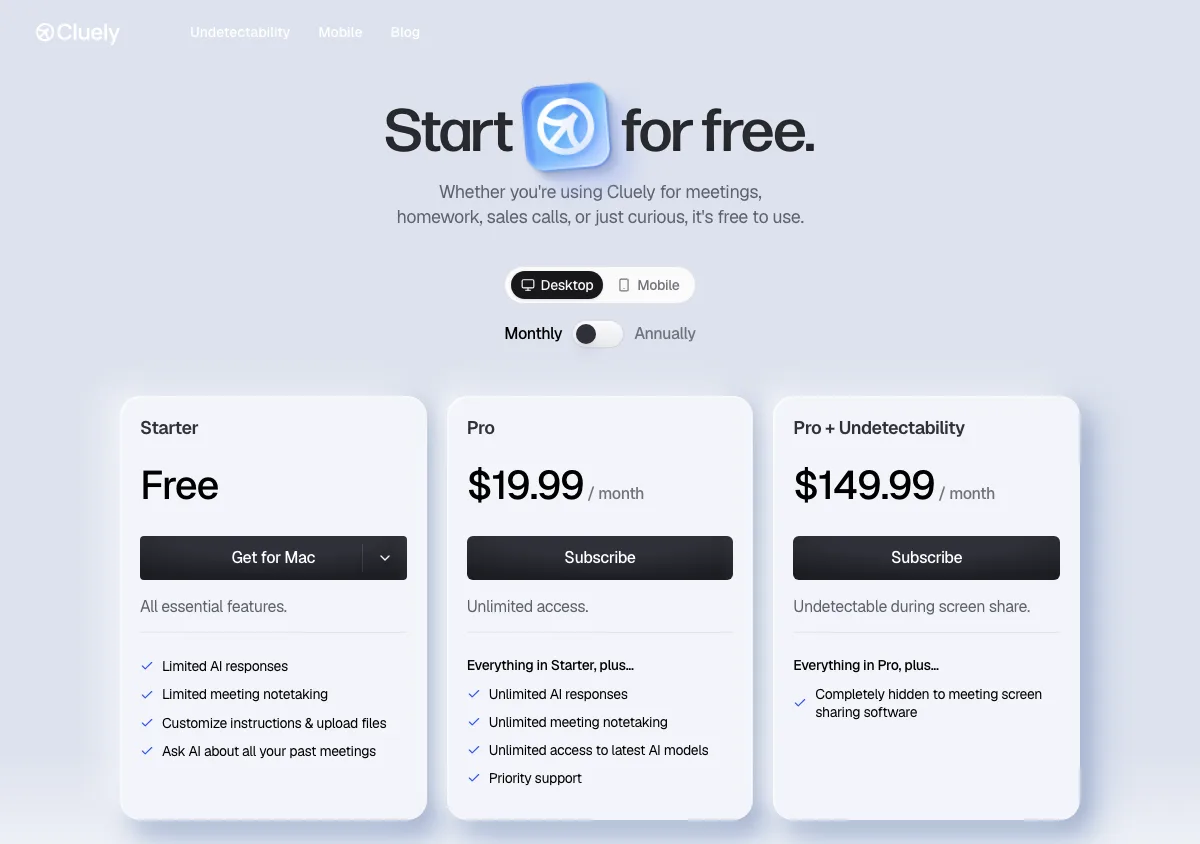
Cluely pricing page, captured September 17, 2026. Plans and prices can change; check the vendor's page before buying.
Sensei AI
A browser-based copilot with the steepest annual discount in this list and a resume and story toolkit included on the free tier.
Latency: not published, but this is the easiest tool here to measure, because the free tier gives you real 15-minute copilot sessions rather than a demo reel. Time it before you pay for anything.
Session cap: 15 minutes per session on the free tier. That is long enough for the stopwatch test and short enough that a real behavioral round would run past it.
On a full-screen share: it runs in a browser tab, so it is visible. If an interviewer switches you from window sharing to "Your entire screen" mid-call, there is no capture-exclusion mechanism to save you, only however fast you can close a tab.
Pros
- The free tier includes real 15-minute copilot sessions, not a canned demo, so you can measure its latency yourself before paying.
- $24 per month on annual billing is competitive against every full-coverage option here except ours.
- Preparation costs nothing at all on the free tier, which includes the resume builder, the story editor, and the customization settings.
- Pro adds a Coding Copilot for the rounds where the question is on screen, plus knowledge base add-ons, and it connects to Zoom, Microsoft Teams, and Google Meet.
Cons
- $89 per month month-to-month is one of the highest monthly rates in this group. The attractive number requires committing to a full year up front.
- It runs in the browser, so a tab is open during your interview. If an interviewer asks mid-call to switch from window sharing to "Your entire screen," you have seconds to react and the switch itself is visible.
- No refund policy is stated on the pricing page.
Price
Free tier with 15-minute copilot sessions; PRO at $89/month or $24/month billed annually, per senseicopilot.com. See InterviewMan vs Sensei AI.
LinkJob AI
A desktop live copilot with the most transparent model disclosure in the category and an aggressive annual discount.
Latency: the only tool here with a third-party measurement, and it is not a flattering one. Final Round AI, a direct competitor, published a LinkJob AI review reporting 4 to 7 second response times and roughly 30 percent of Medium-difficulty problems needing debugging. Treat a rival's test with the skepticism it deserves, but 4 to 7 seconds is the band this article calls visible dead air, so it is worth timing yourself.
The same review describes intermittent crashes in longer sessions, and to be precise about what that claim is: it is that article's summary of Reddit user reports, not something the reviewers measured.
Session cap: nothing published per session. The free trial starts at 30 minutes and grows to 45 minutes for joining their community.
On a full-screen share: a native desktop overlay that claims local processing, with no published mechanism list, so the behavior under a full desktop share is not documented tier by tier.
Pros
- The model roster is printed per tier, lighter models such as Claude Haiku and Gemini Flash on monthly, heavier ones including Claude Opus, GPT-5.6 Sol, Gemini Pro and Grok on yearly. Nobody else here publishes that, us included, and it is the only way in this market to see the speed-against-quality trade before you pay.
- It claims local processing, and it runs an active Discord and WhatsApp community, which is genuine support value during a long search.
- The yearly plan at $29.99 per month is a 70 percent discount off the monthly rate, and a lifetime option exists for people expecting a long search.
- A money-back guarantee applies to first-time purchases of the quarterly and yearly plans, which is more room to test it than Cluely's 24 hours.
Cons
- At $99.99 month to month it is the second most expensive monthly plan in this list, and monthly plans plus all renewals and upgrades are non-refundable. If it turns out to be slow on your machine and network, that money is gone.
- Its own cheapest tiers run the lightest models, so the plan that costs least is also the one whose answers you are most likely to have to fix live.
Price
$99.99 per month on monthly billing, $69.99 per month billed quarterly ($209.97), $29.99 per month billed yearly ($359.88), and $999.99 once for a lifetime licence with the widest model roster. Verified on linkjob.ai/pricing on September 17, 2026. We wrote a full LinkJob AI review and a head-to-head comparison.
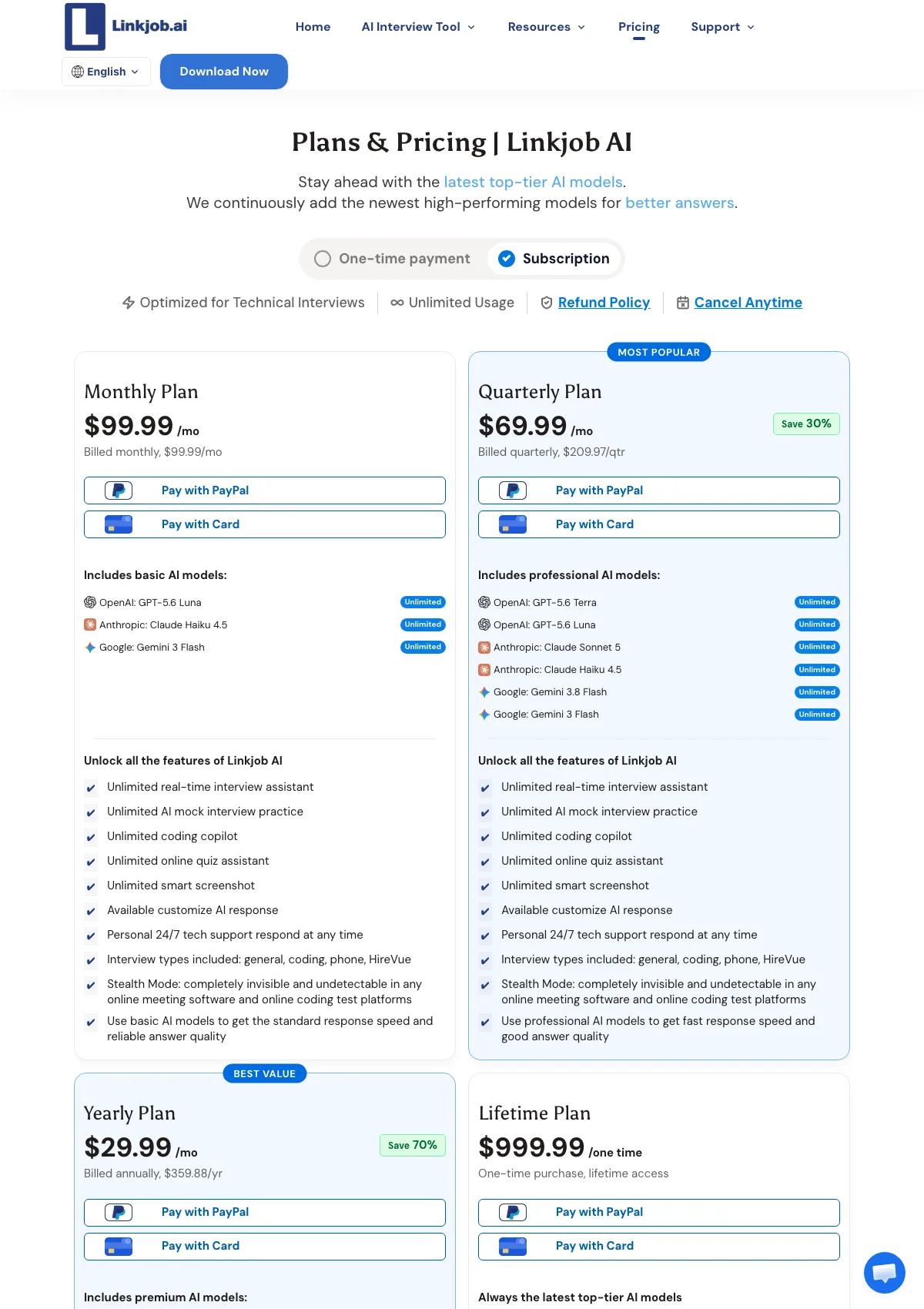
LinkJob AI pricing page, captured September 17, 2026. Plans and prices can change; check the vendor's page before buying.
Etiquette and risk: what actually goes wrong
Almost every failure we hear about is behavioral, not technical.
The pause. A consistent multi-second gap before every answer is the single clearest signal. Humans do not answer with uniform delay. They answer fast on easy questions and slowly on hard ones. If your tool imposes a flat three-second tax, the pattern is legible from the other side of the call.
The eye line. Reading text placed at the edge of a second monitor, or on a phone lying flat on the desk, produces obvious eye movement. Put the text as close to the webcam as physically possible.
Overreach. The tool writes a confident paragraph about a distributed system you have never operated. You read it. The interviewer asks one follow-up. That is the end of the interview, and it is entirely self-inflicted.
Rule violations. Assessment platforms log more than people expect. HackerRank's Secure Mode "prevents candidates from minimizing or resizing the test window," "warns candidates when they attempt to navigate away from the test," "blocks external copy and paste actions during the test," and "detects the use of multiple monitors and allows candidates to continue only if a single monitor is in use." Every violation lands in the candidate report. Notice that a second monitor is itself a flag, which matters if your plan was to put the assistant on a second screen.
Written policy. Rules differ by company and by round. Anthropic, for instance, allows Claude for polishing application materials but states that in live interviews "no AI assistance is allowed in this part of the process unless told otherwise." Read the assessment terms before accepting them, because breaking a written agreement is a defensible reason to withdraw an offer months later.
We cover this ground properly in should you use AI in a job interview in 2026, which companies allow or ban AI in interviews, and how companies detect AI cheating in interviews. Platform-specific detection is covered for HackerRank, CodeSignal, Codility, CoderPad, and Karat.
Frequently asked questions
What is live AI interview help?
Live AI interview help is software that runs during a real interview, transcribing what the interviewer says, identifying the question, and displaying a suggested answer on your screen in real time. It is different from mock interview practice or resume tools, which run before the interview and carry no in-call risk.
How fast does a live AI interview assistant need to be?
Fast enough that you never sit in visible silence. Under about one second is invisible because you can cover it with a filler phrase. Above three seconds and the interviewer sees you waiting, which is a stronger signal than anything software detection would produce. Measure it yourself with a stopwatch in a mock call rather than trusting a marketing claim.
Why is there any delay at all?
Streaming speech-to-text does not finalize a transcript until it detects a pause. Deepgram's default endpointing is 10 milliseconds of silence, and real products raise that threshold so sentences are not cut in half mid-thought. On top of that sits question detection, model generation time, and rendering. Tools that stream tokens to the screen as they arrive feel far faster than tools that wait for a complete answer.
Will the tool show up when I share my screen?
It depends on the tool and on what you share. Zoom, Google Meet, and Microsoft Teams all offer both a single-window option and a whole-screen option, and an interviewer can ask you to switch mid-call. A browser tab is visible on a whole-screen share. A native overlay using screen-capture exclusion is not, though Microsoft's documentation notes that mechanism carries no guarantee, and a phone camera pointed at your monitor still sees everything.
Is a two-device setup better than an overlay?
It is safer on managed machines and under proctoring that inventories running applications, because nothing renders on the interview screen at all. The cost is that glancing at a second device can look like reading from notes. Position the second screen in the same eye line as your webcam and keep answers short, around 30 to 50 words, so you glance rather than read.
Does live AI help work for coding interviews?
Partly. Coding problems arrive as text on screen rather than as speech, so an audio-only pipeline does nothing for them and you need screenshot capture read by a vision model. These tools suggest code; they do not compile, execute, or submit it. Many proctored coding assessments also prohibit outside assistance outright, so check the assessment terms first.
How much does live AI interview help cost in 2026?
The same vendor can charge very different amounts depending on whether stealth is included and how long a period you commit to. Cluely is $19.99 per month for Pro and $149.99 for Pro + Undetectability, falling to $11.99 and $44.99 on annual billing. Final Round AI is $150.00 month to month or $25.00 per month on a year. LinkJob AI is $99.99 monthly or $29.99 on yearly billing.
LockedIn AI is $54.99 on Basic and $119.99 on the Professional tier that carries Stealth Mode. Sensei AI is $89 monthly or $24 annually. InterviewMan is $30 monthly, $12 per month on annual billing, and $129.60 per year for students.
Can I try live interview help for free before paying?
Some tools yes, some no. Sensei AI's free tier includes 15-minute copilot sessions, Cluely has a free Starter tier, and InterviewMan has a minute-limited free trial with no credit card required. Final Round AI states plainly on its pricing page that there is no free trial and that live sessions require an active Pro subscription, so timing it means buying a month at $150.00 or a year at $300 first.
See also
Ready to Ace Your Next Interview?
Join 570,000+ professionals using InterviewMan to get real-time AI assistance during their interviews.
