


An AI system design interview assistant is software that runs during a live system design round and helps you while the call is still going. It listens to the interviewer, reads the diagram on your screen, and puts a short prompt in front of you: the next question to ask, the trade-off you forgot, the bottleneck the interviewer is about to poke at.
It is a different job from a coding helper, because a system design round has no single correct answer. The interviewer is grading how you think out loud, not whether you drew the "right" boxes.
This guide explains exactly how InterviewMan handles that round: what it does at each stage, what it deliberately will not do, and how to set it up so it actually helps instead of getting in your way.
Last updated: October 14, 2026.
Key takeaways:
- A system design round is graded on reasoning, not on the diagram. The assistant's job is to keep your reasoning moving, not to hand you an architecture.
- It draws a real architecture diagram for your exact question. InterviewMan generates a live Mermaid diagram of the actual system you were asked to design, not a generic list of steps ("add a load balancer, add a cache") that fits every prompt and none.
- InterviewMan works on two inputs at once: the interviewer's voice (so it knows the prompt) and your screen (so it can read the whiteboard you are drawing).
- The most useful nudges are the boring ones: ask about scale first, name the read/write ratio, say the trade-off out loud. These are the exact things candidates skip under pressure.
- It runs in a desktop overlay that stays off the shared screen, so the interviewer sees your whiteboard, not your helper. See the system design help page for the setup.
- It covers system design, coding, and behavioral rounds on one $12-a-month plan, instead of a coding-only tool you pay for separately.
What makes the system design round different
In a coding round there is a function signature and a set of test cases. Right or wrong is objective. A system design round is the opposite. The interviewer says "design a notification system that scales to 50 million users" and then spends 40 minutes watching how you get there.
Get real-time help on your system design round
InterviewMan reads the whiteboard and nudges the scope question or trade-off you are about to skip. Covers coding and behavioral rounds too, on one plan.
Download InterviewManWhat they are actually scoring:
- Scoping. Did you ask how many users, read-heavy or write-heavy, latency targets, and whether eventual consistency (data that becomes correct after a short delay, instead of instantly) is acceptable, before you drew anything?
- Trade-off reasoning. When you add a cache, can you say why, and what it costs you?
- Recovery. When the interviewer pushes back ("why not synchronous here?"), do you defend the choice, change it with a reason, or freeze?
Interview-prep sources that review hundreds of these loops say the top failure is not a wrong component. It is designing for a small user base and never addressing growth, or saying "we'll use a cache" with no reason attached (DesignGurus on common mistakes). A good assistant targets those exact gaps.
How InterviewMan reads a system design round
InterviewMan watches two inputs during the call.
1. It listens to the interviewer. The app uses the microphone on the device it runs on to hear the interviewer's voice, turn it into text, and decide what the prompt was. This is why the audio setup matters: if the app cannot hear the interviewer, it has nothing to work from. The hear-the-interviewer guide covers the two-device setup that makes this reliable.
2. It reads your screen. System design rounds happen on a shared whiteboard: Excalidraw, a Google Doc, CoderPad's drawing mode, or a plain diagram tool. When you press Assist, InterviewMan takes a screenshot of your primary screen and reads the diagram and any text on it. So the assistant is not guessing about your design in the abstract. It sees the boxes you drew and the arrows between them, and it answers against that.
Put those together and the assistant has the full picture: the question that was asked, and the current state of your whiteboard. That is what lets it give a prompt that fits the moment instead of a generic essay about load balancers.
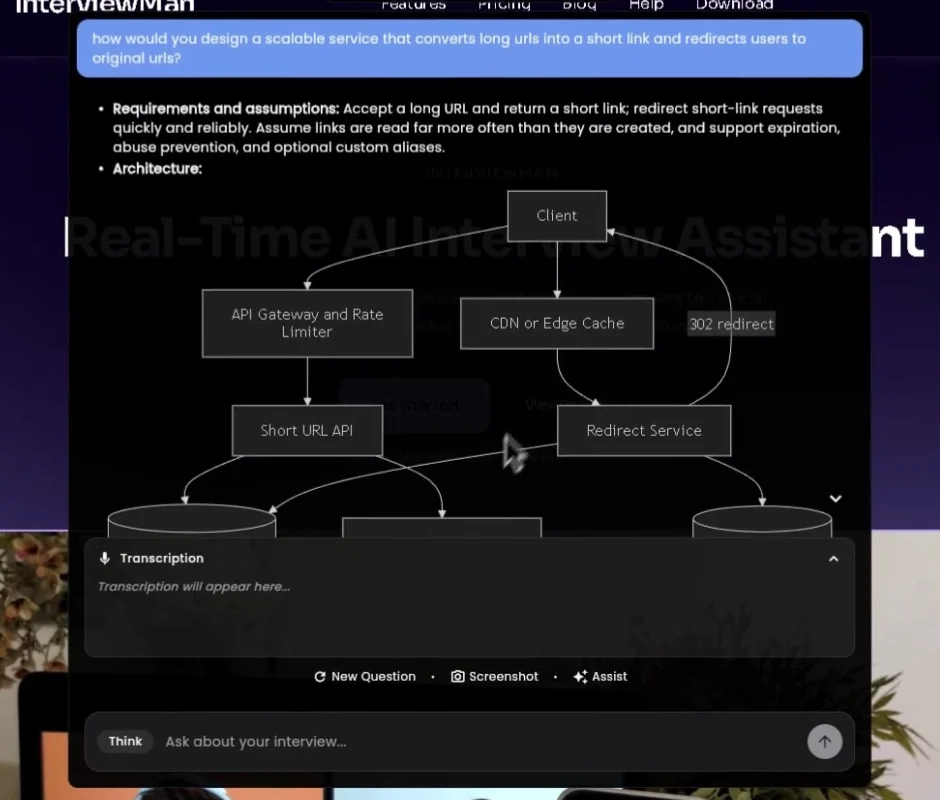
A real system design answer from the app: the question as transcribed from the interviewer, the requirements it is designing for, and a Mermaid diagram drawn for that exact prompt.
A real diagram, not a list of generic steps
This is where InterviewMan is different from most assistants. When you ask for help on the design, it does not return a bullet list like "step 1: add a load balancer, step 2: add a cache, step 3: shard the database." That list is the same for a URL shortener, a chat app, and a payment system, which is exactly why it is useless: it does not match the question in front of you.
Instead, InterviewMan generates a real architecture diagram of the actual system you were asked to design, rendered as a Mermaid diagram (a diagram drawn from a text definition). It shows the specific components for this prompt and how they connect: the clients, the API layer, the queue, the data stores, the cache, with the arrows going the right way for the data flow the question needs.
A good design does not start with boxes. It starts with questions, and InterviewMan is built that way. Before you draw anything, it surfaces the exact scoping questions to put to the interviewer: how many daily active users, read-heavy or write-heavy, the latency target, strong or eventual consistency, what is in scope and what is out. These are the questions the interviewer is waiting to hear. Asking them first is how a real system design round is supposed to go.
Then it listens. InterviewMan is already hearing the call, so when the interviewer answers your clarifying questions, it has those answers in hand. The diagram it builds is shaped by what the interviewer actually told you: the real numbers, the real constraints, the real scope. It is not working from guessed assumptions about scale or geography or how the thing makes money. It designs for the requirements you were given, which is the only design the interviewer is grading.
Why that matters in the round:
- It matches the prompt. A diagram for "design a notification system" looks different from one for "design a news feed." A generic step list does not, so it cannot help you on the part that is actually hard.
- It is a structure you can reason from. You reproduce it on the whiteboard in your own words and defend each box when the interviewer pushes, which is the thing being graded. Copying a vague step list gives you nothing to defend.
- It is faster to recover from a blank. When you freeze, a correct diagram of the real system is a far better anchor than "remember to add a cache."
Most competitors stop at the generic step list. The real, prompt-specific diagram is the difference between a prop you can defend and a script you cannot.
What it nudges, stage by stage
The assistant is tuned to the shape of a system design interview, which almost always runs in the same five stages. Here is what it pushes at each one.
1. Requirements and scope (first 5 minutes)
This is where most candidates lose the round by drawing too early. InterviewMan's first nudges are questions, not architecture: how many daily active users, read or write heavy, what latency is acceptable, do we need strong consistency or is eventual fine, what is in scope and what is out. You still ask them in your own words. The point is that you do not skip them.
Get real-time help on your system design round
InterviewMan reads the whiteboard and nudges the scope question or trade-off you are about to skip. Covers coding and behavioral rounds too, on one plan.
Download InterviewMan2. High-level design
Once scope is set, it helps you name the core components in a sensible order: clients, an API layer, the main data store, and the one or two pieces the prompt really turns on (a queue for a notification system, a blob store for a photo app, a fan-out service for a feed). It keeps you from dumping every component you know onto the board.
3. The deep dive
This is where the interviewer picks one piece and drills. If they ask about the data model, the assistant surfaces the schema choice and the SQL-versus-NoSQL trade-off for this workload. If they ask about scale, it surfaces sharding, replication, and the consistency cost that comes with each.
4. Bottlenecks and failure
The interviewer almost always asks "what breaks first?" InterviewMan flags the usual suspects for your design: a hot shard, a cache stampede when a popular key expires, a single point of failure in a service you drew with no replica, a health check that can black-hole traffic to a dead server. Naming these before you are asked is what senior candidates do.
5. Trade-offs and wrap-up
At the end you summarize and call out what you would change with more time. The assistant helps you phrase the trade-off in one clean sentence ("I put Redis here because reads outnumber writes roughly 100 to 1; the cost is cache invalidation when content changes, which is rare for this data"), which is exactly the eight-second answer interviewers are listening for.
What it will not do (on purpose)
This matters, because a tool that tries to hand you a finished architecture will get you caught and will not teach you anything.
- It gives you the diagram, not the round. It generates a real architecture diagram for the prompt, but you still reproduce it on the whiteboard and defend every box out loud. The diagram is a reference to reason from, not a script to copy in silence.
- It does not read a half-captured screen. If your screenshot cuts off the question or the diagram, it says so instead of guessing. The screenshot help page explains how to capture the whole thing.
- It does not replace practice. If you have never said a trade-off out loud, a prompt on screen will not save you, because you still have to turn it into a 20-second spoken answer. Rehearse first with our system design interview guide.
Make the answers as long or as short as you want
The default answer length is a middle ground. If you want the full breakdown on every design question, or a tighter version you can scan in two seconds, set it yourself in the extra instructions field in the app settings. For detailed answers, paste:
For system design questions, give a detailed answer: the clarifying questions to ask first, functional and non-functional requirements, the high-level architecture, the data model, the main trade-offs, bottlenecks and how to scale, and a full Mermaid diagram.
For short answers, paste:
For system design questions, keep it to 3 to 5 bullet points with the key components, one trade-off, and the diagram.
The same field takes any prepared notes you want the answers to use, such as your preferred stack for design rounds or your prepared behavioral stories. The custom settings guide has the details.
Staying off the shared screen
In a system design round you will almost certainly share your screen so the interviewer can watch the whiteboard. InterviewMan runs as a desktop overlay that stays out of the shared window, and it reads your screen without appearing in the capture. For a monitored round where you share your whole desktop, use two-device Stealth Mode: the desktop app keeps running hidden on your laptop (only a small speaker icon in the corner), your phone becomes the full interface, and the laptop screen shows nothing but the whiteboard. The Stealth Mode guide walks through it.
The part people worry about is the keypress itself: when you press Assist, does that show up to a browser tab or a proctoring tool on the interview machine? It depends on where the trigger happens. In Stealth Mode you never press an InterviewMan hotkey on the laptop keyboard at all. You tap Screenshot and Assist on your phone, and the hidden desktop app does the capture.
So a browser page on the laptop that listens for keystrokes has no InterviewMan keypress to record, because the keypress happened on a different device. You can check this yourself in about a minute: open any free keyboard event viewer in a browser tab on the laptop, start Stealth Mode, tap Assist on your phone, and watch the tab stay empty.
A fair warning: using live assistance in an interview can violate the employer's rules. Read our take on whether you should use AI in an interview and decide for your own situation. For pure practice, run it on a mock round first.
One tool for all three technical rounds
Most loops at Meta, Amazon, and Stripe mix a system design round with a coding round and a behavioral round. A coding-only helper leaves you uncovered on the round that fails the most senior candidates. InterviewMan covers all three on one plan: live help on system design, coding rounds, and behavioral questions, for $12 a month billed annually. Behavioral answers can be shaped around your own background too: add your project details, the job description, and extra instructions in settings, and the answers draw on your actual experience instead of a generic STAR template. That is the main reason to pick it over a single-round tool like Interview Coder, which is coding-only at a higher price.
Try it on a practice round first
The honest way to use a system design assistant is to rehearse with it, so the prompts feel natural before a real call. Open a free practice prompt (URL shortener, chat app, news feed), set up the app exactly as you would on interview day, and run a full 40-minute mock. By the second or third run the scoping questions and trade-off sentences are coming from you, and the assistant is just backup.
- Compare the field in best AI interview assistant for system design.
- Follow the step-by-step playbook for using AI in a system design interview.
- Set it up with the system design help page.
Download InterviewMan and run it on one practice round tonight.
Get real-time help on your system design round
InterviewMan reads the whiteboard and nudges the scope question or trade-off you are about to skip. Covers coding and behavioral rounds too, on one plan.
