

Most "AI interview assistant" tools were built for coding rounds: you paste a LeetCode-style problem, it writes the function. A system design round breaks that model. There is no function to write. The interviewer wants to watch you scope a vague problem, draw an architecture, and defend every box when they push on it. So the right question is not "which tool is best at interviews," it is "which tool actually helps on the whiteboard round."
I judged every major assistant on four things that matter for system design specifically, then ranked them. This is a focused companion to our general best AI interview apps list.
Last updated: October 14, 2026. Prices checked on each vendor's pricing page on that date.
Key takeaways:
- Only a few tools truly support system design. Many are coding-only and give you nothing on the round that fails the most senior candidates.
- InterviewMan is my top pick: it reads the whiteboard, covers all three technical rounds, and costs the least.
- The one feature most buyers miss is whether the tool can see your diagram and draw one back. The best help is a real architecture diagram for your exact prompt, not a generic step list that fits any question.
- Price gaps are large. A coding-only tool can cost more than a full assistant that also covers system design and behavioral rounds.
How I ranked them for system design
Five criteria, in order of weight:
- Does it draw a real diagram, or just generic steps? The most useful output is an architecture diagram built for your exact prompt. Many tools return the same step list for every question ("add a load balancer, add a cache"), which fits a URL shortener and a payment system equally, so it helps with neither.
- Does it read the whiteboard? System design happens on a shared diagram. A tool that can screenshot and read your architecture can give a prompt that fits what you drew. One that only transcribes the question is guessing.
- Does it cover system design at all? Several popular tools are coding-only. For this list that is close to disqualifying.
- Latency and stealth on a screen share. You share your screen in almost every system design round. The helper has to answer fast and stay out of the shared window.
- Price for full coverage. Most loops bundle system design with coding and behavioral. Paying three times for three tools is the wrong move.
1. InterviewMan — best overall for system design
InterviewMan is the one I recommend for the whiteboard round, for a simple reason: it reads both inputs that matter. It listens to the interviewer so it knows the prompt, and it screenshots your screen so it can read the diagram you are building. That means its prompts are about your architecture, not a generic essay on load balancers.
The top pick for system design rounds
InterviewMan reads the whiteboard, covers all three technical rounds, and costs the least. Test it on a practice round before you commit.
Download InterviewManWhat it does well on system design:
- Draws a real diagram for your prompt. It generates an actual architecture diagram (a Mermaid diagram) of the exact system you were asked to design, with the right components and data flow, not a generic step list. The how-it-works guide breaks this down.
- Reads the diagram you built. Press Assist, it captures the whiteboard and answers against the boxes and arrows you drew.
- Nudges the right things. Scope first (users, read/write ratio, latency, consistency), then trade-offs, then bottlenecks: the exact steps candidates skip under pressure.
- Covers all three rounds. System design, coding, and behavioral on one plan.
- Stays off the shared screen. The overlay is out of the capture, and for a full desktop share two-device Stealth Mode keeps the interface on your phone, so you never press an InterviewMan hotkey on the laptop keyboard.
The differentiation here is concrete, not marketing. The clarifying-questions-first workflow and the real prompt-specific diagram are the system design story above. On top of that, one plan covers all three rounds: system design, coding, and behavioral. Behavioral is on the same plan, not an add-on, and those answers can be personalized with your project details and the job description (settings), so you are not stitching together a separate tool for each round.
Price: $30/month, or $12/month billed annually; students get $129.60 a year. That is the cheapest full-coverage option here. See pricing.
Set it up: the system design help page.
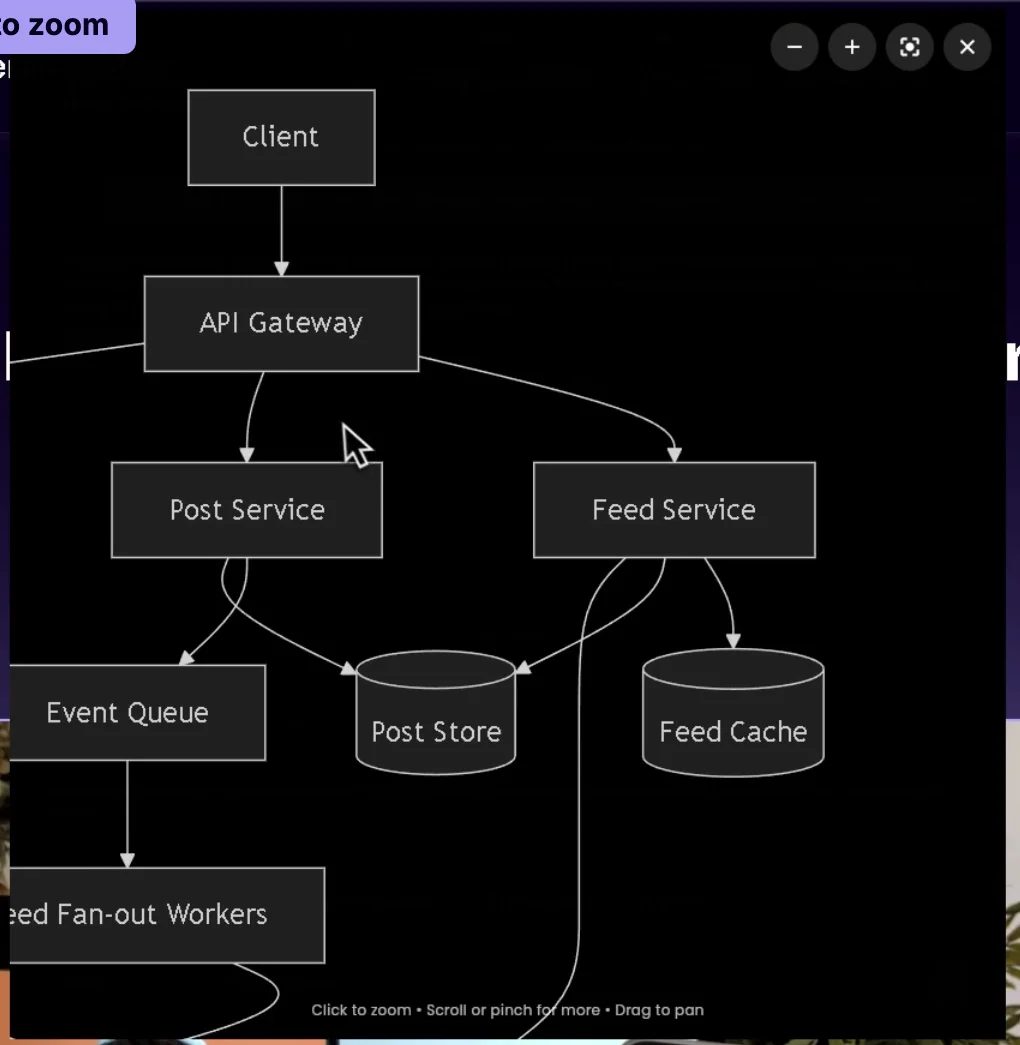
A different prompt (design a news feed) gets a different diagram. Click it in the app and it opens full screen with zoom and pan.
2. Final Round AI — strong coverage, higher price
Final Round AI does support system design and structures answers around components and trade-offs, and it adds post-interview scorecards. It is a capable tool. The catch for a system-design buyer is price: its live-help tiers run well above InterviewMan's for the same job, and much of the marketing leans on invisibility claims rather than how it handles a diagram. If budget is not a concern and you want the extra practice features, it is a reasonable second choice. See the full InterviewMan vs Final Round AI comparison.
3. LockedIn AI — fast live answers, coding-first
LockedIn AI is a competent live copilot: it listens, transcribes, and returns answers and code quickly. Its design strength is speed on a live call. Its weakness for this list is that its depth is on coding and general Q&A; system design is covered more thinly, and the whiteboard-reading story is weaker. Good if coding is your hardest round, less so if system design is. Details in InterviewMan vs LockedIn AI.
4. Interview Solver — covers design, worth checking
Interview Solver is one of the few that explicitly lists system design diagrams alongside live coding, and it can ground answers in a resume or job description you upload. It is a real option for the whiteboard round. It lands at number four mostly on price and breadth versus InterviewMan rather than on any single failing.
5. Interview Coder — skip it for system design
Interview Coder is the clearest example of the coding-only trap. It is built to solve coding problems and does nothing useful on a system design whiteboard, yet it costs more than a full assistant. If system design is a round in your loop, this is the wrong tool. Full write-up: best Interview Coder alternative.
The short version
If system design is in your loop, you want a tool that can see your diagram and that also covers your other rounds without a second subscription. That points to InterviewMan first, with Final Round AI and Interview Solver as the next options if you need a specific feature they have.
Before you pick:
- Watch the two-minute demo of a Mermaid diagram being drawn live in a system design round.
- Read how an AI system design assistant actually works.
- Follow the system design interview AI playbook.
- Learn the round itself with the system design interview guide.
One habit will serve you better than any review or ranking: test the assistant yourself before you pay. Run it on a practice system design round and watch what it actually does with a real prompt. Does it scope the problem first, surface the read/write ratio and latency target to ask, then draw a diagram for that exact system? Or does it hand back the same generic steps any question would get?
You learn more in ten minutes of hands-on use than from any list. And weigh reviews carefully: praise and criticism are both easy to stage, so a strong opinion from a stranger tells you less than a few minutes with the tool itself on your own prompt.
Download InterviewMan and test it on one practice whiteboard round before you commit.
The top pick for system design rounds
InterviewMan reads the whiteboard, covers all three technical rounds, and costs the least. Test it on a practice round before you commit.
