

Every few weeks the same post appears on the LeetCode discussion board: a candidate finished a company's online assessment (OA, a timed coding test taken from home) built from LeetCode-style problems, and now they want to know what the platform saw. The answers are a mess, because "LeetCode" means two different things. There are the contests on leetcode.com, where LeetCode's own plagiarism checker runs.
And there are company OAs, which almost never run on leetcode.com at all. They run on HackerRank, CodeSignal, CoderPad or Codility, and each of those watches something different.
This guide separates the two. It covers what LeetCode itself checks, who is actually watching a "LeetCode OA", the six signals that get candidates flagged, and how InterviewMan handles a LeetCode-style assessment without leaving any of those signals behind.
We build InterviewMan, so read the comparison section with that in mind. Every claim about a platform or another tool links to its source.
Last updated: November 15, 2026.
Key takeaways:
- LeetCode's own detection is a plagiarism checker for contests, reviewed by human staff, with penalties applied without warning. It publishes no proctoring spec for its interview products, and candidates report no webcam monitoring.
- A company's "LeetCode OA" usually runs on HackerRank, CodeSignal, CoderPad or Codility. The link's domain tells you who is watching, and those platforms log tab switches, pastes, typing patterns, webcam frames and the shared screen.
- LeetCode problems are public with known solutions. That is exactly what similarity checks compare against, so pasting a known solution is the fastest way to get flagged.
- InterviewMan's overlay is excluded from screen capture, its shortcuts never reach the browser, and Stealth Mode puts the answers on your phone with nothing running visibly on the test machine. It has zero confirmed detections across its users.
- It is $12/mo on the yearly plan with a 20-minute free trial and no card. Interview Coder is $299/mo with no refunds.
The two things people mean by "LeetCode"
Contests on leetcode.com. Weekly and biweekly contests are ranked events. Cheating here hurts your own account and ranking, and this article does not cover ways around it. LeetCode's own enforcement is described below so you know what it is.
Hidden on every OA platform
Excluded from the screen recording, shortcuts the test page never sees, and Stealth Mode with the answers on your phone. $12/mo on the yearly plan, 20-minute free trial, no card.
Download InterviewManCompany OAs built from LeetCode-style problems. This is what most people searching "does LeetCode detect cheating" are actually facing: an Amazon, Google or startup assessment with two to four problems that look like LeetCode mediums. The questions are LeetCode-style. The platform watching you is not LeetCode.
The rest of this page is about the second case. If your invitation link ends in leetcode.com, read the next section. If it ends in hackerrank.com, codesignal.com, coderpad.io or codility.com, skip to the section on who is actually watching.
What LeetCode itself does
LeetCode's detection is built around contests, and the company has written about it twice on its own board.
- A plagiarism checker runs on every contest. In Maintaining Fairness in LeetCode Contests, LeetCode says its cheating detection tool identifies similar code and that manual reviews confirm dishonest behaviour. Once cheating is confirmed, penalties apply without prior warning and are not waived.
- Humans review every flag. In Addressing Contest Fairness and Actions on Violations, LeetCode explains that rankings can take days to update because each case flagged by the detector is reviewed one by one by staff. Reports go to support@leetcode.com, which it says is tracked better than forum posts.
- Templates are allowed, but they can trip the checker. Code written before the contest is fine. Two people using the same public template can look like plagiarism, and the appeal route is a support ticket with the type set to "contest".
- The listed violations are about sharing, not tooling. Multiple accounts submitting similar code for the same problem, and disclosing solutions before the contest ends, are the examples in the rules.
Community posts dispute the counts. A thread titled What does Leetcode actually do about cheaters? collects complaints, and one user ran an independent checker on a contest and got a different number of plagiarised submissions from the one staff quoted. The gap is unverified, but it tells you the checker is similarity-based and reviewed by people, not a live monitor.
For interviews and assessments, LeetCode publishes no detailed proctoring spec. Candidates report that it logs paste events and tab-focus loss, that there is no webcam monitoring, and that there is no published AI-detection system. Treat those reports as unverified, and treat the absence of a spec as the real information: a platform that watches your camera tells you so before the test starts.
Who actually watches a LeetCode OA
Look at the domain in your invitation. That is the whole answer to "what can they see".
- HackerRank. Proctor Mode logs tab switches and every time you leave the test window, takes periodic screenshots of your screen and webcam photos, and checks pastes and code similarity. A Discord user cleared a proctored HackerRank OA with the webcam on; their follow-up about body language is quoted below. Full guide: Does HackerRank detect AI tools?
- CodeSignal. The Suspicion Score combines code similarity against every past submission and public solutions, a pattern detector, typing telemetry (how you type and pause) and paste events, which record what you pasted and from which window. A proctored General Coding Assessment adds camera, microphone, full-screen recording and a photo ID. CodeSignal reported that 35% of proctored assessments were flagged in 2025. Guides: how to cheat on CodeSignal without getting caught and does CodeSignal detect cheating?
- CoderPad. Used for live rounds and take-homes, with its own fraud and cheating detection. Guide: Does CoderPad detect screen sharing or AI tools?
- Codility. Tracks tab switching when proctoring is on, plus IP, ID and similarity checks. Guide: Does Codility track tab switching?
None of these platforms scan your running processes or install anything on your computer for a browser test. Everything they know comes from the tab, the recording and your code.
The six signals that get people flagged
Every "I got caught on my OA" story fits one of these.
- Code similarity. LeetCode problems are public, and the top solutions are everywhere. A similarity check compares your submission with past submissions and with the web. Pasting the editorial solution is the most common flag on every platform above.
- Paste events. CodeSignal logs the text and the source window. HackerRank logs the paste. Fifty lines arriving at once, at the end of the task, from a window that is not the test, is the easiest thing in the report to spot.
- Typing order. Telemetry looks for code that arrives top to bottom in one burst after a long pause, which is how pasted or dictated code looks. Human code grows out of order: signature, loop, edge cases, a fix.
- Tab and focus loss. Leaving the test tab, or a page losing focus because you clicked another window, is logged as an event. Overlays that take keyboard focus trigger it without a tab switch.
- Webcam. Proctored tests flag a phone in frame, a second person, and eyes that keep going down and to the side. Nothing an app does changes what the camera sees.
- A visible overlay in the share. A proctored test records the whole screen. A ChatGPT window, a second browser, or an overlay that is not excluded from capture ends up in the recording a reviewer watches.
Signals one to three are about how you type. Signals four to six are about the tool. The next section is about what InterviewMan does for the second group, and the step-by-step section is about what you do for the first.
How InterviewMan handles a LeetCode-style OA
InterviewMan is a native app for Mac and Windows with iPhone, Android and web apps that pair with it. Two ways to run it on an OA, both on every plan.
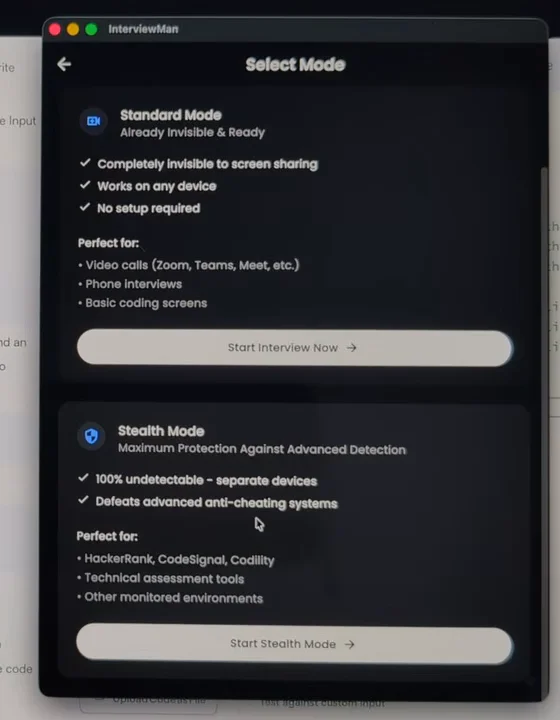
The mode picker. Standard Mode is already invisible to screen sharing; Stealth Mode is the one the app recommends for HackerRank, CodeSignal and Codility.
Standard Mode: an overlay the recording cannot capture
Start a session, pick Standard Mode, and the answer window sits over the editor. Press Cmd+H (Ctrl+H on Windows) to screenshot the problem, Cmd+Enter (Ctrl+Enter) to generate, Cmd+B (Ctrl+B) to hide the window. The answer comes as commented code with a short explanation, time and space complexity, and the common pitfalls for that problem, so you understand what you are typing.
Four things make this safe on a recorded test, and each one maps to a signal above:
- Excluded from screen capture (signal 6). On macOS the window's sharing type is set to "none", which ScreenCaptureKit honours on macOS 13 and later. On Windows the app sets SetWindowDisplayAffinity with the exclude-from-capture flag, plus SetWindowCompositionAttribute with the exclude-from-desktop-duplication flag, plus Chromium's own content protection. We verified it on Windows 11 21H2 and 24H2. The recorder gets a blank where the window is. The overlay is also hidden from the Dock and Cmd+Tab on Mac and from the taskbar on Windows.
- Never takes focus (signal 4). The window is a non-activating panel on Mac and a non-focusable window on Windows. Using it does not blur the test page, so no focus-loss event fires. Cmd+I (Ctrl+I) turns on mouse pass-through so a stray click goes through the overlay to the editor underneath.
- Shortcuts the browser never sees (signal 4 again). The shortcuts are registered with the operating system as global hotkeys (RegisterHotKey on Windows, system hotkeys on macOS). The system delivers the key press to InterviewMan and swallows it. The browser and the test page never receive it. You can check this with the W3C Keyboard Event Viewer: press the shortcuts with the page focused and the table stays empty.
- It never types for you (signals 1 to 3). The app shows the answer; you write the code. That is deliberate, and the step-by-step section explains why it matters.
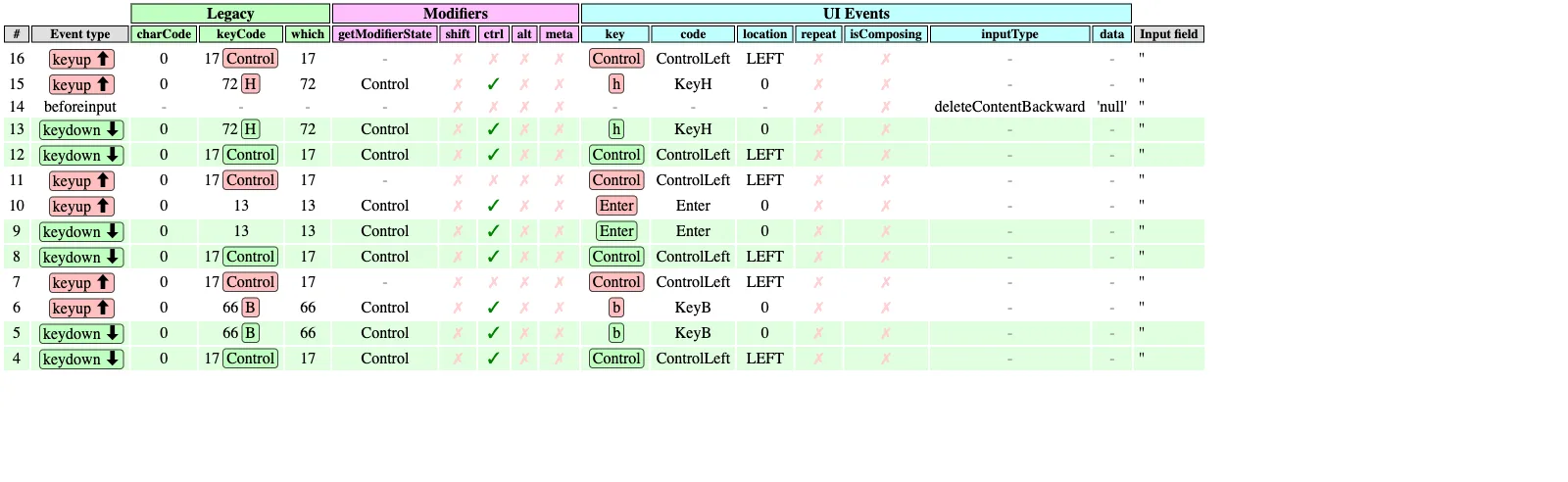
What a leaked shortcut looks like to a test page: Ctrl+B, Ctrl+Enter and Ctrl+H logged as normal key events, captured November 15, 2026. With InterviewMan running, these rows do not appear, because the operating system consumes the hotkey before the browser sees it.
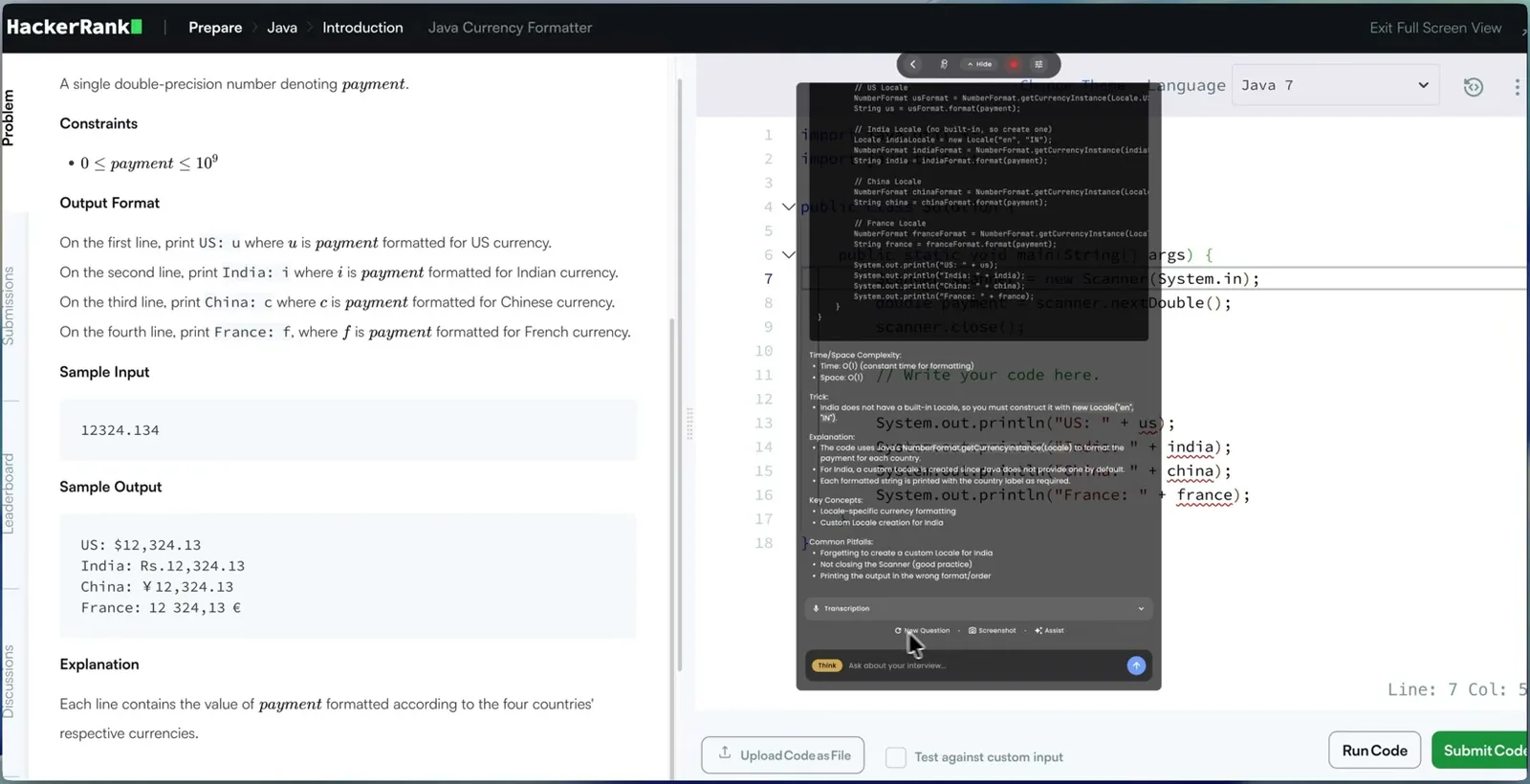
Standard Mode over a HackerRank task: commented code, time and space complexity, an explanation and the common pitfalls, in a window the recording does not capture.
Stealth Mode: nothing on the test machine
This is what we recommend for a proctored OA. Pair the desktop app with the phone app once; the first pairing takes a few minutes, so do it the day before. On test day, click Start, choose Stealth Mode, and the laptop app hides itself completely. Its window is removed from the operating system's window list (the CGWindowList on Mac), which is the list window-scanning monitors read.
Hidden on every OA platform
Excluded from the screen recording, shortcuts the test page never sees, and Stealth Mode with the answers on your phone. $12/mo on the yearly plan, 20-minute free trial, no card.
Download InterviewManOn the Mac direct-download build the process also runs under a different name in Activity Monitor. On Windows you choose a custom app name at install, so Task Manager shows that name instead of InterviewMan (renamed, not hidden).
From the phone, tap Screenshot. The laptop captures its screen and sends it, and the answer appears on the phone. Screenshots wait in a tray until you press Assist, so you can capture a long problem statement in two or three parts and have the AI read them in order. Cmd+B (Ctrl+B) brings the window back after the test. Setup steps are in the Stealth Mode help article, and Normal Mode vs Stealth Mode has the decision guide.
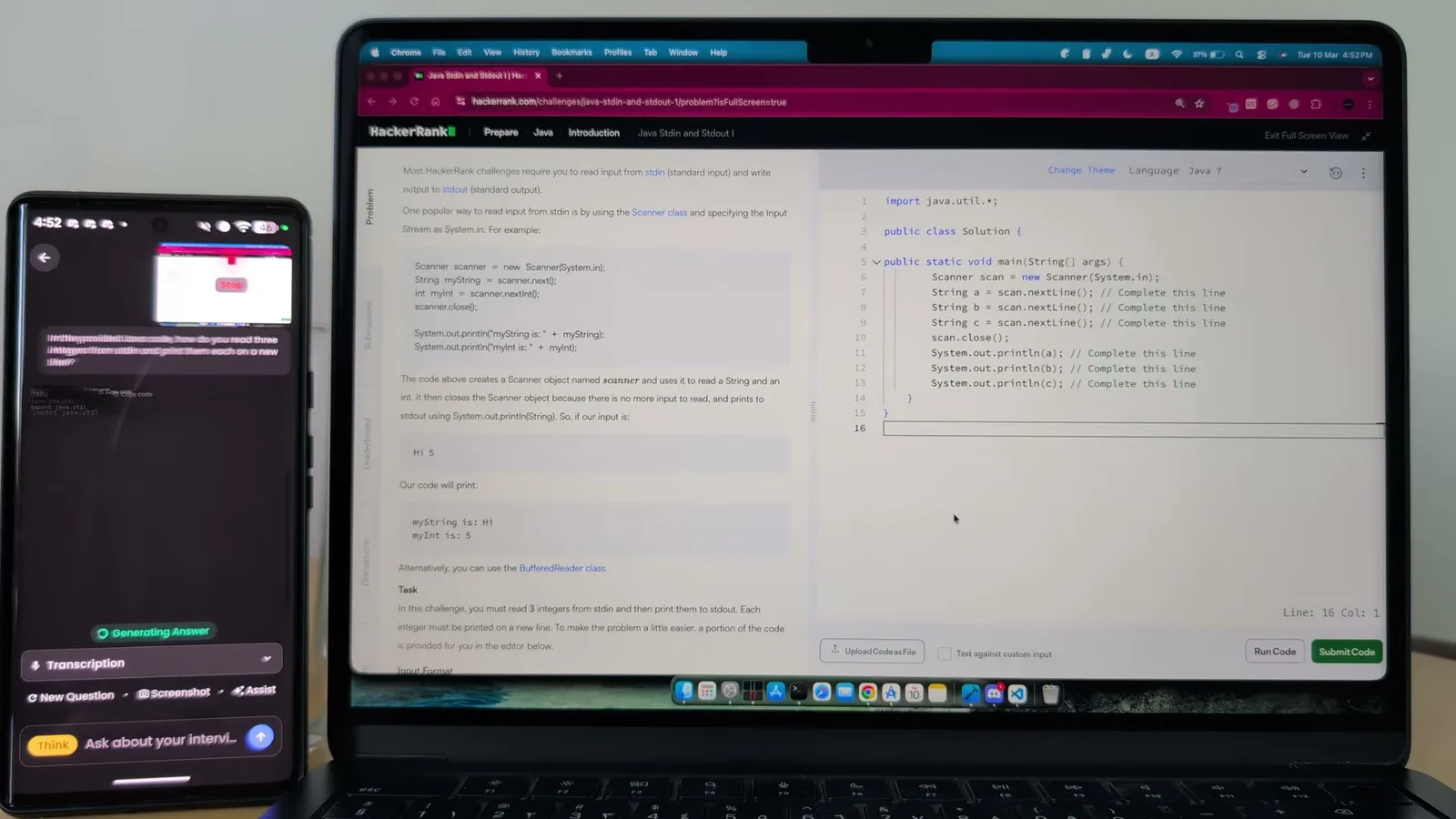
Stealth Mode: the laptop screen is just the test, the phone shows the screenshot thumbnail and "Generating Answer".
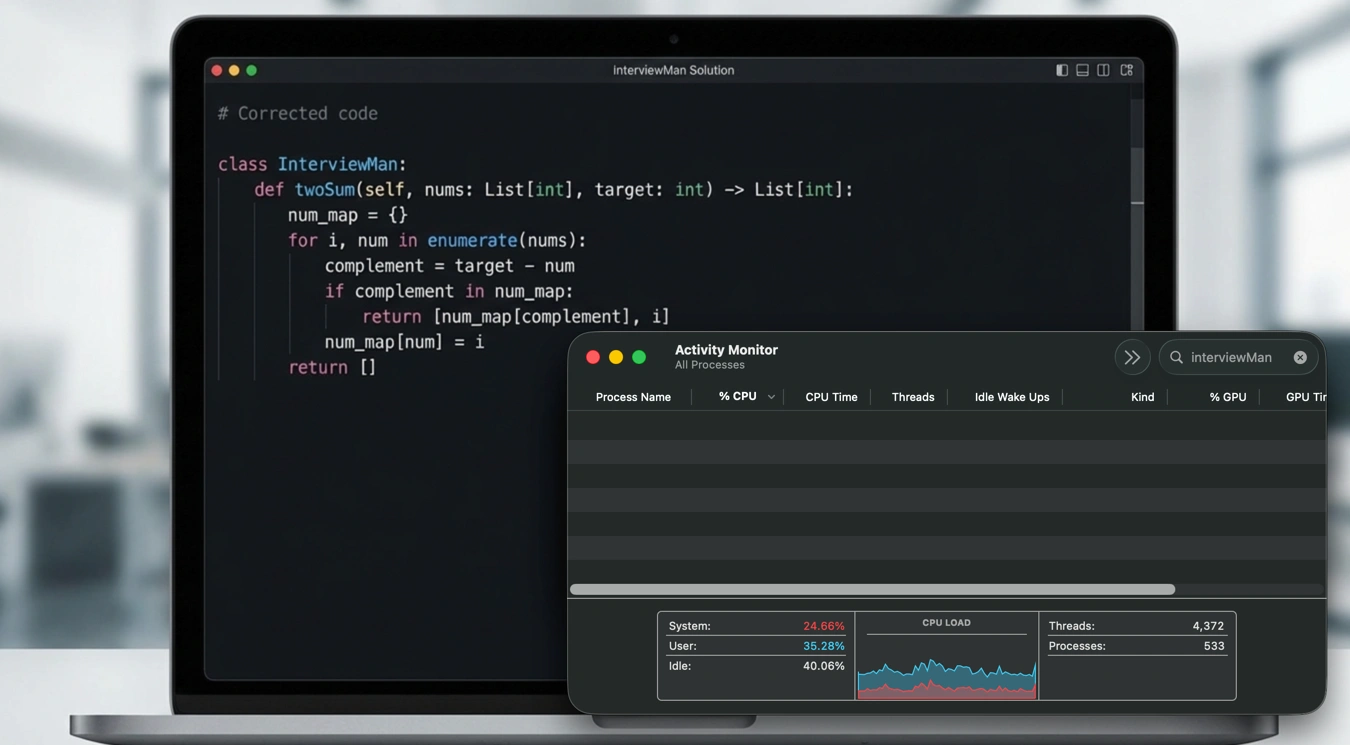
Activity Monitor finds no InterviewMan process on the Mac direct-download build, because the process runs under a different name.
For a hard problem, turn on the Think toggle next to the text box. It uses a slower reasoning model that works through the problem before answering. Screenshots always use the vision model.
How it compares
| Check | InterviewMan | Interview Coder | Cluely | Final Round AI |
|---|---|---|---|---|
| Hidden in a full-screen share or recording | Yes, Mac and Windows, plus Stealth Mode with nothing on the shared screen | Claimed; its support page admits it can show in Google Meet on Windows 10 | Only on the paid Undetectability tier | Yes, on by default |
| Shortcuts reach the browser | No: OS-level hotkeys, the page never receives them | Yes, in our test | Not published | Not published |
| Second-device mode | Stealth Mode on iPhone, Android or a second browser | No phone app | Desktop only | Desktop only |
| Explanation with the code | Commented code, complexity, pitfalls | Code and explanations | Not published | Not published |
| Price | $12/mo yearly ($144/yr) or $30/mo, 20-minute free trial, no card | $299/mo or $799 once | $79.99/mo yearly or $149.99/mo for the tier with stealth | $25/mo yearly or $150/mo, no free live sessions |
| Refunds | Try it free first | "A no-refund policy for all purchases" | Its terms say detection by screen-sharing software is not refundable | Check the vendor's terms before paying |
Vendor claims and prices checked November 6, 2026; check each pricing page before paying. Full comparisons: InterviewMan vs Interview Coder, InterviewMan vs Cluely, InterviewMan vs Final Round AI. InterviewMan vs LeetCode Wizard covers the coding-only tool of that name.
Step by step: a LeetCode-style OA with InterviewMan
- Read the domain in the invitation. leetcode.com means LeetCode's own rules. hackerrank.com, codesignal.com, coderpad.io or codility.com means that platform's monitoring, and the guides linked above tell you exactly what it logs.
- Pick the mode the day before. Proctored test with camera or screen recording: Stealth Mode, paired and tested in advance. Unproctored OA or a basic coding screen: Standard Mode is enough.
- Rehearse on a free LeetCode problem. Open any public medium, run your setup end to end: screenshot, Assist, read the answer, type it, submit. Learn the shortcuts there, not on the real test. The keyboard shortcuts page lists them.
- Capture the problem in parts. Long statements scroll. Screenshot the description, scroll, screenshot the examples and constraints, then press Assist once. The AI reads them in order. If a question comes out incomplete, this help page covers it.
- Type the solution yourself, in your own order. This is signals one to three in one move. Never paste. Write the function signature, the main loop, then the edge cases, and rename the variables to your own style. The explanation and pitfalls tell you what each part does, so the follow-up call with an engineer is not a surprise.
- Submit early, then improve. Get a passing solution in first. Optimise only if a test case times out. Platforms keep your best score, not your first.
- Keep the camera honest. Phone or tablet out of frame or just under the webcam, no second person in the room, no glancing down and to the side every ten seconds.
What people report
The reviews page has every rating and the Discord reports we were allowed to quote. The ones about assessments:
- "Monday, I attended an online Q&A assessment & online coding assessment using the standard mode and its not detected. it was an online assessment using the wecreateproblems.com assessment platform. I had no issues or banned." (a Discord user, April 21, 2026)
- "I was able to clear hackerrank proctored OA with stealth mode. Thank you", followed three weeks later by the useful part: "Hackerrank OA had webcam on so it tracks your body language and nuances about you answering, plagiarism scores etc. I had to be super careful about not making it apparent that I was using another device to view the code" (a Discord user, April and May 2026)
- "Passed Anthropic OA on codesignal with standard mode" (a Discord user, April 23, 2026)
- "Used interview on hackerrank with the built in video with three people watching me. Completely undetected and cleared the interview" (a Discord user, August 21, 2026)
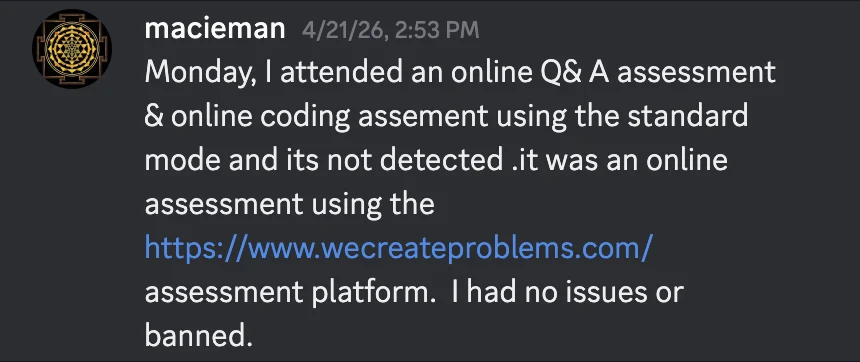
An online assessment cleared in Standard Mode, as posted in the InterviewMan Discord.
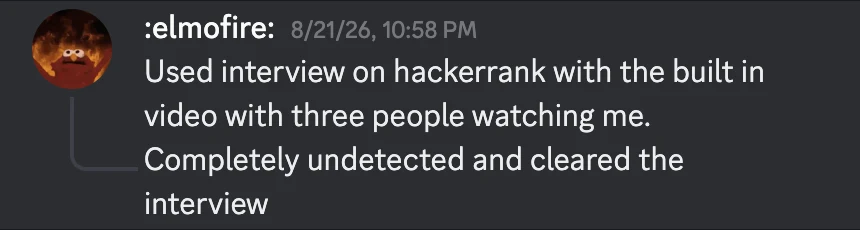
A HackerRank round with three interviewers on the built-in video, from the same Discord.
InterviewMan has zero confirmed detections across its users and is rated 4.9 on both the App Store and Google Play. That is a track record, not a promise, and the next section is the part that stays on you.
What no tool can fix
- Pasted code. Similarity checks run on your submission, and typing telemetry runs on your keystrokes. An overlay changes neither. If you paste a known solution, you get flagged with or without any tool.
- A phone in frame. Stealth Mode moves the answers off the shared screen. It does not make a phone invisible to a webcam. Position it out of frame or use a second laptop.
- A 360-degree room scan. If the proctor asks you to pan the camera, a second device on the desk is in the recording.
- A contest on leetcode.com. LeetCode's checker compares your code with everyone else's, humans review the flags, and the penalty is on your account. There is no setup that makes that a good idea, and this page is not one.
- A follow-up you cannot explain. The OA is a filter. The next round is a person asking why you chose a hash map. Read the explanation, not only the code.
A LeetCode-style OA is a browser test that records your screen, your keystrokes and sometimes your face. A tool that is invisible to the recording, silent to the page and off the shared machine covers the first part. The second part is still you.
Frequently asked questions
Does LeetCode detect cheating in contests?
Yes. LeetCode runs a plagiarism checker on every contest, flags similar code, and has staff review each flag by hand, which is why rankings can take days to update. Penalties apply without warning and are not waived. Pre-written templates are allowed but can trigger a false flag, and appeals go through a support ticket with the type "contest".
Does LeetCode track tab switching?
For contests and practice, candidates report that LeetCode logs paste events and tab-focus loss but has no webcam monitoring and no published AI-detection system, and LeetCode publishes no proctoring spec to confirm either way. A company OA on HackerRank, CodeSignal or Codility does log tab switches and focus loss as events. InterviewMan's window never takes focus, so using it does not fire one.
Can LeetCode see a second monitor or a phone?
A browser test cannot see a second device on its own. A proctored OA with a webcam can see a phone in your hand or on the desk, and reviewers are told to flag it. In Stealth Mode the laptop app hides itself and the answers appear on the phone, so keep the phone out of the camera's view or under the webcam where your eyes already go.
Does an Amazon or Google OA run on LeetCode?
Usually not. Companies write LeetCode-style problems, but the assessment runs on a vendor platform such as HackerRank or CodeSignal, and that platform's monitoring applies. The domain in your invitation link tells you which one, and our guides for HackerRank, CodeSignal, CoderPad and Codility list exactly what each logs.
Is using AI on a LeetCode-style OA detectable?
The platforms detect signals, not tools: pasted code, code that matches public solutions, typing that arrives in one burst, focus leaving the tab, a phone on camera, and an overlay visible in the recording. InterviewMan avoids the tool-side signals with capture exclusion, OS-level hotkeys and a window that never takes focus, and in Stealth Mode nothing runs visibly on the test machine. Typing the code yourself and keeping the camera honest covers the rest. InterviewMan has zero confirmed detections across its users.
Which mode should I use for a LeetCode-style OA?
Stealth Mode for a proctored OA with a camera or screen recording, because the laptop hides the app completely and the answers go to your phone. Standard Mode for an unproctored OA or a basic coding screen. Set Stealth Mode up the day before, because the first pairing of the computer and the phone takes a few minutes.
Download: InterviewMan for Mac, Windows, iPhone, Android and web ($12/mo on the annual plan or $30/mo, with a one-time 20-minute free trial and no card)
Hidden on every OA platform
Excluded from the screen recording, shortcuts the test page never sees, and Stealth Mode with the answers on your phone. $12/mo on the yearly plan, 20-minute free trial, no card.
