

You do not have to trust a review, and you do not have to trust us. InterviewMan has a free trial with 20 free minutes and no credit card, so you can prove the tool is worth it on your own screen, with your own CV, before you pay a single cent. This guide shows you exactly how to do that, and the whole test fits inside those 20 minutes. InterviewMan is our own tool, so read this as a vendor demo plus a test plan, not an independent review.
We also recorded the whole test as one short video so you can see it before you install anything. In the video, a synthetic voice (a computer-generated voice, the same way a text-to-speech app reads text out loud) asks real interview questions through the speakers. InterviewMan hears them through the microphone, transcribes them live, detects the question, and streams a suggested answer into its private window.
That is the exact path a real video call takes, except that there the interviewer is the one speaking. The video at the top of this page is that test, with no edits.
A live interview copilot (a tool that runs during the real interview, listens to the interviewer, and puts a suggested answer on your screen while the call is still going) only earns your money if it is fast, accurate, and private. The free trial lets you check all three. Here is the test.
Why test in the trial first
Most buyers pay, try one question, and hope. You can do better. The trial includes the real engine, every interview type, and Stealth Mode, so a ten-minute test in the trial tells you the same thing a paid month would, without the risk.
Test it free before you pay
Free trial minutes, no credit card. Set up your CV, ask a question for every interview type and watch the answer before it costs anything.
Start the free trialThree things decide whether a copilot is worth it, and you can measure each one:
- Speed. How many seconds pass between the question and a usable answer on screen. On a live call, every second of silence is visible.
- Accuracy. Whether the answer is correct and specific to you, not a generic paragraph anyone could have written.
- Privacy. Whether the window stays hidden when you share your screen on Zoom, Microsoft Teams, or Google Meet.
The free-trial test, step by step
Step 1: Start the trial (no credit card)
Create your account, download InterviewMan for Mac or Windows (or open the web app at web.interviewman.com), and start the free trial. You are not asked for a card. The trial gives you 20 free minutes, which is more than enough for this test.
Step 2: Set it up like your real interview
Before you ask anything, spend one minute on setup so the test reflects your actual interview:
- Interview language (the language the interviewer speaks) and answer language (the language the suggested answer is written in). They can match or differ.
- Answer style. Pick a structure like STAR (Situation, Task, Action, Result, a simple way to tell a story about past work) and a format like Bullet Points, so answers are easy to glance at.
- Your CV. Go to Settings → Resumes and upload your CV as a PDF, or add it by hand (name, summary, work experience, skills). You can also paste the job description into Custom Instructions. This is what makes the answer about you, not a stranger.
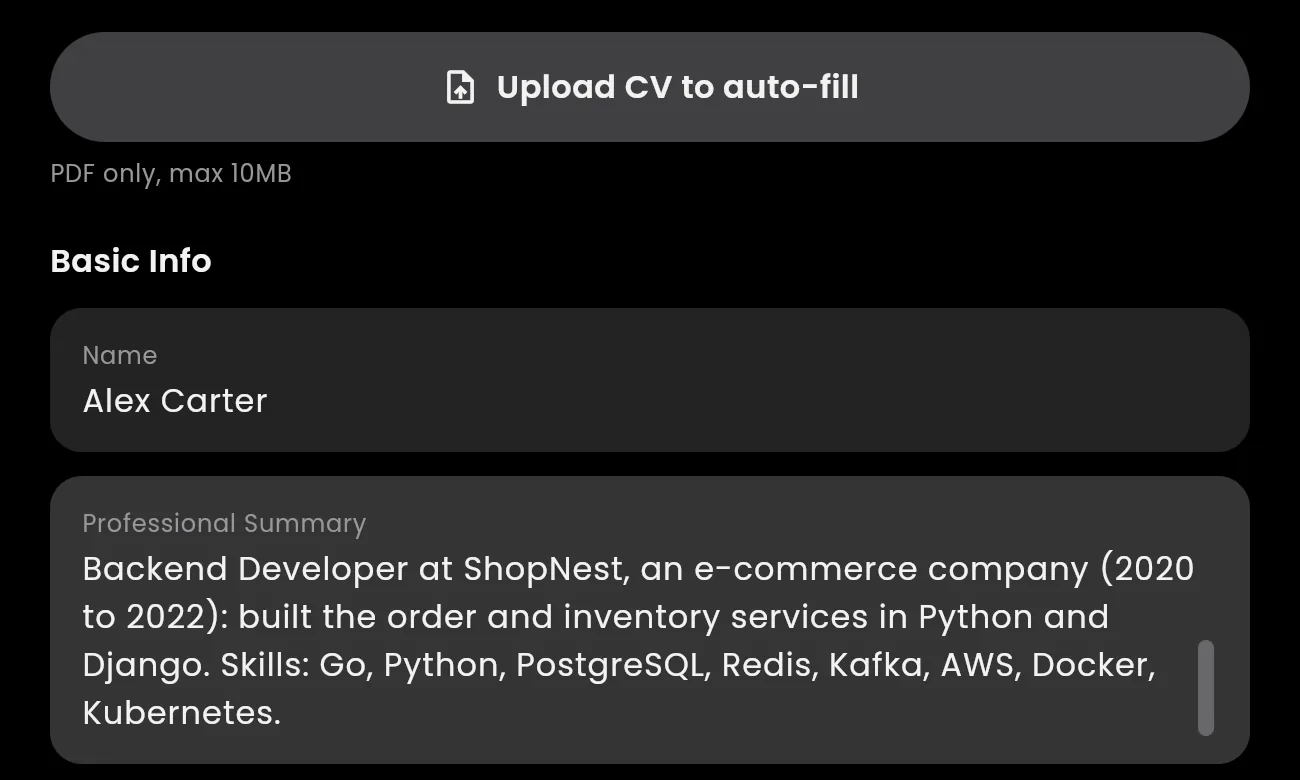
A sample CV added under Settings → Resumes. All screenshots in this guide come from one real test session in the InterviewMan web client, using this sample CV (a backend engineer with five years of experience).
Step 3: Test every interview type
Now play interviewer. Ask one question out loud for each type you expect, and watch the answer appear. These are the types the trial covers, with a sample question for each:
- Behavioral (an interview about how you handled past situations). Ask: "Tell me about a time you disagreed with a teammate." A good answer comes back as short STAR bullets you can say in your own words.
- System design (designing a large software system, like "design Instagram"). Ask: "How would you design a URL shortener?" A good answer lists requirements, components, a data model, and trade-offs, in bullets you can scan.
- Coding and LeetCode (timed programming problems). Ask a problem like "Find the longest substring without repeating characters." The answer gives an approach and the code.
- Multiple choice (technical screens with A, B, C, D options). Read out the options. The answer gives the correct letter first, then one line of why.
- Non-technical and HR. Ask: "Why do you want this job?" or "What is your expected salary?" The answer stays short and natural.
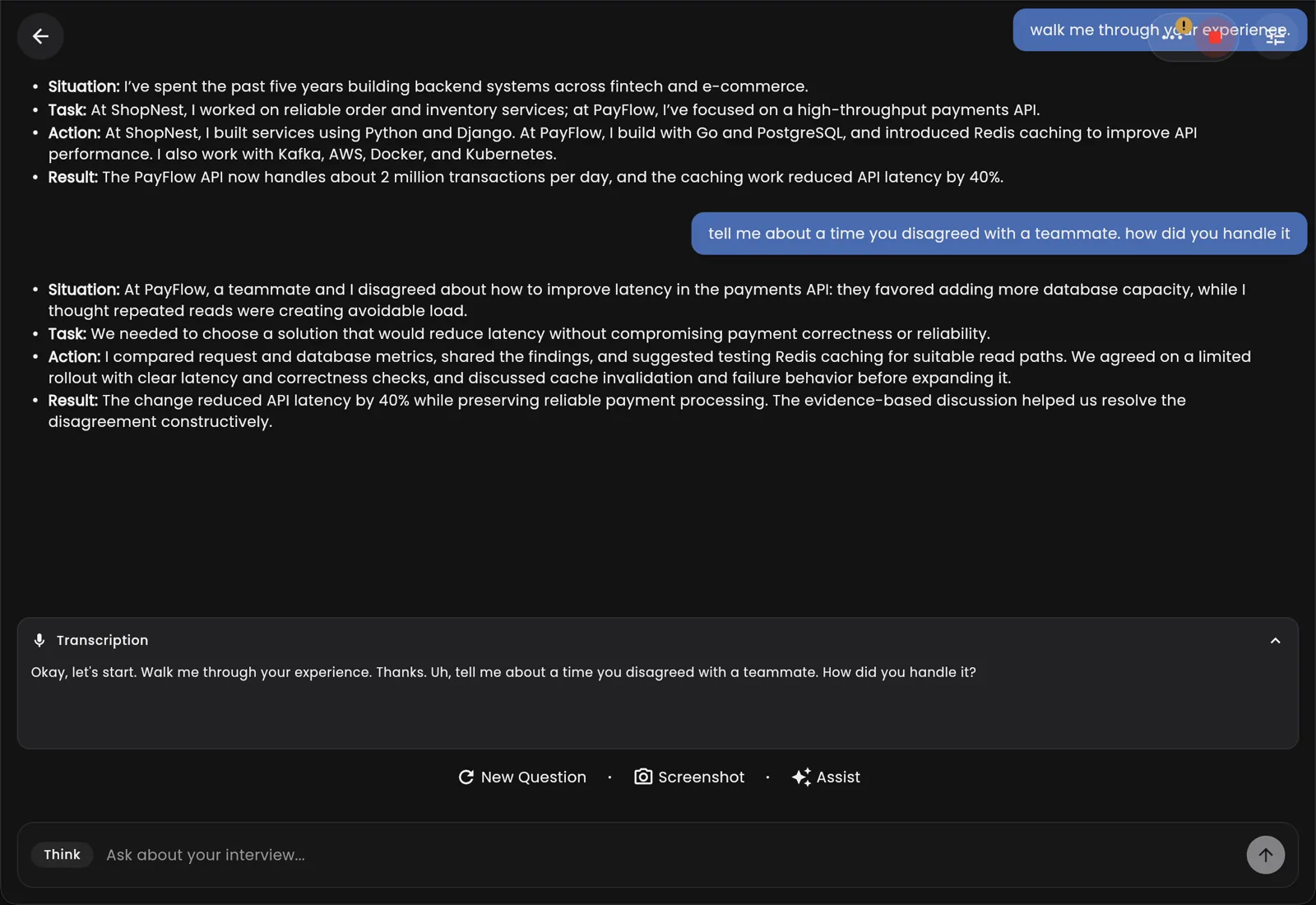
Two spoken questions answered live: "walk me through your experience" and a behavioral question. Both answers use the real details from the sample CV (the company names, two million transactions a day, 40% lower latency).
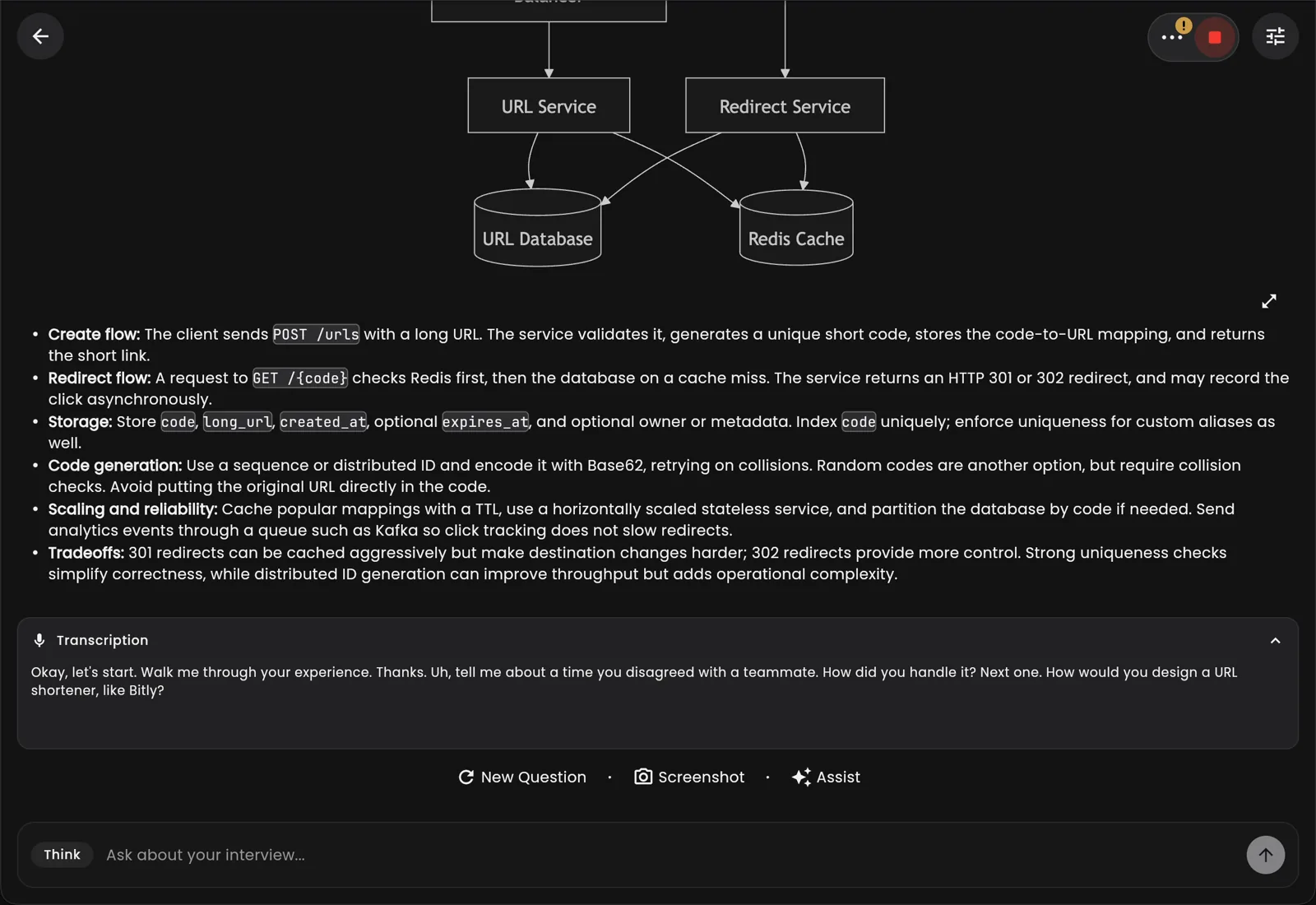
A system design question ("How would you design a URL shortener like Bitly?") answered with a diagram plus bullets for the main flows, storage, scaling and trade-offs.
Step 4: Check that the answer matches your CV
This is the step most people skip, and it is the one that proves value. Ask: "Walk me through your experience." The answer should name your real roles, years, and projects, because you added your CV in Step 2. If you remove the CV and ask again, the answer gets generic. That difference, on your own screen, is the proof.
Step 5: Test speed (the thing that matters live)
Watch the clock. From the end of the question to a usable answer, a live copilot has to be fast, because on camera the interviewer sees the pause. In the trial, ask three questions in a row and notice how quickly the transcription appears at the bottom and the answer streams in at the top. If it is fast enough that you could start talking within a second or two, it works for a real call.
Step 6: Test that it stays hidden
Open Zoom, Microsoft Teams, or Google Meet, start "Share screen," and share your whole screen. InterviewMan's window does not appear in what you share. That is Stealth Mode (the app shows text in a private window that is left out of screen sharing, so the interviewer never sees it). Confirm it yourself before you ever rely on it.
What "worth it" looks like
If the six steps pass, here is what you are paying for after the trial:
- Unlimited minutes and unlimited session length. No meter running during a long final-round interview.
- Every interview type, technical and non-technical, in one tool.
- Stealth Mode on every plan, not an upsell.
- Your interview history, exported so you can learn from every answer.
- The price. $30 per month, or $12 per month billed yearly at $144 per year. Students get 10% off the yearly plan. There is no separate "pro" tier that hides the good features.
Compared with tools that charge $99 to $150 a month for less, the test is the point: you can see the value yourself before you pay, instead of after.
Frequently asked questions
Can I really test InterviewMan without paying?
Yes. The free trial needs no credit card. You get 20 free minutes, which is enough to test every interview type, check speed, and confirm Stealth Mode before you decide.
How do I make sure the answers are about me and not generic?
Add your CV under Settings → Resumes (upload a PDF or add it by hand) before you test. Then ask "walk me through your experience" and check that the answer names your real roles and projects.
Does InterviewMan show in a screen share?
No. The answer window is left out of screen sharing on Zoom, Microsoft Teams, and Google Meet. You can confirm it in the trial by sharing your whole screen and seeing that the window does not appear.
Which interview types can I test in the trial?
All of them: behavioral, system design, coding and LeetCode, multiple choice, and non-technical or HR questions. The trial uses the same engine as the paid plans.
What does InterviewMan cost after the trial?
$30 per month, or $12 per month billed yearly at $144 per year, charged in US dollars. Verified students get 10% off the yearly plan. Every plan includes unlimited minutes, all interview types, and Stealth Mode.
Test it free before you pay
Free trial minutes, no credit card. Set up your CV, ask a question for every interview type and watch the answer before it costs anything.
