

Every AI interview assistant generates answers from scratch. The problem is, those answers sound like an AI wrote them. They are generic, they miss the specific story you rehearsed, and they do not match the way you actually talk. If you have prepared a strong answer for "Tell me about yourself" and the AI ignores it and gives you a template, that is a tool working against you, not for you.
The fix is custom Q&A pairs. You write the answers you want, map them to the questions you expect, and the AI uses your version instead of inventing one. This guide shows how to set that up in InterviewMan, with real examples you can copy and edit.
Last updated: October 14, 2026.
Key takeaways:
- You can paste your own prepared answers into the Custom Instructions box in the app settings. The AI uses them when it hears a matching or similar question.
- The XML format (
) works best because the AI parses it cleanly. Plain text works too, but XML is more reliable.<custom_qa_pairs>- You can map multiple questions to the same answer, so "Tell me about yourself" and "Walk me through your CV" both trigger the same response.
- Keep it short. A few strong pairs beat a wall of text. Long instructions slow the AI down.
- This works alongside your uploaded resume. Custom Q&A pairs handle specific questions you want answered a specific way; the resume gives the AI your background for everything else.
The problem with generic AI interview answers
When you ask an AI assistant to help with "Tell me about yourself," it writes something like: "I am a dedicated professional with 5 years of experience in software engineering, passionate about building scalable solutions..." That sentence could come from anyone. It does not mention the project you led, the stack you actually used, or the reason you are switching jobs.
The interviewer hears a scripted answer and moves on. Your rehearsed version, the one with the real story about the service you rebuilt, the team you scaled, the product that shipped, never gets used.
Make the AI sound like you
Paste your prepared answers into the Custom Instructions box and the AI uses your words instead of a template. Set it up in 2 minutes.
Download InterviewManGeneric answers have three specific problems:
- They do not match your experience. The AI does not know about the migration you led or the startup you joined early, so it invents a generic career arc.
- They sound the same as everyone else's. If 10 candidates use the same AI tool, the interviewer hears 10 variations of the same template.
- They break your flow. You rehearsed a specific way to answer "Why do you want to work here?" and the AI gives you a different one. Now you are reading something unfamiliar during a live call instead of speaking from memory.
What custom Q&A pairs do
Custom Q&A pairs let you store your prepared answers inside the app. When the interviewer asks a question that matches one of your pairs, the AI pulls your version instead of generating a new one.
Think of it as a cheat sheet the AI checks first. If you wrote an answer for "Tell me about yourself," the AI uses yours. If the question is something you did not prepare for, like a technical question about caching, the AI generates an answer on its own, the same way it always does.
This means you control the important answers (the ones you rehearsed) and let the AI handle the rest.
How to set it up in InterviewMan
Step 1: Open the Custom Instructions box
Go to the app settings. Under the Interview section, you will see a text field labeled Custom Instructions. This is where your Q&A pairs go.
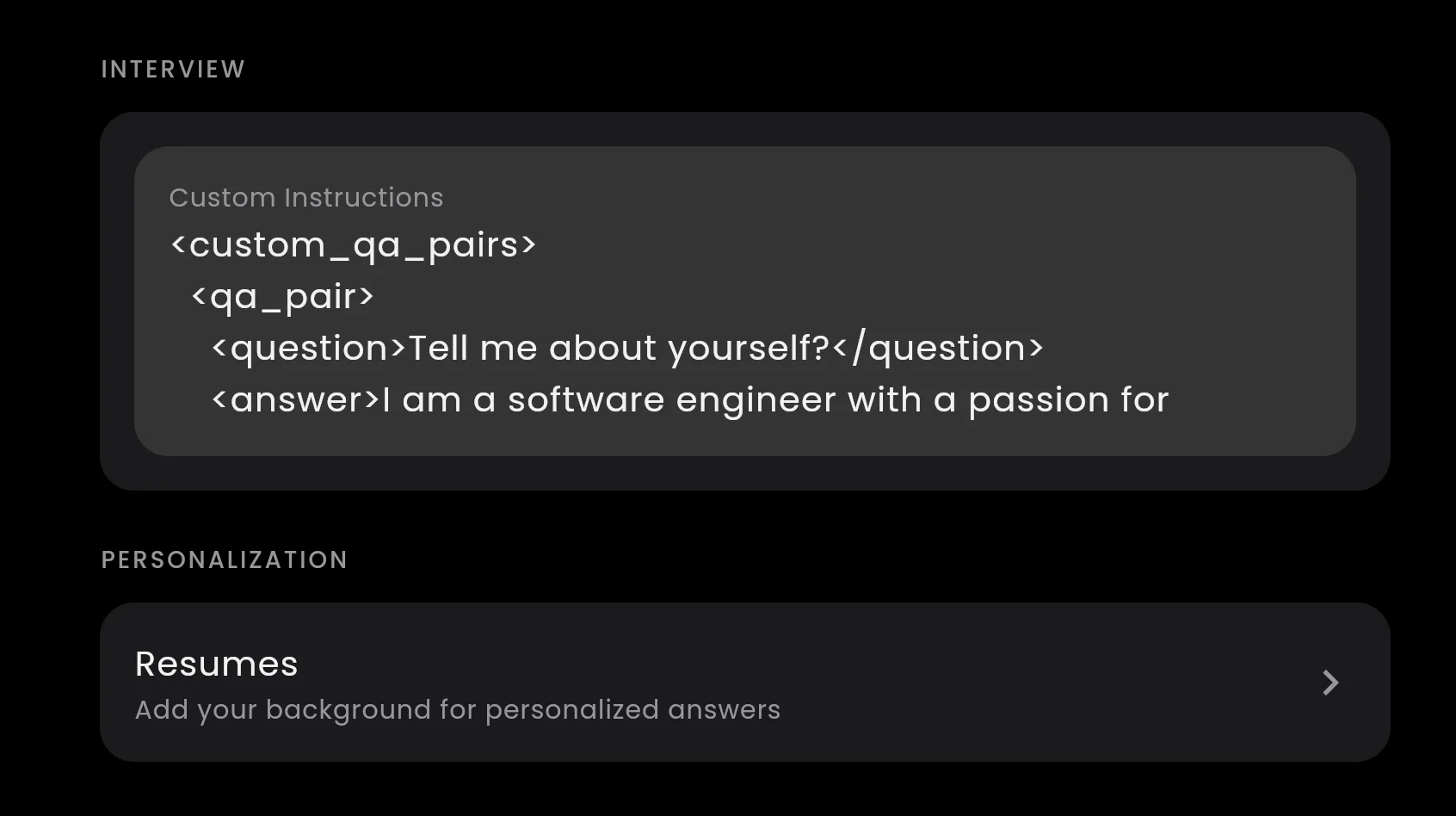
The Custom Instructions box in the app settings. Paste your Q&A pairs here.
Step 2: Write your Q&A pairs in XML format
The format uses simple XML tags. Each pair has a
<question><answer><qa_pair><custom_qa_pairs><custom_qa_pairs> <qa_pair> <question>Tell me about yourself?</question> <answer>I'm a backend engineer with 4 years at a fintech startup where I rebuilt the payment processing pipeline from a monolith to microservices. That project cut transaction failures by 60% and taught me how to ship large migrations without downtime. I moved to this space because I like working where engineering decisions have a direct business impact.</answer> </qa_pair> </custom_qa_pairs>
You can add as many pairs as you need. Just put each one inside its own
<qa_pair><custom_qa_pairs> <qa_pair> <question>Tell me about yourself?</question> <answer>I'm a backend engineer with 4 years at a fintech startup where I rebuilt the payment processing pipeline. That project cut transaction failures by 60%.</answer> </qa_pair> <qa_pair> <question>Why do you want to work here?</question> <answer>I've been following your engineering blog, especially the post about migrating to event-driven architecture. That's exactly the kind of problem I spent the last two years solving. I want to do that work at a larger scale.</answer> </qa_pair> <qa_pair> <question>What is your biggest weakness?</question> <answer>I tend to over-engineer early. Last year I spent two weeks building a generic config system for something that needed three environment variables. I've learned to ship the simple version first and only abstract when there's a second use case.</answer> </qa_pair> </custom_qa_pairs>
Step 3: Add a style instruction (optional)
If you want the AI to match the style of your answers even for questions you did not prepare, add an instruction line after the closing tag:
<custom_qa_pairs>
  <qa_pair>
    <question>Tell me about yourself?</question>
    <answer>I'm a backend engineer with 4 years at a fintech startup. I rebuilt the payment pipeline from a monolith to microservices, cutting transaction failures by 60%.</answer>
  </qa_pair>
</custom_qa_pairs>

Instructions: Follow the style of these answers. Keep responses conversational, use specific numbers, and mention real projects.
The AI reads the examples and adjusts its tone for other questions too.
Mapping multiple questions to the same answer
Some interview questions are different words for the same thing. "Tell me about yourself," "Walk me through your CV," and "Give me a quick intro" all expect the same answer.
You can map multiple questions to one answer by adding several
<question><qa_pair><qa_pair> <question>Tell me about yourself?</question> <question>Walk me through your resume</question> <question>Give me a quick introduction</question> <answer>I'm a backend engineer with 4 years at a fintech startup. I rebuilt the payment pipeline, cutting failures by 60%. Before that I did two years of full-stack work at an agency, shipping client projects every 2 to 4 weeks.</answer> </qa_pair>
Or you can write each as a separate pair with the same answer. Both approaches work, but grouping them keeps the instructions shorter.
What to prepare and what to skip
Not every question needs a custom answer. Focus on the questions where your prepared version is better than anything the AI would generate on its own.
Worth preparing:
- "Tell me about yourself" (your elevator pitch, rehearsed and specific)
- "Why do you want to work here?" (needs company-specific research the AI does not have)
- "Why are you leaving your current job?" (sensitive, needs your real reason framed well)
- "What is your biggest weakness?" (needs a real example, not a cliche)
- Behavioral stories you have rehearsed (the STAR-format answers you already drilled)
- Company-specific knowledge ("What do you know about our product?")
Skip these (let the AI generate):
- Technical knowledge questions ("Explain how a hash map works")
- Coding questions (the AI generates the solution live)
- System design questions (the AI draws the architecture from your prompt)
- Questions you have not thought about at all (a generated answer is better than nothing)
Make the AI sound like you
Paste your prepared answers into the Custom Instructions box and the AI uses your words instead of a template. Set it up in 2 minutes.
Download InterviewManTips for getting the best results
Keep it short. The Custom Instructions box has a practical limit. A few strong pairs work better than 20 mediocre ones. The AI reads everything in the box before each answer, so shorter instructions mean faster responses.
Write the way you talk. If you would not say "I am a dedicated and passionate professional" out loud, do not write it. Write the way you would actually answer in a conversation. The AI will deliver it the same way.
Update for each interview. Swap the "Why do you want to work here?" answer before each interview. The rest of your pairs can stay the same across companies.
Use it alongside your resume. Custom Q&A pairs handle the questions you prepared for. Your uploaded resume (in the Personalization section below the Custom Instructions box) gives the AI your full background for everything else. They work together: the AI checks your Q&A pairs first, then falls back to your resume and its own knowledge.
Test before the real call. Open the app, start a session, and say a question out loud. Check that the answer matches what you wrote. Adjust the wording if the match is not triggering.
For more settings like answer length, project details, and job descriptions, see the full custom settings guide. To learn how to set up the audio so the app hears the interviewer, see the audio setup guide. The complete Custom Instructions walkthrough is on the custom Q&A pairs help page.
Make the AI sound like you
Paste your prepared answers into the Custom Instructions box and the AI uses your words instead of a template. Set it up in 2 minutes.
