

You prepared for the interview. You wrote answers, rehearsed stories, studied the company. Then during the call the AI assistant ignores all of that and invents its own version of your career. It gives you an answer that is technically correct but has nothing to do with your actual experience.
The solution is to preload your answers. You feed the assistant the specific responses you want it to use, and it pulls from your library instead of generating from scratch. This is not a hack or a workaround. InterviewMan has a built-in Custom Instructions feature designed for exactly this.
Last updated: October 14, 2026.
Key takeaways:
- You can preload your own answers using Custom Q&A pairs in the app settings. The AI uses your version when it hears a matching question.
- The format is simple XML tags:
and<question>wrapped in<answer>blocks.<qa_pair>- You can also preload without XML, using plain text with clear labels, but XML gives the AI a cleaner signal.
- Preloaded answers work for behavioral questions, company-specific answers, and any question where your prepared version matters more than a generated one.
- The AI still generates answers for questions you did not preload. You control the important ones and let the AI handle the rest.
Why preloading beats generating from scratch
An AI assistant that generates every answer from scratch has two inputs: the question it just heard and whatever background you uploaded (your resume, the job description). That is enough for technical questions, where the answer is factual. But for behavioral and personal questions, the AI is guessing.
When the interviewer says "Tell me about a time you dealt with a difficult stakeholder," the AI does not know about the product manager who kept changing requirements on the payments project, or the client who wanted to rewrite the API two weeks before launch. It makes up a plausible scenario using your resume keywords. That scenario is vague, it sounds generated, and you cannot expand on it because it did not happen.
Preload your answers in 2 minutes
Paste your Q&A pairs into InterviewMan and the AI delivers your prepared answers during the call. No more generic templates.
Download InterviewManA preloaded answer is the opposite. You wrote it. You rehearsed it. You can expand on any detail because it is a real event from your career. The AI just surfaces it at the right moment.
Preloaded answers are better because:
- They are real. The interviewer can ask follow-up questions and you have answers, because the story actually happened.
- They sound like you. You wrote them in your own voice, not in AI-speak.
- They are consistent. You gave the same "Tell me about yourself" pitch in the phone screen and the on-site. The interviewer does not hear a different version each time.
- They are faster. The AI does not need to reason about what your career looks like. It reads your answer and delivers it.
What you can preload
Behavioral stories (STAR format)
These are the highest-value pairs to preload. You already wrote them during prep. Now paste them in so the AI uses them during the call:
<custom_qa_pairs>
  <qa_pair>
    <question>Tell me about a time you had to deal with a tight deadline</question>
    <answer>At my last company we had a client demo in 10 days and the integration was half-built. I mapped out the critical path, cut two features from the demo scope, and paired with the backend engineer on the API contract. We shipped on time and the client signed. The two features we cut went out in the next sprint.</answer>
  </qa_pair>
  <qa_pair>
    <question>Describe a situation where you disagreed with your manager</question>
    <answer>My manager wanted to rewrite our auth service from scratch. I thought migrating incrementally was safer. I put together a comparison: rewrite would take 8 weeks with a risky cutover, migration would take 6 weeks with zero downtime. He agreed to the migration. It took 5 weeks and we had no production incidents.</answer>
  </qa_pair>
</custom_qa_pairs>
The elevator pitch
"Tell me about yourself" is asked in almost every interview, and it is the one answer where the AI's generic version hurts the most. Preload yours:
<qa_pair>
  <question>Tell me about yourself</question>
  <question>Walk me through your resume</question>
  <question>Give me a quick introduction</question>
  <answer>I'm a full-stack engineer, 5 years in. Started at a dev agency shipping client projects, then moved to a B2B SaaS company where I own the billing and payments service. The system I built processes about 40,000 transactions a day. I'm looking for a senior role where I can lead a small team and own a product area end to end.</answer>
</qa_pair>
Company-specific answers
The AI does not know why you want to work at this specific company unless you tell it. Preload this answer fresh for each interview:
<qa_pair>
  <question>Why do you want to work here?</question>
  <question>Why this company?</question>
  <answer>I've been using your product for two years and I noticed you shipped the new collaboration features last quarter. I read the engineering post about how you built the real-time sync layer on CRDTs. That's exactly the distributed systems problem I want to work on next.</answer>
</qa_pair>
Technical talking points
For technical questions where you have a preferred way to explain something:
<qa_pair>
  <question>How do you approach system design?</question>
  <answer>I start by asking about scale and constraints: how many users, read-heavy or write-heavy, latency targets. Then I draw the high-level components, name the data flow, and pick the storage and caching layer based on the access pattern. I always name the trade-off out loud before the interviewer asks.</answer>
</qa_pair>
Plain text format (without XML)
If XML feels like too much, you can write your answers in plain text with clear labels:
Q: Tell me about yourself
A: I'm a full-stack engineer with 5 years of experience. I started at a dev agency and now I own the billing service at a B2B SaaS company. It processes 40,000 transactions daily.

Q: Why are you leaving your current job?
A: I've grown as far as I can in a team of three. I want to join a larger engineering org where I can mentor junior engineers and take on more architectural decisions.
Both formats work. The XML tags are better because the AI parses them more reliably, especially when you have many pairs. But for two or three answers, plain text is fine.
How to set it up
- Open the app settings in InterviewMan.
- Find the Custom Instructions text field under the Interview section.
- Paste your Q&A pairs (XML or plain text).
- Start a session and test by saying a question out loud. Verify the app returns your preloaded answer.
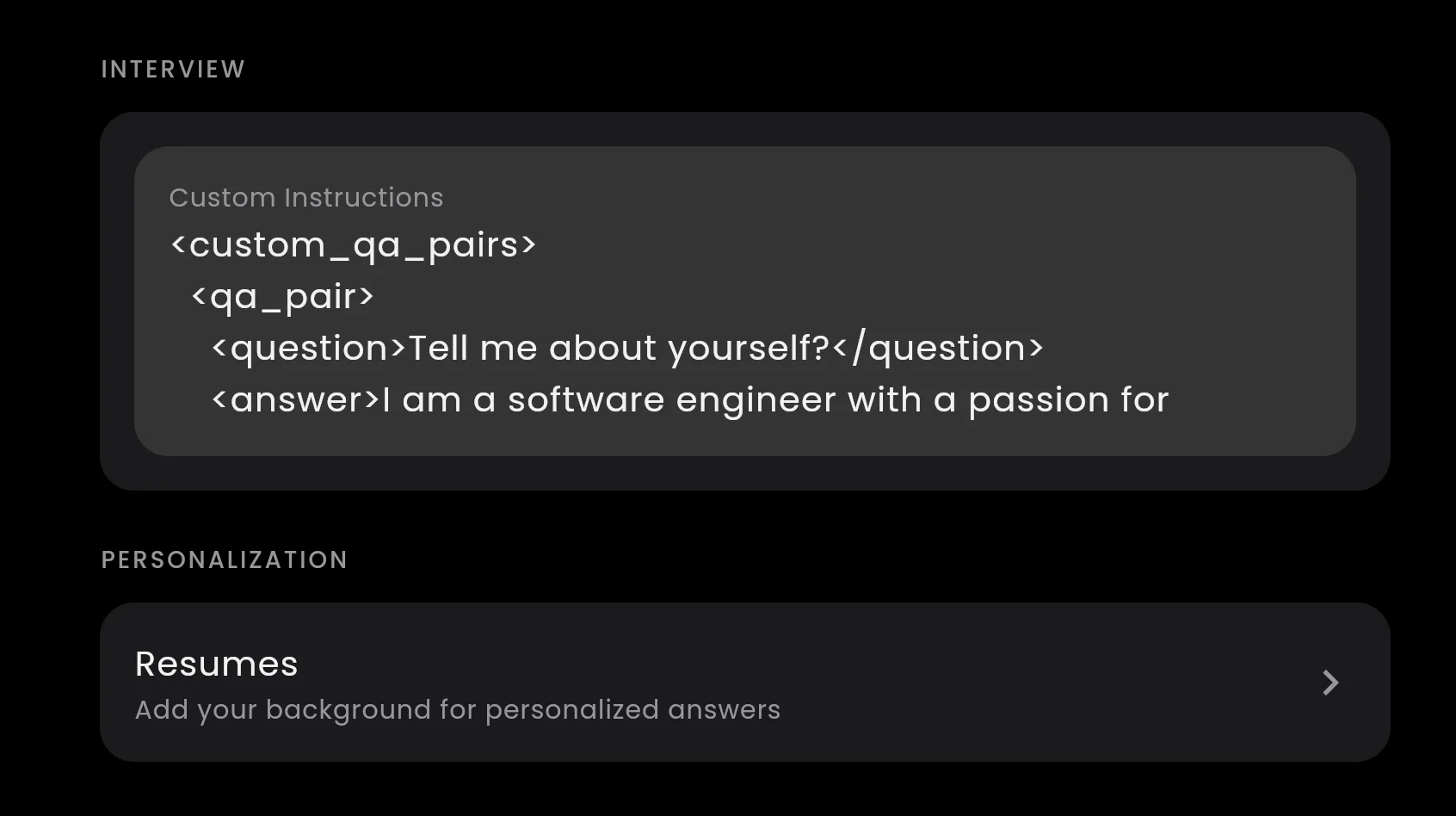
The Custom Instructions box in the app settings. This is where your preloaded answers go.
For the full step-by-step walkthrough with screenshots, see the custom Q&A pairs help page.
How many answers should you preload?
Start with 3 to 5. These are the must-haves:
- "Tell me about yourself" (your elevator pitch)
- "Why do you want to work here?" (company-specific, swap before each interview)
- "What is your biggest weakness?" (your rehearsed real example)
- One or two behavioral stories (the ones you drilled in STAR format)
You can add more, but keep the total short. The Custom Instructions box is read by the AI before every answer, so a wall of text slows it down. A focused set of 5 to 8 pairs is the sweet spot.
Do not preload:
- Technical knowledge answers (the AI handles these well on its own)
- Coding solutions (the AI generates these live from the problem)
- Answers you have not actually prepared (a generated answer is better than a bad preloaded one)
Preloaded answers plus your resume
Custom Q&A pairs and your uploaded resume work together. Here is how the AI prioritizes:
- Check Q&A pairs first. If the question matches a preloaded pair, the AI uses your answer.
- Check the resume. If there is no matching pair, the AI reads your resume for relevant experience and builds an answer from it.
- Generate from context. If neither applies, the AI generates an answer based on the conversation and the question.
This means your preloaded answers override everything else for the questions that matter most, while the rest of the interview is still covered.
Keep it fresh
- Swap company-specific answers before each interview. The "Why do you want to work here?" answer should be different for every company.
- Add new stories as you go through interview rounds. If a question catches you off guard, write an answer for it and add it to your pairs.
- Remove outdated pairs when they no longer apply. If you changed your elevator pitch, update it.
Custom Q&A pairs turn your AI assistant from a generic answer machine into a tool that sounds like you, because it is you. The AI just delivers your words at the right moment.
For more settings like answer length and job descriptions, see the custom settings guide. To learn about the full Custom Instructions feature, read our guide on making your AI assistant use your own words.
Preload your answers in 2 minutes
Paste your Q&A pairs into InterviewMan and the AI delivers your prepared answers during the call. No more generic templates.
